

Business intelligence has a security paradox. The more useful a BI environment becomes, the more people, systems, data sources, dashboards, exports, and automated processes it connects. That accessibility creates business value, but it also expands the surface that security teams must govern.
For CIOs, the goal is not to make data difficult to access. It is to make the right data easy for the right people to use, while making inappropriate access difficult, visible, and recoverable.
That requires more than securing a dashboard tool. Business intelligence data security has to cover the full path from source systems and data pipelines through the warehouse, semantic model, dashboard, sharing layer, exports, and administrative accounts.
Actiknow’s Business Intelligence services describe this end-to-end environment in practical terms: integrating databases and APIs, designing solution architecture, implementing BI platforms such as Power BI, Tableau and Looker Studio, publishing solutions, and defining refresh mechanisms. Security therefore needs to be designed across the same lifecycle, not bolted onto the final report.
What Business Intelligence Data Security Actually Means
A secure BI environment protects four things simultaneously:
- Confidentiality. Users should only see data they are authorized to see.
- Integrity. Metrics and underlying data should not be altered without authorization or traceability.
- Availability. Critical reporting should remain accessible when the business needs it.
- Accountability. The organization should be able to determine who accessed, changed, shared, or administered important data assets.
A dashboard can be perfectly configured and still be insecure if its warehouse is broadly accessible. A warehouse can be tightly controlled and still leak information through emailed exports. Strong identity controls can be undermined by a service account with excessive privileges. Security must therefore be treated as a chain.
Start With Data Classification, Not Dashboard Permissions
Before defining roles, classify the data that BI will expose. A simple classification model is often enough to begin:
Public: information approved for unrestricted disclosure.
Internal: ordinary operational information intended for employees or approved partners.
Confidential: commercially sensitive information such as detailed financials, pricing, customer information, employee information, forecasts, or contracts.
Restricted: information requiring especially tight controls because of regulation, contractual commitments, personal data, credentials, payment information, or material business sensitivity.
The purpose is not to create an elaborate labeling exercise. Classification should drive concrete controls. If a dataset contains restricted fields, the organization should know whether those fields belong in the analytical environment at all, who may access them, whether masking is required, and whether they may be exported.
A useful CIO question is: if this dashboard were accidentally shared with every employee, what information would create the greatest problem? That question quickly identifies where controls deserve the most attention.

Use Identity as the Security Perimeter
Modern BI environments span cloud services, remote users, APIs and external partners. Network location alone is not a sufficient security boundary. Identity should sit at the center of the design.
Prefer centralized identity through the organization’s identity provider, single sign-on where supported, multi-factor authentication, and role-based access. Avoid shared user accounts. Administrative privileges should be separated from ordinary consumption accounts where practical.
The principle of least privilege matters especially for service accounts. A connector that only needs to read a source should not receive write or administrative access. A refresh process should not automatically inherit the permissions of a powerful developer account.
Actiknow’s published security practices describe the use of minimum necessary permissions for data-source access, OAuth where possible, encrypted token storage, and encrypted connections to customer data sources and destinations. These are useful principles for any BI architecture, regardless of the implementation partner or platform.
Design Roles Around Business Responsibilities
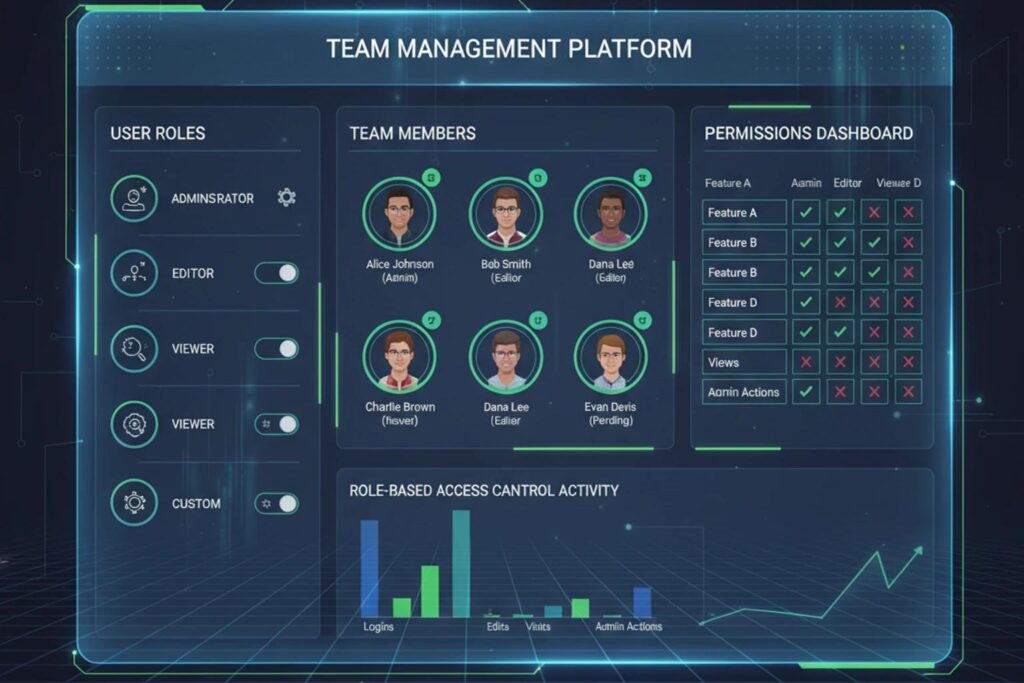
Role-based access control works best when roles correspond to durable business responsibilities rather than individual exceptions.
For example, an organization might define roles for executive leadership, finance analysts, regional sales managers, operational managers, HR analysts, report developers, data engineers, and BI administrators. Each role receives the minimum capabilities and data needed for its function.
Avoid a permissions model dominated by one-off grants such as ‘Jane can see this report but not that page, except during month-end.’ Exceptions accumulate, become difficult to audit, and eventually make access unpredictable.
A quarterly access review should ask three questions: Does this person still need access? Does the role still require these datasets? Are privileged users still appropriate?
Row-Level Security Is Powerful, but It Is Not the Whole Security Model
Row-level security, or RLS, restricts which records a user can see. A regional manager might see only their region, while a national executive sees all regions. A customer-facing portal might use the same analytical model while ensuring each customer sees only its own records.
RLS is valuable because it allows organizations to reuse governed models instead of cloning a report for every audience. But it must be tested as a security control, not merely configured as a reporting feature.
Testing should include ordinary users, users belonging to multiple roles, users with missing mappings, recently transferred employees, administrators, external identities, and attempts to reach underlying datasets through alternate paths.
Also remember that RLS addresses rows. Sensitive columns may require separate models, object-level controls, masking, or exclusion entirely. A sales manager who is correctly restricted to ten customers could still see unnecessary personal information for those ten customers.
Treat PII as a Design Decision
A common security mistake is loading every available field into the warehouse ‘in case it is useful later.’ This increases risk without necessarily increasing analytical value.
For personally identifiable information, ask whether the analytical use case requires the raw field. A dashboard may need customer age bands without dates of birth, geographic analysis without street addresses, or a unique customer key without an email address.
Where raw PII is necessary, separate access from ordinary analytical access. Consider masking or tokenization where appropriate, document retention requirements, and make sure development and test environments do not become uncontrolled copies of production-sensitive data.
The best protected sensitive field is often the one that never needed to enter the reporting layer.
Secure the Data Pipeline, Not Just the Destination
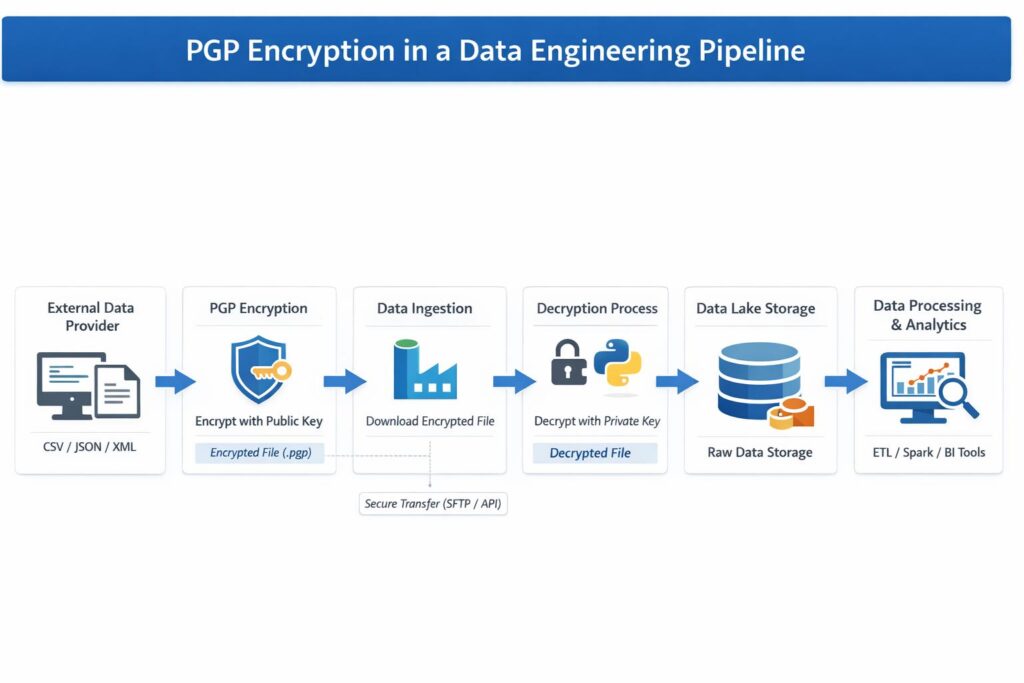
Data frequently passes through more systems than leaders realize: source application, connector, staging area, transformation layer, warehouse, semantic model, BI service, embedded application, export, and perhaps a downstream spreadsheet.
For each hop, document:
- what data moves;
- how it is authenticated;
- whether it is encrypted in transit;
- whether an intermediate system stores or caches it;
- how credentials and tokens are protected;
- which logs may contain sensitive values;
- what happens when access is revoked;
- who owns failures and security incidents.
Actiknow’s security page, for example, states that connections to customer data-source APIs, systems, and supported destinations are encrypted, and describes controls around OAuth tokens and temporary caches. A buyer evaluating any integration provider should request this level of architectural clarity rather than accepting a generic statement that a service is ‘secure.’
Separate Development, Testing, and Production
BI teams move quickly, which can lead to production credentials appearing in scripts, developers receiving broad warehouse access, or live customer data being copied into test environments.
A stronger operating model separates environments and privileges. Production changes should follow review and deployment controls. Secrets should be stored in an appropriate secrets-management mechanism rather than source code or shared documents. Test data should be minimized or de-identified when feasible.
The objective is not bureaucracy. It is reducing the probability that a routine development action becomes a data incident.
Audit Logs Need an Owner and a Use Case
Many platforms produce extensive logs, but logging is not the same as monitoring.
Decide which events matter. Examples include administrative role changes, unusual export activity, failed authentication patterns, creation of public links, changes to row-level security, service-account changes, access to especially sensitive datasets, and unexpected refresh or connector behavior.
Then define who reviews those signals and what happens next. If an alert has no owner or response procedure, it is mostly noise.
For high-value BI environments, the security team should be able to reconstruct important events. Who had access? When did access change? Which credential performed a refresh? Was a report shared externally? What changed before an unexpected exposure?

Control Sharing and Exports
One of the easiest ways to bypass a carefully designed BI permission model is to export the data.
CSV, Excel, PDF, email subscriptions, screenshots, copied visuals, downloaded semantic models, and external sharing can all move information outside the controlled analytical environment.
That does not mean exports should be universally disabled. It means export rights should reflect the sensitivity of the data and the business purpose. Highly sensitive dashboards may require tighter controls than ordinary operational reporting.
CIOs should also distinguish between ‘can view’ and ‘can redistribute.’ They are different privileges.
Vendor Security Is Part of Your Security Boundary
BI environments often rely on implementation partners, SaaS connectors, cloud platforms, contractors, and support teams. Each can become part of the effective security boundary.
Before granting access, ask vendors to explain what data they access, what permissions they require, where credentials are stored, whether customer data is persisted, how staff access is controlled, how incidents are handled, and how access is removed at the end of an engagement.
Relevant evidence is more useful than a long questionnaire. Architecture diagrams, permission scopes, security policies, third-party assessments, access-control procedures, and incident-response processes can reveal far more about operational maturity.
Actiknow publishes detailed security practices covering encrypted connections, least privilege, multi-factor authentication for administrative access, employee security training, change management, incident response, vendor management, and annual third-party security audits of its application and systems. Organizations evaluating Actiknow can review these security practices directly and discuss the controls relevant to their specific engagement.
Do Not Confuse Compliance With Security
Compliance can provide useful evidence that controls exist, but a certificate does not answer every architecture-specific question.
A technically compliant environment can still be poorly designed for a particular business. Conversely, an organization may implement strong practical controls while still working toward a formal certification relevant to a procurement requirement.
CIOs should separate three questions:
- What does regulation or the contract require?
- What controls reduce the actual risk of this BI architecture?
- What evidence is needed to demonstrate those controls?
This prevents security reviews from becoming checkbox exercises.
A Practical BI Security Review for CIOs
A useful review can be organized around ten control areas:
- Data inventory: Which sensitive datasets and fields enter BI?
- Identity: Is access tied to individual, centrally managed identities?
- Authentication: Is MFA enforced where appropriate, especially for privileged access?
- Authorization: Are roles and row-level controls based on least privilege?
- Pipeline security: Are connections encrypted and credentials protected?
- Environment separation: Are development, testing and production appropriately isolated?
- Sharing: Are external links, exports and redistribution controlled?
- Monitoring: Are meaningful security events logged, reviewed and actionable?
- Vendor access: Can third-party access be justified, traced and revoked?
- Recovery: Is there a tested process for credential compromise, inappropriate sharing, or other BI-related incidents?
The important word is tested. A control that exists only in configuration documentation may fail when identities, roles, source schemas, or personnel change.
Security Should Follow the Data Lifecycle
A strong security model can be mapped to the lifecycle of an analytical product.
During discovery, classify data and identify regulatory or contractual requirements.
During architecture, define identities, trust boundaries, encryption, environment separation, and access patterns.
During implementation, apply least privilege, protect secrets, configure roles, and avoid unnecessary sensitive fields.
During testing, test permissions as aggressively as calculations. Attempt access from the perspective of users who should not see the data.
During deployment, validate production identities, sharing settings, service accounts, and logging.
During operations, review access, monitor changes, rotate or revoke credentials when needed, and revisit controls as new data sources and audiences are added.
This lifecycle view is particularly important because BI rarely stays static. A dashboard that begins with finance data may later add CRM, HR, marketing, operational, and customer-level information. The security classification of the solution can change substantially even if the dashboard looks almost identical.

What the Board and Executive Team Should Ask
Executives do not need to inspect every technical permission. They do need assurance that ownership is clear.
Useful questions include:
- Who owns the classification of data in this reporting environment?
- Who approves access to sensitive datasets?
- How quickly can access be revoked?
- Can we identify all external users with access?
- Which reports allow exports of sensitive information?
- How are privileged and service accounts reviewed?
- Can we demonstrate that regional or customer-level restrictions work?
- What would we do in the first hour after discovering inappropriate dashboard access?
- When was the access model last tested rather than simply reviewed?
Clear answers indicate a functioning security model. Ambiguous ownership is itself a risk signal.
Frequently Asked Questions
What is business intelligence data security?
Business intelligence data security is the set of technical and operational controls used to protect data throughout the BI lifecycle, including source connections, pipelines, warehouses, semantic models, dashboards, sharing, exports, identities, and administrative access.
Is row-level security enough to secure a BI dashboard?
No. Row-level security is one important authorization control, but organizations must also consider authentication, column sensitivity, source and warehouse permissions, service accounts, exports, external sharing, credentials, logging, and administration.
Should BI developers have access to all production data?
Not automatically. Access should follow least privilege. Developers may need elevated access for specific tasks, but production permissions should be justified, time-appropriate where feasible, individually attributable, and periodically reviewed.
How should PII be handled in business intelligence?
Start by minimizing it. Only bring PII into the analytical environment when the use case requires it. Where it is necessary, apply appropriate access restrictions, masking or tokenization where suitable, retention controls, and stronger protections for development and testing copies.
What is the biggest security risk in self-service BI?
There is no universal single risk, but uncontrolled sharing, broad access, duplicated datasets, exports, and inconsistent permission ownership commonly weaken otherwise strong platform controls. Self-service should expand analytical autonomy inside clear governance boundaries.
How often should BI access be reviewed?
The cadence should reflect data sensitivity, organizational change, and regulatory obligations. Privileged access and highly sensitive datasets deserve more frequent review. Access should also be reassessed after role changes, departures, reorganizations, major new data sources, or changes to external sharing.
How should a CIO evaluate a BI implementation partner’s security?
Ask for specifics: required permissions, identity model, credential storage, encryption, data persistence, staff access, environment controls, incident response, offboarding, and independent security evidence where relevant. Compare those controls with the sensitivity and architecture of your project.
The Executive Principle: Make Secure Access the Default
The best BI security model is not the one with the most restrictions. It is the one in which legitimate access is predictable, inappropriate access is difficult, sensitive movement is visible, and changes can be governed without slowing every analytical request to a halt.
Security and usability are not opposites. Poorly designed security creates workarounds. Well-designed security gives people a trusted route to the information they need.
If your organization is designing or modernizing a BI environment, Actiknow can help assess the architecture, integrations, reporting model, and operational controls required around the solution. Explore Actiknow’s Business Intelligence capabilities or contact Actiknow to discuss the scope and security requirements of your reporting environment.