

Multi-Tenant Analytics Security Is an Application Architecture Problem
A customer portal becomes materially more sensitive the moment it includes analytics.
The application is no longer only displaying a customer’s account information. It may be exposing operational history, revenue, transactions, employee activity, locations, performance metrics, forecasts, or other data that would be commercially sensitive if shown to the wrong organization.
In a multi-tenant product, the most important security requirement is therefore simple to state and difficult to prove: Tenant A must never be able to retrieve Tenant B’s data.
That requirement cannot be delegated to a dashboard filter.
Secure multi-tenant analytics requires the application identity layer, authorization logic, embedded BI configuration, semantic model, data platform, exports, APIs, caching, and operational processes to agree on the same tenant boundary. A weakness at any one of those layers can undermine controls elsewhere.
Actiknow’s Business Intelligence services cover BI architecture, data-source integration, platforms including Power BI, Tableau and Looker Studio, publishing, embedding, and refresh mechanisms. When analytics sits inside a customer-facing product, that BI architecture needs to be designed together with the portal’s security model.
This guide uses Power BI Embedded examples because the platform makes the architectural choices concrete, but the principles apply broadly to customer-facing analytics.
1. Start With the Tenant Boundary
Before choosing row-level security rules or workspace structures, define what a tenant actually is.
For many SaaS products, a tenant is a customer organization. But real applications quickly become more complicated.
A customer may have subsidiaries. A reseller may need access to several customers. A regional manager may see multiple business units. An external consultant may temporarily work across accounts. One enterprise customer may require stronger isolation than the standard product.
The architecture should explicitly define:
- what constitutes a tenant;
- which users belong to each tenant;
- whether a user can belong to more than one tenant;
- which roles exist within a tenant;
- whether parent organizations can see child organizations;
- how tenant membership is provisioned and revoked;
- whether support or administrative users can cross tenant boundaries.
If these rules exist only inside dashboard logic, they will eventually diverge from the application.
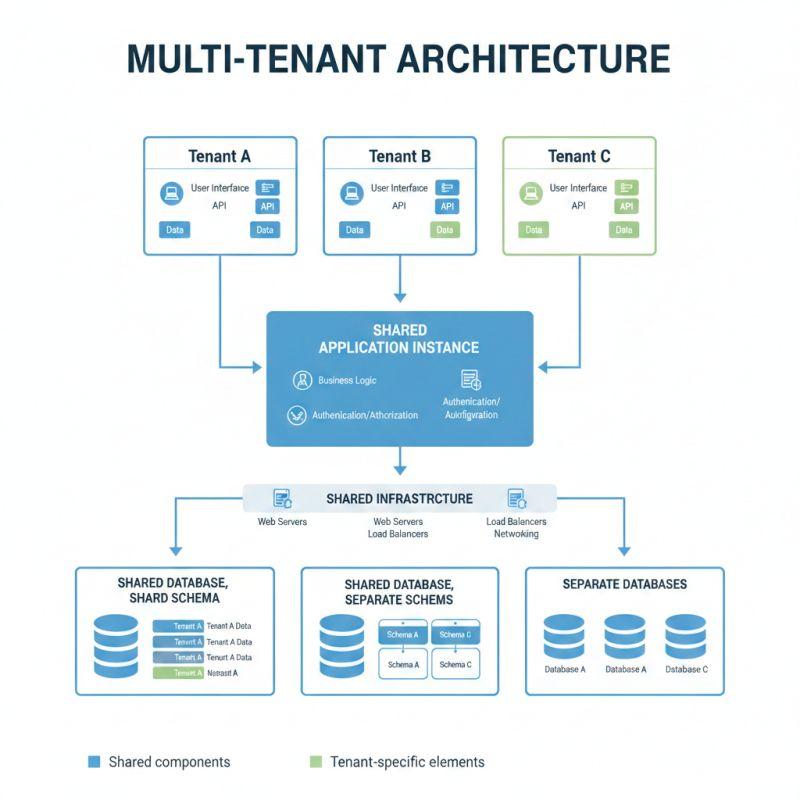
The portal should have a canonical authorization model, and the analytics layer should receive a security context derived from that model.
2. Authentication Is Not Tenant Authorization
A user successfully signing into your customer portal proves identity. It does not prove which customer data that user should see.
This distinction is essential.
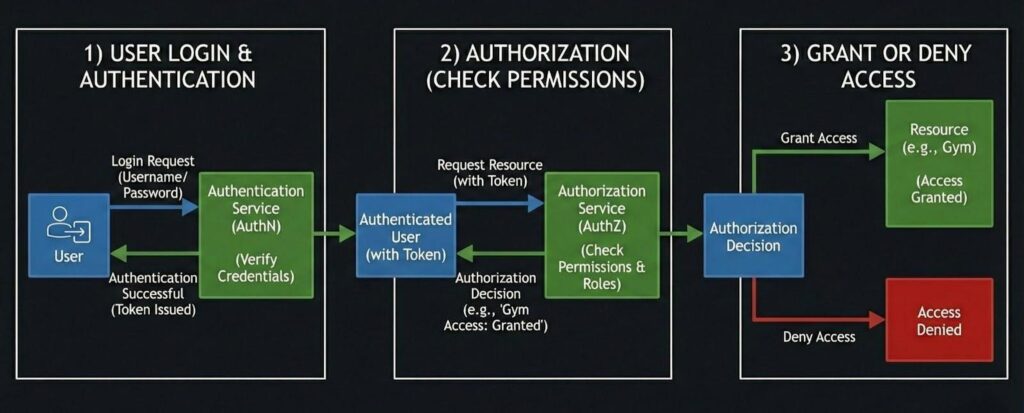
Authentication answers: Who is this user?
Authorization answers: Which tenant, resources, actions, and data is this user allowed to access?
A secure request flow should establish both before an embedded analytics session is created. The server should determine the authenticated user’s permitted tenant context from trusted application data. It should not accept a tenant identifier from the browser and assume it is valid simply because the user is logged in.
A common dangerous pattern looks harmless:
the browser sends customer_id=123;
the backend generates an analytics token for customer 123;
the report filters to customer 123.
If the backend never verifies that the authenticated user belongs to customer 123, changing one request parameter can become a cross-tenant data leak.
The tenant context must be authorized server-side.
3. Choose the Right Isolation Model
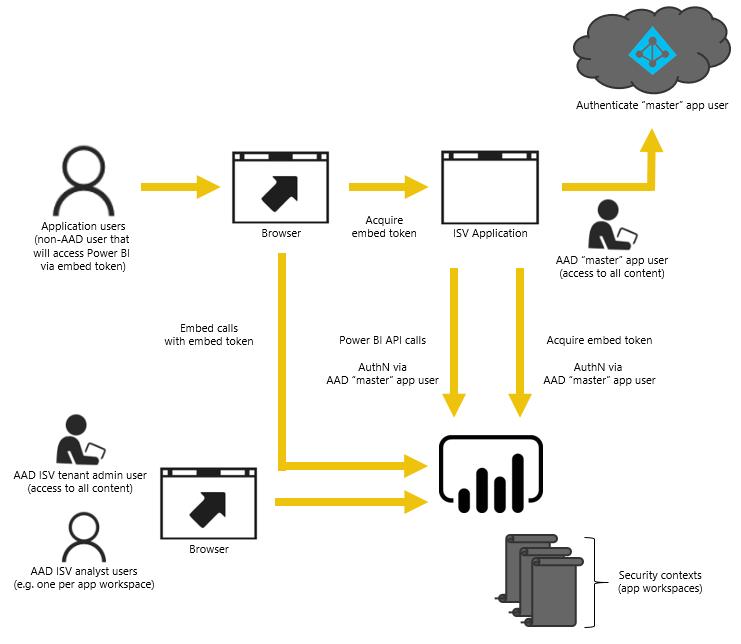
There are two broad patterns for multi-tenant embedded analytics.
Multiple customers’ data resides in a shared semantic model. The analytics platform receives an effective identity or tenant context and applies row-level security so each customer sees only permitted rows.
This can simplify report maintenance and onboarding because one model and report definition can serve many customers.
The trade-off is concentration. Data for multiple customers exists in the same model, so the correctness of tenant filtering becomes a critical security control.
Separated customer content
Customers receive stronger separation, such as customer-specific workspaces, semantic models, or data connections.
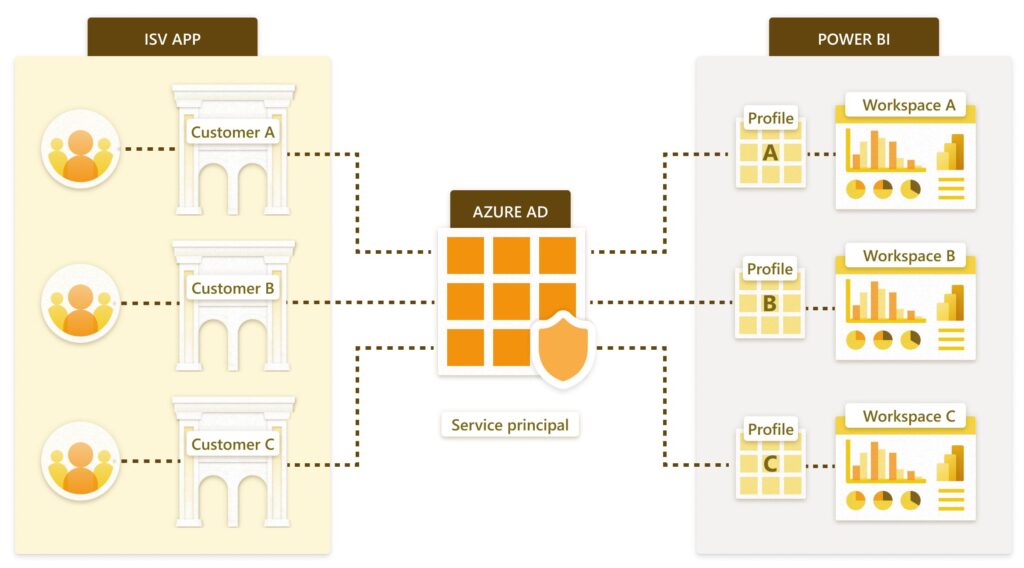
Microsoft’s current guidance for Power BI embedded multi-tenancy recommends workspace-based separation for stronger customer isolation and describes service principal profiles as a scalable way to map customers to Power BI content. Each profile can represent a customer and manage content associated with that customer.
Separation can reduce the blast radius of a filtering error, but it introduces operational work: provisioning, deployment, refresh, monitoring, version management, and cleanup across many customer environments.
Neither pattern is automatically correct.
Choose based on customer count, data volume, customization, compliance obligations, operational maturity, performance, and the consequence of an isolation failure.
4. Treat Row-Level Security as One Control, Not the Security Architecture
Row-level security is valuable because it allows a semantic model to filter records based on the effective identity or role presented to it.
But RLS should not be the only barrier between tenants.
Consider the full path:
User -> Portal authentication -> Application authorization -> Backend -> Embed-token generation -> BI workspace/model -> Data source -> Export/API
Tenant context should remain controlled across that chain.
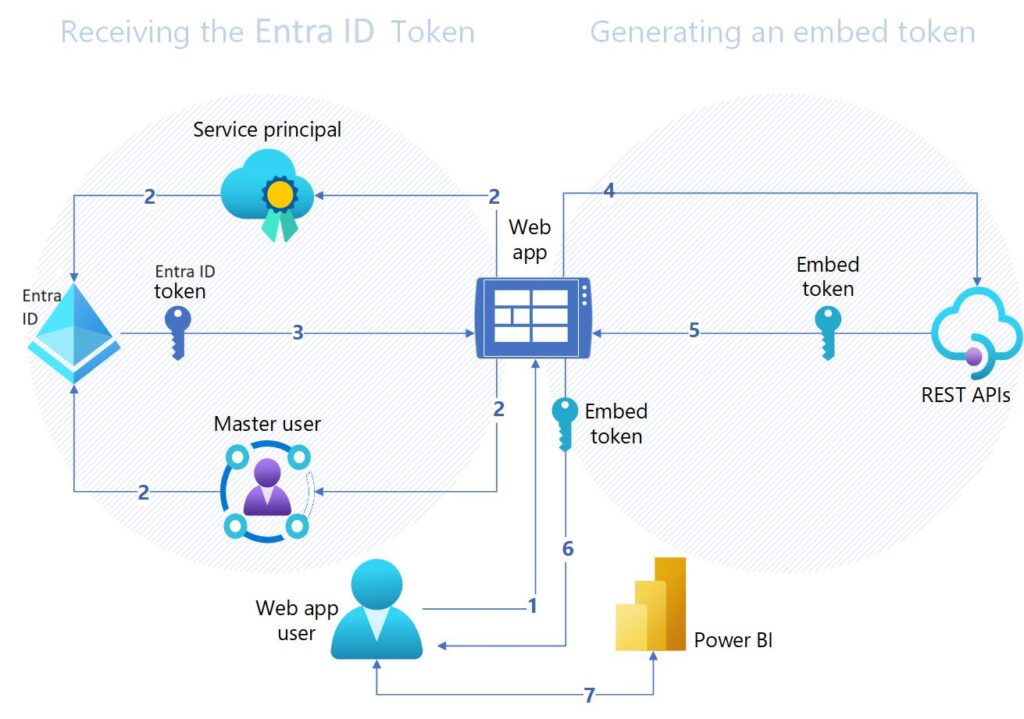
For Power BI’s embed-for-your-customers model, Microsoft documents that the application backend is responsible for authenticating end users and deciding which content and access level each user receives. When RLS is used, the effective identity supplied during embed-token generation is part of how those restrictions are enforced.
That means token generation is security-sensitive backend code.
Do not let the browser decide the effective identity, role, workspace, semantic model, or report that will be placed into a token without server-side authorization.
5. Use Deny-by-Default Tenant Mapping
A useful design principle is that a missing or ambiguous tenant mapping should result in no analytics access.
Avoid fallbacks such as:
- tenant not found -> show default tenant;
- role missing -> use standard user;
- customer mapping failed -> use report without RLS;
- token generation failed -> retry with broader permissions.
Operational convenience should never silently broaden access.
The secure flow is:
- identify the user;
- resolve permitted tenant membership;
- resolve the user’s role inside that tenant;
- resolve the permitted analytical resource;
- generate the minimum required analytics authorization;
- log the decision;
- return the embedded session.
If any security-relevant mapping fails, stop.
6. Keep Tenant Context Out of User-Controlled Trust Boundaries
Tenant IDs will naturally appear in URLs, browser state, API requests, filters, and application navigation. That is fine for identifying what the user wants to access. It is not sufficient for deciding whether access should be granted.
Treat every tenant identifier arriving from a client as untrusted input.
The backend should compare it with the user’s authorized tenant memberships before using it to:
- query customer data;
- generate an embed token;
- select a Power BI workspace;
- set an RLS effective identity;
- retrieve an export;
- call a reporting API;
- load cached analytics.
The same principle applies to roles. A request saying role=admin does not make the user an administrator.
7. Secure the Data Layer as Well as the BI Layer
A perfectly configured dashboard can still sit on top of an unsafe data architecture.
Ask where tenant separation exists in the underlying platform.
Possible designs include:
- a shared database with tenant keys;
- separate schemas;
- separate databases;
- separate warehouse objects;
- customer-specific data connections;
- hybrid patterns based on customer tier.
With shared storage, every tenant-scoped table should have an explicit and reliable tenant key. Joins should preserve that boundary. Transformation logic should be reviewed for accidental cross-tenant joins or aggregations.
Be particularly careful with derived tables.
A source table may correctly contain tenant_id, while an intermediate aggregate drops the tenant key and groups customers together. The final dashboard can then expose information that RLS cannot separate correctly because the model itself lost the security dimension.
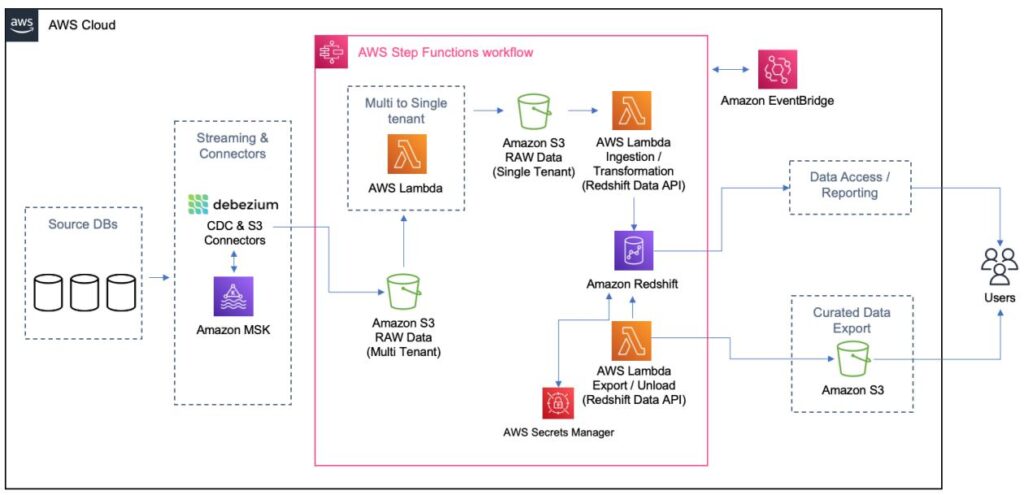
Tenant-aware modeling should be part of data engineering, not added after the warehouse is built.
8. Minimize Privileges for Service Identities
Embedded analytics usually involves non-human identities such as service principals, API credentials, database users, and refresh accounts.
These identities can become extremely powerful because they operate behind the scenes.
Microsoft recommends service-principal authentication for production Power BI embed-for-your-customers applications. Its guidance also supports restricting service-principal access through specific security groups rather than enabling broad organizational access.
Apply least privilege throughout:
- limit which workspaces the embedding identity can access;
- limit database permissions to required objects and actions;
- separate development and production credentials;
- avoid using personal administrator accounts for application workloads;
- rotate and protect credentials;
- prefer certificates or managed secret mechanisms where appropriate;
- log privileged operations.
Actiknow’s published security practices describe minimum necessary permissions, encrypted connections, OAuth where possible, multi-factor authentication for administrative access, and regular review of IAM policies and security roles. These are useful principles for the wider application and integration environment around embedded analytics.
9. Design Exports as a Separate Security Surface
Teams often test what a user can see on screen and forget what the user can export.
Exports can behave differently from interactive reports. They also create durable copies of data outside the portal.
Review every supported path:
- Export to Excel
- CSV downloads
- PDF exports
- scheduled email
- API access
- underlying-data export
- copy/paste
- custom download endpoints
For each path, confirm that the same tenant and role restrictions apply.
Also decide whether the customer should be able to export all visible data. A user legitimately allowed to view a summarized KPI may not necessarily be authorized to download every underlying record.
Analytics permissions and data-extraction permissions are related but not identical.
10. Test for Data Leakage, Not Just Functional Correctness
Most QA plans ask whether Tenant A can open its dashboard.
A security-focused QA plan asks whether Tenant A can make the system reveal anything about Tenant B.
Build explicit negative tests.
At minimum, test:
- change the tenant ID in a request;
- change report, workspace, or semantic-model identifiers;
- reuse an embed token in another tenant context;
- use a lower-privilege account to request an administrative report;
- manipulate URL parameters and report filters;
- attempt exports under restricted roles;
- call backend endpoints directly instead of through the UI;
- use stale sessions after tenant membership is revoked;
- test users belonging to multiple tenants;
- test accounts with no tenant;
- test deleted and suspended customers;
- test cached responses after switching tenants.
For Power BI RLS, test the real embedded flow using actual embed tokens and effective identities. Microsoft explicitly notes that service-principal embedded scenarios should be tested with the actual effective identity because “Test as role” in the Power BI service does not reproduce the embedded authentication flow.
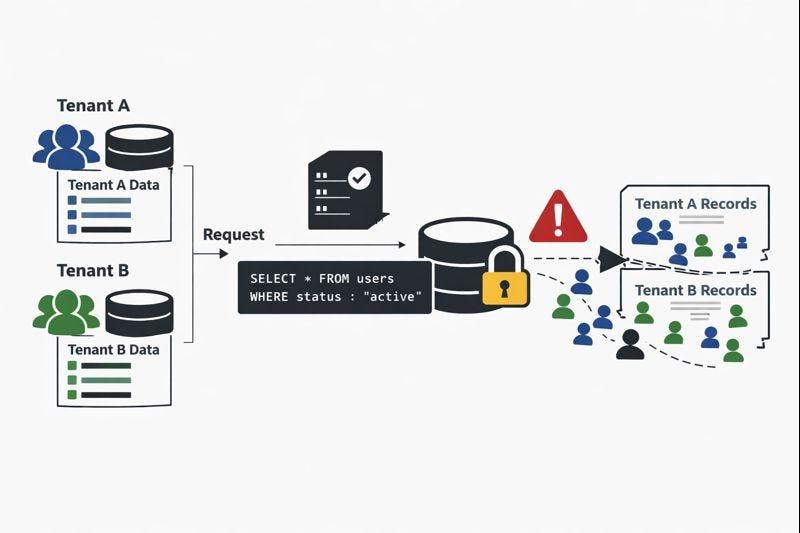
A passing visual test is not enough.
11. Add Automated Tenant-Isolation Tests to Every Release
Tenant security should not depend on a one-time penetration test.
Create repeatable automated tests that seed distinctive data for multiple test tenants and verify that each identity can retrieve only its expected records.
A useful test fixture might include:
- Tenant Alpha with customer code ALPHA_ONLY_781;
- Tenant Beta with customer code BETA_ONLY_492;
- a multi-tenant support user;
- a standard user;
- a restricted user;
- an inactive user.
Then test the portal, APIs, embedded reports, and exports for forbidden markers.
The goal is to make cross-tenant leakage a release-blocking failure.
This becomes particularly important when developers change semantic models, relationships, DAX, SQL views, authorization middleware, caching, or provisioning code. A seemingly unrelated model change can alter security behavior.
12. Be Careful With Caching
Caching improves performance, but tenant-aware systems need tenant-aware cache keys.
If a response is cached only by endpoint or report identifier, data generated for one customer can potentially be served to another.
Include every security-relevant dimension in cache design, such as:
- tenant;
- user or role where necessary;
- resource;
- filters that affect authorization;
- data version where appropriate.
Do not cache privileged and ordinary responses under the same key.
The same concern applies to server-side rendered exports, generated PDFs, temporary files, query-result caches, and CDN behavior.
13. Separate Support Access From Customer Access
Support teams sometimes need to view a customer’s portal or analytics to investigate a problem. Giving support staff permanent broad access is convenient and risky.
Prefer controlled support access with:
- named individual identities;
- explicit roles;
- time-bounded elevation where feasible;
- reason or ticket reference;
- audit logging;
- clear indication when impersonation is active;
- restricted export capability where appropriate.
Avoid shared “super admin” credentials.
If support impersonation exists, the product should make it difficult for a support user to forget that they are operating inside a customer context.
14. Automate Tenant Provisioning and Deprovisioning
Manual setup becomes a security risk as customer count grows.
A repeatable provisioning workflow should create the correct combination of application tenant record, BI resources, data connection, permissions, refresh configuration, and monitoring.
The workflow should be idempotent: rerunning it should not accidentally create broader permissions or duplicate resources.
Deprovisioning deserves equal attention.
When a customer leaves:
- disable portal access;
- revoke relevant identities and tokens;
- remove or archive BI resources according to retention requirements;
- stop refreshes and integrations;
- remove credentials;
- handle exports and cached data;
- record completion.
A customer that no longer appears in the application should not leave forgotten analytical access behind.
15. Monitor Security-Relevant Analytics Events
Monitoring should answer more than “Did the report load?”
Capture events that help reconstruct access decisions:
- authenticated application user;
- resolved tenant;
- role;
- requested report or resource;
- token-generation outcome;
- administrative actions;
- exports;
- authorization failures;
- provisioning changes;
- support impersonation;
- unusual repeated access attempts.
Avoid putting sensitive tokens or unnecessary personal data into logs.
Alerts should focus on meaningful anomalies: repeated cross-tenant authorization failures, unexpected administrative actions, unusual export volume, or access to resources outside normal patterns.
Good auditability changes incident response from guesswork into investigation.
16. Review the Portal, BI Platform, and Data Platform Together
Security reviews often happen in silos.
The application team reviews authentication.
The BI team reviews RLS.
The data team reviews warehouse permissions.
The infrastructure team reviews secrets.
A multi-tenant analytics threat crosses all four.
Run at least one architecture review that follows a single customer request from login to data retrieval and back to the browser.
For each step ask:
- What identity is being used?
- Where is tenant membership verified?
- What resource can this identity access?
- What prevents a different tenant from being selected?
- What happens if an identifier is modified?
- What gets logged?
- What gets cached?
- What can be exported?
Actiknow’s Custom Solutions work includes web applications, integrations, databases and data lakes, while its BI practice includes embedded analytics. That combination reflects the actual shape of this problem: secure customer analytics sits across application and data boundaries.
A Practical Reference Architecture
A robust customer-portal flow can be expressed in eight stages.
- User authenticates to the customer portal.
- Backend resolves the user from the trusted identity.
- Backend loads permitted tenant memberships and roles from the application authorization store.
- User selects or enters an allowed tenant context.
- Backend verifies that context and maps it to the permitted BI resource and data scope.
- Backend obtains platform credentials and generates a narrowly scoped embed token or session.
- BI and data layers independently enforce the expected tenant restrictions.
- Portal renders the analytics experience and logs security-relevant events.
Notice that the browser never becomes the authority for tenant access.
For higher-isolation Power BI deployments, the mapping at step 5 may select a tenant-specific workspace or service principal profile. For shared-model deployments, it may generate an effective identity used by RLS. In either case, the application authorization decision happens before the analytics session is created.
Security Review Checklist for Executives and Product Leaders
Before approving a customer-facing analytics release, leadership should be able to get clear answers to these questions:
- Can one user belong to multiple tenants, and how is that handled?
- Where is tenant membership stored and verified?
- Can a browser-supplied tenant ID ever bypass server-side authorization?
- What is the blast radius of an RLS or semantic-model mistake?
- Are customers separated by RLS, workspaces, data stores, or a combination?
- How are embedding identities scoped?
- Can users export more data than they can reasonably consume on screen?
- Are tenant-isolation tests automated?
- How are support and administrator access controlled?
- Are caches tenant-aware?
- What happens immediately when a user or customer is disabled?
- Can logs reconstruct who accessed which tenant and resource?
- Who owns the security model when application, BI, and data changes interact?
If the answers require three teams to give contradictory explanations, the architecture is not yet mature enough.
Frequently Asked Questions
What is multi-tenant analytics architecture?
Multi-tenant analytics architecture is the design used to provide analytics to multiple customer organizations while keeping each tenant’s data and permissions appropriately isolated. It spans application authentication and authorization, BI resources, semantic models, data storage, APIs, exports, caching, and operations.
Is row-level security enough for a multi-tenant customer portal?
No. RLS is an important data-filtering control, but secure isolation also requires server-side tenant authorization, correctly scoped embedding identities, secure data models, controlled exports, tenant-aware caching, least-privilege service accounts, monitoring, and testing.
Should every customer have a separate Power BI workspace?
Not always. Microsoft documents both workspace-based separation and shared-model approaches using RLS. Workspace separation provides stronger resource boundaries and is Microsoft’s recommended approach for multi-tenant embedded scenarios, while shared models can reduce operational overhead for suitable workloads. The choice should reflect scale, security requirements, data size, customization, and operational capability.
What are Power BI service principal profiles?
Service principal profiles are Power BI security principals designed to help applications manage customer-specific content in multi-tenant embedded solutions. A profile can represent a customer and be assigned permissions to that customer’s Power BI resources, supporting stronger isolation and scalable automation.
Where should the tenant ID come from?
A tenant identifier may be supplied by the UI to indicate the requested context, but it should be authorized against trusted server-side membership data. Never treat a browser-supplied tenant ID as proof that the user belongs to that tenant.
How should RLS be tested in an embedded Power BI application?
Test the actual embedded flow with realistic users, effective identities, roles, and embed tokens. Include negative tests that deliberately request another tenant’s resources or data. Microsoft notes that the Power BI service’s “Test as role” experience does not simulate the complete service-principal embedded authentication flow.
How do you prevent cross-tenant data leakage?
Use layered controls: server-side tenant authorization, least-privilege identities, appropriate workspace or model isolation, correct RLS where used, tenant-aware data models and caches, controlled exports, automated negative tests, monitoring, and disciplined provisioning and deprovisioning.
Call to Action
If you are designing or reviewing analytics inside a multi-tenant customer portal, evaluate the application, BI, and data security model as one architecture. Actiknow can help with the customer-facing application, embedded BI implementation, data integration, tenant-isolation design, and the testing needed to validate the complete flow. Discuss your customer portal and analytics architecture with Actiknow.