
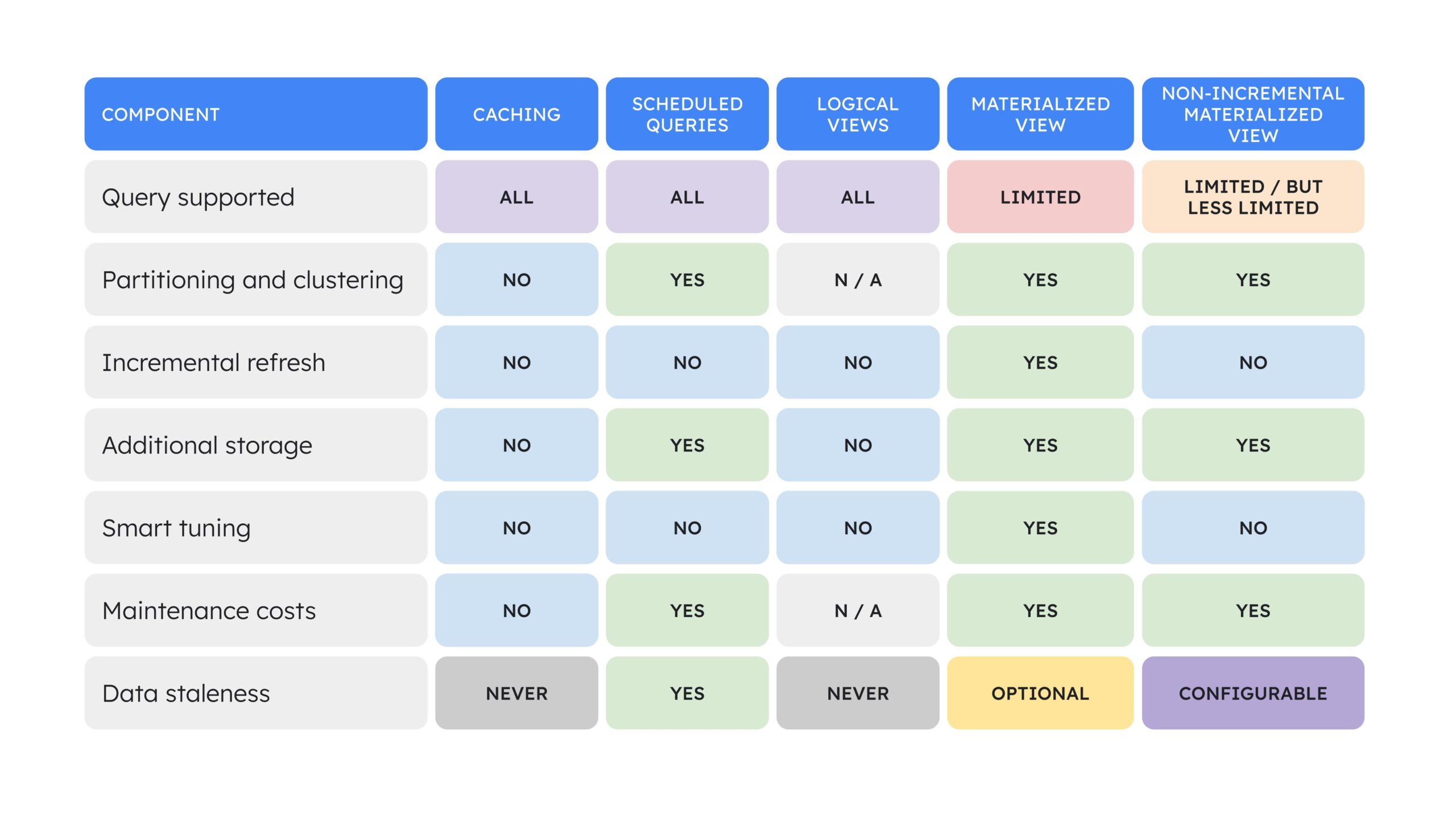
A BigQuery view can make SQL easier to reuse, but it does not automatically make the underlying query cheaper or faster.
That distinction matters when dashboards repeatedly execute the same expensive joins and aggregations.
BigQuery offers two different view patterns:
- Logical views, often called standard views, store the query definition.
- Materialized views store precomputed results that BigQuery can maintain and reuse.
The right choice depends on query repetition, cost, freshness, SQL compatibility and how frequently the underlying data changes.
What a Standard BigQuery View Does
A logical view is a virtual table defined by SQL.
It does not store the result data.
When a user queries the view, BigQuery executes the underlying logic against its source data.
Logical views are useful for:
- Reusable business logic.
- Simplifying complex SQL.
- Abstracting table structures.
- Providing curated interfaces.
- Centralizing common filters.
They are lightweight and flexible.
But if the view scans a large table and performs an expensive aggregation, every qualifying query can still incur that work.
What a Materialized View Does
A materialized view physically stores precomputed results.
BigQuery maintains the materialized result and can use it to reduce repeated computation.
Google Cloud’s current documentation also describes smart tuning, where the optimizer can automatically rewrite eligible queries against base tables to use a materialized view when it improves efficiency.
This means applications do not always need to query the materialized-view name directly to benefit.
Actiknow’s business intelligence and data engineering services include BigQuery modeling, pipeline design and dashboard optimization. The decision to materialize should start with actual query patterns rather than a blanket rule that every reporting view needs precomputation.
Use Logical Views for Abstraction
Logical views are ideal when the main requirement is to hide complexity.
For example, a view can:
- Rename technical columns.
- Standardize business filters.
- Join small reference tables.
- Expose only approved fields.
- Create a stable semantic interface.
If the underlying query is already inexpensive, materializing it adds maintenance and storage without meaningful benefit.
Use Materialized Views for Repeated Expensive Work
Materialized views are most compelling when many queries repeatedly perform similar expensive operations.
Examples include:
- Daily sales aggregation over billions of rows.
- Repeated counts by date and customer segment.
- Dashboard metrics that scan the same fact table.
- Common pre-filtered datasets.
- Frequently reused aggregation patterns.
The benefit comes from avoiding repeated work, not from the word “view.”
Start With Query History
Before creating a materialized view, identify recurring patterns.
Ask:
- Which queries consume the most bytes or slots?
- Which patterns repeat?
- Which dashboards run them?
- How often?
- How many users?
- What is the current latency?
- How much does the query cost?
- Would the precomputed shape answer multiple workloads?
BigQuery also provides materialized-view recommendations for some recurring query patterns.
Use evidence.
A materialized view nobody reuses is additional architecture without return.
Smart Tuning Can Improve Existing Queries
For eligible incremental materialized views, BigQuery can automatically rewrite a query to use the materialized result.
Google calls this smart tuning.
The query still references the base tables, but the optimizer can choose the materialized view when it contains the required rows and columns and other conditions are met.
This can improve performance without changing every downstream report.
However, smart tuning has eligibility rules.
Confirm actual usage through query plans or materialized-view statistics rather than assuming it happened.
Materialized Views Have SQL Restrictions
Incremental materialized views support a more restricted SQL pattern than logical views.
This is a fundamental trade-off.
A logical view can represent broader SQL logic.
An incremental materialized view must remain compatible with BigQuery’s incremental maintenance rules.
Google’s current documentation lists limitations around SQL constructs, aggregate behavior and source types.
If the required transformation does not fit, options can include:
- A logical view.
- A non-incremental materialized view.
- A scheduled query writing to a table.
- An upstream transformation pipeline.
Choose the simplest option that satisfies the workload.
Non-Incremental Materialized Views Are Different
BigQuery also supports non-incremental materialized views for broader SQL definitions.
These refresh by recomputing the full query rather than incrementally maintaining changes.
They also do not support smart tuning.
That means “materialized view” is not one performance profile.
Know whether the design is incremental or non-incremental.
Freshness Has Nuance
Materialized data is maintained in the background.
For incremental materialized views, BigQuery can account for base-table changes when returning fresh results.
BigQuery also supports max_staleness configurations for use cases where bounded staleness is acceptable and avoiding extra base-table processing is more important.
The right choice depends on the dashboard SLA.
Do not set staleness based only on technical convenience.
Understand Base-Table Change Patterns
Append-heavy tables are generally friendlier to incremental materialization than tables that undergo frequent updates and deletes.
Google documents cases where updates, deletes or changes to joined tables can prevent incremental use and force fallback behavior.
This affects cost.
A materialized view over a heavily mutating source may not deliver the expected savings.
Analyze the actual DML pattern.
Joins Need Particular Attention
Materialized views can support joins within documented limitations, but incremental behavior depends on which tables change.
For some join patterns, changes on the right side can prevent incremental updates.
This makes dimension-change behavior important.
If a dashboard joins a massive fact table to a frequently changing dimension, test the materialized-view design with realistic changes.
Do not validate only append scenarios.
Partition Alignment Can Improve Efficiency
When base data is partitioned, align the materialized view where appropriate.
Good partition design can limit the scope of refresh work and query scanning.
Poor partition design can increase maintenance cost.
Evaluate:
- Partition key.
- Query filters.
- Data retention.
- Update patterns.
- Materialized-view definition.
The physical design of the base table still matters.
Clustering Can Help Query Patterns
BigQuery supports clustering materialized views by eligible output columns.
If consumers repeatedly filter by certain dimensions, clustering may improve query efficiency.
Do not add clustering mechanically.
Use query history to identify whether the filters justify it.

Cost Has Three Components
A materialized view can create:
- Storage cost for the materialized data.
- Maintenance compute for refresh.
- Query compute when users access it.
The business case is:
Cost avoided by reducing repeated base-table work
minus
Storage and maintenance cost.
This is why high-repetition workloads are usually better candidates.
A dashboard queried thousands of times may justify materialization.
A monthly report queried once may not.
Latency Can Be as Important as Cost
Even when query cost is acceptable, user experience may justify precomputation.
Interactive dashboards need predictable response.
If a common aggregation takes eight seconds against base data and one second through a precomputed path, that difference can materially improve report usability.
Define a latency target.
Then test both architectures.
Materialized Views Are Not Always Faster
Google explicitly notes that some direct queries over materialized views can be slower than equivalent manually materialized tables because BigQuery may need to account for recent base-table changes to return fresh results.
This is an important reminder.
Benchmark the actual query.
Do not assume every materialized view is the fastest possible physical structure.
A Scheduled Table Can Be Simpler
Sometimes the clearest solution is:
Scheduled query → reporting table
This can be appropriate when:
- Exact refresh timing matters.
- The SQL is not supported by materialized views.
- The business accepts batch freshness.
- A stable snapshot is useful.
- You want explicit control over transformation and validation.
The trade-off is that your team owns scheduling and update logic.
Materialized Views Reduce Some Pipeline Ownership
When the workload fits, BigQuery handles refresh behavior.
This can reduce custom orchestration.
The team still needs to monitor:
- Refresh health.
- Query usage.
- Costs.
- Staleness.
- Schema changes.
- Eligibility.
Optimization is managed, not invisible.
Schema Changes Need Governance
A materialized view depends on its base tables.
Changes to source columns or metadata can invalidate incremental behavior or require recreation.
Treat important materialized views as production dependencies.
Document:
- Owner.
- Base tables.
- Consumers.
- Refresh behavior.
- SLA.
- Change procedure.
Do not let them become anonymous optimization objects.
Use Views as Stable Interfaces
One useful architecture is to separate the consumer contract from the physical optimization.
A logical view can expose a stable business interface.
Underlying tables or optimization structures can evolve.
However, materialized-view support for referencing logical views has specific current limitations and some capabilities may be pre-GA.
Validate the exact BigQuery feature state before designing a dependency chain around it.
Security Requirements Matter
Logical and materialized views participate in BigQuery access-control patterns differently depending on configuration.
If the purpose of a view is primarily security and controlled data exposure, evaluate authorized views, row-level security and column-level controls as part of the design.
Do not choose materialization solely for security.
It is primarily a performance and computation strategy.
A Practical Decision Framework
1. Choose a logical view when:
- The main goal is reusable SQL or abstraction.
- The underlying query is inexpensive.
- SQL flexibility is important.
- The query pattern is not repeated enough to justify precomputation.
- The data changes in ways that make materialized maintenance inefficient.
2. Choose a materialized view when:
- The same expensive pattern runs repeatedly.
- The query fits supported materialized-view semantics.
- Precomputation reduces meaningful bytes or slot usage.
- Interactive latency matters.
- The maintenance cost is lower than repeated recomputation.
3. Choose a scheduled physical table when:
- The query does not fit materialized-view restrictions.
- You want exact refresh timing.
- A point-in-time batch result is desirable.
- You need explicit transformation and validation control.
Evaluation Checklist
Before creating a materialized view, confirm:
- The query pattern repeats often enough.
- Current query cost is measurable.
- Current latency is a problem.
- The SQL is supported.
- Base-table changes fit incremental behavior.
- Join behavior has been tested.
- Partitioning is appropriate.
- Freshness requirements are explicit.
- Storage and maintenance cost are estimated.
- Smart tuning eligibility is understood.
- Actual materialized-view usage will be monitored.
- Schema-change ownership is defined.
Frequently Asked Questions
What is the difference between a BigQuery view and materialized view?
A logical view stores a SQL definition and executes its underlying logic when queried. A materialized view stores precomputed results that BigQuery maintains and can reuse.
Do materialized views reduce BigQuery cost?
They can reduce repeated query work when workloads reuse the precomputed result. They also incur storage and refresh cost, so savings should be measured.
Are materialized views always faster?
No. Performance depends on the query, refresh state, base-table changes and how BigQuery serves fresh results. Benchmark the real workload.
What is BigQuery smart tuning?
For eligible materialized views, BigQuery can automatically rewrite compatible queries against base tables to use the materialized result when beneficial.
Can a materialized view use any SQL?
No. Incremental materialized views have SQL and source limitations. Non-incremental materialized views support broader SQL but refresh fully and do not support smart tuning.
Should I replace all logical views with materialized views?
No. Logical views remain simpler for abstraction and low-cost queries. Materialize only where repeated computation or latency justifies it.
How do I know whether BigQuery used a materialized view?
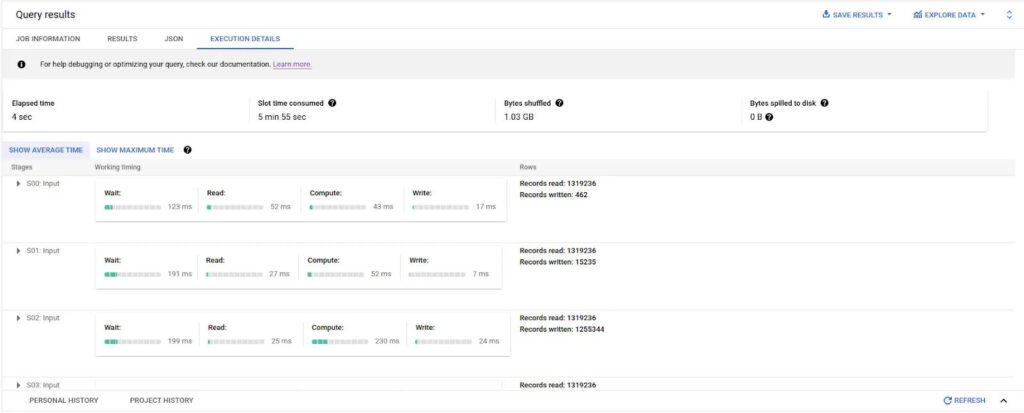
Inspect query plans or BigQuery materialized-view statistics to confirm whether the optimizer selected it and, when not selected, review the rejection reason.
Conclusion
BigQuery materialized views are an optimization tool, not a replacement for standard views.
Use logical views to create reusable, understandable interfaces.
Use materialized views when repeated expensive queries justify precomputation and the workload fits BigQuery’s maintenance model.
Use scheduled tables when explicit batch control is more important than managed incremental refresh.
The right decision comes from query history, not architectural fashion.
Measure repetition, bytes, slots, latency, freshness and maintenance cost. Then materialize the workloads where the economics and user experience actually improve.
If your BigQuery dashboards are expensive or slow, Actiknow can help analyze query patterns, warehouse models and BI workloads to identify where materialization, partitioning or upstream transformation will have the greatest impact. Discuss your BigQuery and BI requirements with Actiknow.