

Power BI Copilot is not a shortcut around semantic modeling. It makes the quality of the semantic layer more visible.
If business terms are ambiguous, measures overlap, technical fields dominate the model or security has not been tested properly, natural-language access can expose those weaknesses faster than a conventional dashboard.
Microsoft’s current Power BI guidance recommends preparing semantic models specifically for AI. The preparation experience includes AI data schemas, verified answers, AI instructions and an Approved for Copilot setting. Microsoft also notes that Copilot output is nondeterministic, so testing and user expectations remain important.
For CIOs and BI leaders, that means Copilot readiness should be treated as a governance exercise, not simply a feature switch.
Actiknow’s business intelligence and Power BI work focuses on the same foundation: trusted metrics, understandable semantic models and controlled access before adding new consumption experiences.
The Short Answer: What Makes a Power BI Semantic Model Copilot-Ready?
A Copilot-ready model should have five characteristics:
- A focused schema containing fields users actually need.
- Clear business definitions for measures, tables and important dimensions.
- AI instructions for organization-specific terminology and analytical rules.
- Verified answers for high-value questions that need consistent, human-approved responses.
- Security, quality and ownership controls that have been tested with real user personas.
The objective is not to make Copilot answer every possible question. It is to make the supported analytical surface clear, trustworthy and maintainable.
Start With the Questions the Business Actually Asks
Before changing the model, collect representative questions from executives, analysts and operational teams.
Examples include:
- What is year-to-date revenue versus last year?
- Which regions are below target?
- How many active customers do we have?
- What changed in pipeline this month?
- Which product categories are driving margin decline?
This question set becomes the acceptance test.
It also reveals terminology that may not exist explicitly in the model. A sales leader may say “bookings” while the warehouse uses Contracted Revenue. A membership team may say “active members” while the model exposes several status fields.
Those gaps should be resolved deliberately.
Do Not Expose the Entire Warehouse to Copilot
Microsoft’s AI data schema capability lets authors narrow the fields available for Copilot analysis.
Use that intentionally.
Raw models often contain:
- Surrogate keys.
- ETL timestamps.
- Helper columns.
- Technical status codes.
- Duplicate source fields.
- Intermediate measures.
- Fields used only for sorting.
- Relationships that make sense to developers but not business users.
Removing irrelevant fields from the AI-facing schema reduces ambiguity and makes field selection easier.
This is one of the highest-value preparation steps because it changes the problem from “understand everything in the model” to “understand the curated business surface.”
Use Business-Friendly Names
Names should reflect the vocabulary users employ.
Poor:
cust_stat_cd
Better:
Customer Status
Poor:
amt_net_usd_adj
Better:
Adjusted Net Revenue
Do not rename a field merely for AI. Good semantic naming improves Power BI for everyone.
Where two measures sound similar, make the distinction explicit.
For example:
Gross Revenue
Net Revenue
Recognized Revenue
Booked Revenue
If users routinely confuse them, Copilot can too.
Create Explicit Measures for Important KPIs
Important business metrics should be modeled explicitly rather than reconstructed ad hoc from raw columns.
Examples:
- Revenue.
- Active Customers.
- Conversion Rate.
- Gross Margin.
- Qualified Pipeline.
- Renewal Rate.
A governed measure gives the organization one definition that can be reused by reports, analysts and AI experiences.
If the business has not agreed on the calculation, that is a governance problem to solve before Copilot rollout.

Document the Meaning, Not Just the Label
Descriptions should add context.
A weak description:
Active Customers: Number of active customers.
A useful description:
Active Customers: Distinct customers with at least one non-cancelled order in the trailing 12 months as of the selected reporting date.
Document:
- Business definition.
- Important exclusions.
- Grain.
- Units.
- Date basis.
- Whether the measure is additive.
- Any important caveat.
Microsoft’s guidance identifies descriptions as useful semantic metadata for AI scenarios.
Clarify Time Semantics
Time is one of the easiest ways to get a plausible but wrong answer.
A model may contain:
- Order Date.
- Invoice Date.
- Payment Date.
- Created Date.
- Closed Date.
Define which date should drive each major metric.
Also clarify:
- Calendar versus fiscal year.
- Week definition.
- Current-period rules.
- Prior-year comparison.
- Incomplete current periods.
- Time zone where relevant.
If management reporting uses fiscal periods, encode that into the semantic model and AI guidance instead of expecting users to restate it in every prompt.
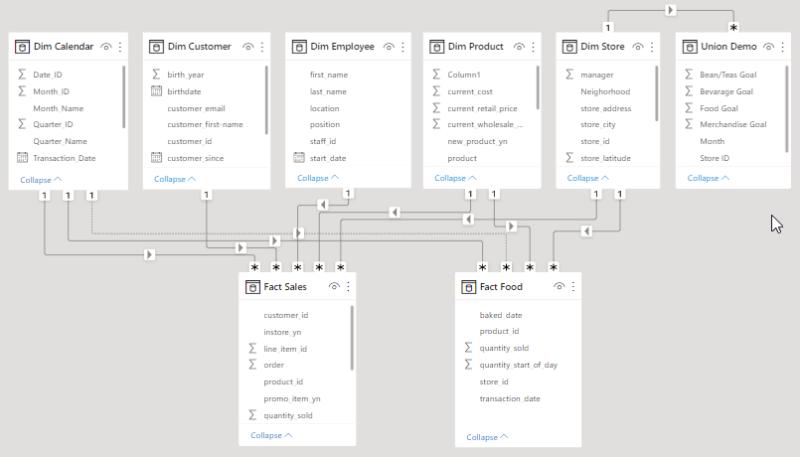
Review Model Relationships
Before AI rollout, review:
- Cardinality.
- Active and inactive relationships.
- Bidirectional filtering.
- Many-to-many relationships.
- Role-playing dates.
- Ambiguous filter paths.
A report author may know which field to use around a modeling compromise. Copilot does not inherit that undocumented tribal knowledge.
Simpler, business-oriented models generally create a better natural-language surface.
Define the Grain of Every Fact Table
Document what one row means.
For example:
- One order line.
- One invoice.
- One customer-day snapshot.
- One web session.
- One membership affiliation.
Mixed or unclear grain is dangerous because counts and sums can appear reasonable while being wrong.
If the model cannot explain its grain clearly, it is not ready for broad natural-language querying.
Use AI Instructions for Business Context
Microsoft’s AI instructions allow semantic model authors to provide business context, terminology and analytical guidance.
Useful instructions can include rules such as:
- When users say revenue, use Net Revenue unless they explicitly ask for gross revenue.
- Management reporting uses Fiscal Year rather than calendar year.
- Exclude test accounts from customer metrics.
- “Clients” and “customers” both refer to the Customer dimension.
- Use Average Opportunity Days for sales-cycle questions.
These instructions should describe stable business logic.
Do not use AI instructions to compensate for incorrect DAX, broken relationships or poor security.
Fix the model first.
Keep AI Instructions Specific
Avoid vague instructions such as:
“Give useful business insights.”
Prefer instructions that resolve genuine ambiguity.
Good AI instructions answer questions like:
- Which measure?
- Which table?
- Which date?
- Which exclusion?
- Which organizational term?
Maintain them as governed semantic metadata.
Use Verified Answers for High-Value Questions
Microsoft describes verified answers as human-approved visual responses associated with trigger phrases. They are stored on the semantic model and can be reused across reports that use that model.
That makes them useful for recurring questions where consistency matters.
Examples:
- What is year-to-date revenue?
- How many active customers do we have?
- What is pipeline by stage?
- How are sales trending by region?
A verified answer is not a replacement for a good model. It is an additional control for important, predictable questions.

Choose Verified Answers Deliberately
Prioritize questions that are:
- Asked frequently.
- Executive-facing.
- Easy to misunderstand.
- Based on an approved KPI.
- Suitable for a stable visual answer.
Do not create hundreds of verified answers merely to cover every possible phrasing.
The better goal is a smaller set of high-value approved responses plus a strong semantic model for exploration.
Test Trigger Phrases Like Real Users
Executives do not always ask perfectly structured questions.
Test variations such as:
- “How are sales doing?”
- “Revenue YTD.”
- “Show me this year versus last year.”
- “How much have we sold?”
- “Are we ahead of plan?”
Record whether Copilot:
- Selects the expected measure.
- Uses the correct date.
- Applies the intended filters.
- Returns the verified answer where appropriate.
- Asks for clarification when ambiguity is real.
Use an AI Question Test Suite
Treat Copilot testing like software testing.
Create a repeatable suite covering:
- Simple KPI questions.
- Time comparisons.
- Trend questions.
- Segment filters.
- Ambiguous terminology.
- Unsupported questions.
- Security-sensitive questions.
- Edge cases.
- Questions with no valid answer.
For each test, record the expected behavior.
Because Microsoft explicitly notes that Copilot outputs can be nondeterministic, repeat important tests rather than validating a prompt once.
Test Wrong and Unsupported Questions
A trustworthy analytical assistant also needs to handle questions it cannot answer.
Ask about:
- Data not present in the model.
- Undefined business metrics.
- Causal explanations the data cannot establish.
- Sensitive fields.
- Future predictions without an approved forecasting model.
A polished answer is not necessarily a correct answer.
Your validation process should focus on whether the result is grounded in the available model.
Security Still Comes First
Copilot does not remove the need for Power BI access controls.
Review:
- Workspace access.
- Semantic model permissions.
- Row-level security.
- Object-level security where used.
- Build permission.
- Sensitive fields.
- Export behavior.
- Sharing and app distribution.
Then test with representative user identities.
Do not validate only as an administrator.

Test Real Personas
Create tests for roles such as:
- Executive.
- Regional manager.
- Department analyst.
- Finance user.
- Operations user.
- External or embedded persona where relevant.
Ask equivalent questions as each persona.
Confirm that results remain within the user’s authorized data scope.
Review Sensitive Data Before AI Discovery
A semantic model may contain data that was technically accessible but rarely surfaced in dashboards.
Natural-language exploration can make such fields easier to discover.
Review:
- PII.
- Employee information.
- Compensation.
- Customer details.
- Contract values.
- Health or regulated information.
- Internal notes.
Hide, separate or restrict fields that should not be part of general exploration.
“Approved for Copilot” Should Be a Governance Decision
Microsoft provides an Approved for Copilot setting for semantic models.
Do not treat it as a cosmetic label.
Before approval, require evidence that:
- The model has a named owner.
- Critical measures are governed.
- The AI data schema is curated.
- Descriptions are adequate.
- AI instructions have been reviewed.
- Verified answers have been tested.
- Security has been validated.
- Representative prompts have passed testing.
- There is a support and maintenance process.
Approval should mean the organization is prepared to stand behind the analytical surface.
Create an AI-Ready Model Review
A practical approval workflow can include four reviews.
1. Technical review:
Model structure, relationships, measures and performance.
2. Business review:
Definitions, terminology, exclusions and executive KPIs.
3. Security review:
Access, RLS, sensitive fields and sharing.
4. AI behavior review:
Question suite, instructions, verified answers and unsupported scenarios.
Only then should the model be broadly promoted for Copilot use.
Avoid Duplicate and Ambiguous Models
If users can choose among:
- Sales.
- Sales New.
- Sales Final.
- Sales v2.
- Sales Test.
natural-language analytics begins with the wrong problem.
Clean the model catalog.
Use clear names such as:
- Sales – Certified Executive.
- Sales – Operations.
- Sales – Development.
Control which models are approved.
Separate Development From Production
Test semantic changes, AI instructions and verified answers outside the executive production environment where possible.
Use normal BI engineering disciplines:
- Version control where applicable.
- Deployment pipelines.
- Peer review.
- UAT.
- Change notes.
- Rollback planning.
AI metadata is part of the analytical product and should follow the same change discipline.
Monitor Questions After Launch
A rollout generates valuable evidence about how people actually talk about the business.
Review:
- Common questions.
- Failed questions.
- Ambiguous phrases.
- Unexpected measure selection.
- Questions that repeatedly need clarification.
- High-value questions not yet supported.
Use this feedback to improve the semantic layer.
Do not solve every problem by adding another AI instruction. Sometimes the right fix is a better measure, description, relationship or data model.
Maintain AI Instructions Like Code
Business definitions change.
Record:
- Owner.
- Change date.
- Reason.
- Related metric.
- Test cases.
- Approval.
An instruction that was correct six months ago can become misleading after a business-rule change.
Review Verified Answers After Model Changes
Re-test verified answers when:
- A measure changes.
- A table changes.
- Relationships change.
- Security changes.
- Fiscal logic changes.
- A source system changes.
- A visual definition changes.
“Verified” should describe the current state, not the state when the feature was first configured.
Keep Governed Dashboards
Copilot is useful for exploration and follow-up questions.
It does not eliminate the value of curated dashboards for:
- Official KPI reporting.
- Board reporting.
- Recurring executive review.
- Operational monitoring.
- Regulatory reporting.
- Alerts.
Use Copilot as an additional interface to governed data, not as a reason to remove the governed layer.
A Practical Copilot Readiness Checklist
1. Semantic model:
- Business-friendly names.
- Explicit measures for important KPIs.
- Clear descriptions.
- Defined fact-table grain.
- Correct date semantics.
- Reviewed relationships.
- Technical fields hidden or excluded where appropriate.
2. AI preparation:
- AI data schema curated.
- Organization terminology documented.
- AI instructions added for real ambiguities.
- Verified answers configured for important questions.
- Representative question suite tested.
- Unsupported questions tested.
3. Governance:
- Business owner assigned.
- Technical owner assigned.
- Security validated by persona.
- Sensitive fields reviewed.
- Change process documented.
- Support path defined.
- Model approved for Copilot only after review.

What Should CIOs Measure After Rollout?
Do not measure success by the number of people who opened Copilot.
Measure whether it improves analytical access without reducing trust.
Useful signals include:
- Adoption among intended users.
- Questions answered without analyst intervention.
- Repeated failure categories.
- User-reported incorrect answers.
- Time to answer common ad hoc questions.
- Usage of approved semantic models.
- New terminology discovered from user prompts.
- Support tickets caused by ambiguous definitions.
The most useful outcome may be that Copilot exposes weaknesses in the semantic layer that were already present.
Fixing those weaknesses improves both AI and conventional BI.
When Should You Delay Copilot Rollout?
Delay broad rollout if:
- Business KPIs are still disputed.
- RLS has not been tested.
- The model exposes sensitive fields unnecessarily.
- There are several competing semantic models for the same domain.
- Important measures lack owners.
- Users cannot tell which model is authoritative.
- The team has no process for validating AI behavior.
Copilot readiness is primarily data and governance readiness.
Frequently Asked Questions
What is a Power BI Copilot semantic model?
It is a Power BI semantic model used as grounding for Copilot experiences. Microsoft recommends preparing the model for AI by curating its schema, adding semantic context and testing the resulting behavior.
What are AI instructions in Power BI?
AI instructions are model-level guidance that gives Copilot business context, terminology and analytical rules to help it interpret questions more accurately.
What are verified answers?
Verified answers are human-approved visual responses tied to trigger phrases. They are stored with the semantic model and can provide consistent responses to important questions.
Should every semantic model be approved for Copilot?
No. Approval should be reserved for models that have been prepared, governed and tested for AI consumption.
Does Copilot respect Power BI security?
Copilot operates within Power BI access and security controls, but organizations should still test real personas, row-level security and sensitive data exposure before rollout.
Can AI instructions fix a poorly designed semantic model?
They can provide context, but they should not be used to hide incorrect measures, ambiguous relationships or poor security. Correct the underlying model first.
Does Copilot replace executive dashboards?
No. Curated dashboards remain useful for official, repeatable reporting. Copilot adds a natural-language exploration layer on top of governed data.
Sources and Further Reading
- Microsoft Learn: Prepare semantic models for Copilot.
- Microsoft Learn: Prepare your data for AI.
- Microsoft Learn: AI instructions.
- Microsoft Learn: Verified answers.
Conclusion
The safest way to roll out Power BI Copilot is to treat it as a new interface to a governed semantic product.
Curate the schema.
Define the metrics.
Document the business language.
Add AI instructions where context is genuinely needed.
Use verified answers for high-value recurring questions.
Test security and representative prompts.
Then approve the model for Copilot.
If your Power BI estate contains multiple models, inconsistent KPI definitions or complex security, the preparation work can be more valuable than the feature rollout itself.
Actiknow can help assess Power BI semantic models, rationalize business definitions and prepare a governed BI architecture for Copilot and other self-service analytics experiences. Talk to Actiknow about Power BI and semantic-model readiness.