

A cloud data warehouse can load every pipeline successfully and still be wrong.
Rows may be missing.
Deletes may not propagate.
Currency logic may differ.
Historical dimensions may be assigned incorrectly.
Late transactions may land in the wrong reporting period.
A dashboard can look polished while finance is quietly comparing it with the source and finding unexplained differences.
That is why warehouse go-live needs reconciliation, not just technical testing.
What Data Warehouse Reconciliation Means
Data warehouse reconciliation is the structured process of proving that warehouse outputs agree with authoritative source systems within documented and accepted rules.
It should validate more than row counts.
A production-ready reconciliation process tests:
- Completeness.
- Financial accuracy.
- Business keys.
- Updates.
- Deletes.
- Dates.
- Dimensions.
- Historical behavior.
- Transformations.
- Exceptions.
The goal is not necessarily zero difference.
The goal is that every material difference is either corrected or understood and approved.
Actiknow’s business intelligence and data engineering services include warehouse implementation, data validation and BI delivery. Reconciliation should be designed alongside the pipeline rather than left to the final week of a project.
Define the System of Record
For every business measure, identify the authoritative source.
Examples:
- Invoices → ERP.
- Opportunities → CRM.
- Payments → payment processor.
- Website sessions → analytics platform.
- Inventory → warehouse management system.
- Membership status → membership application.
If two sources disagree, the project needs a rule.
Do not let the warehouse silently choose one.
Define the Reconciliation Grain
Totals can match while detail is wrong.
Reconcile at multiple levels.
For example, revenue:
- Total revenue.
- Revenue by month.
- Revenue by legal entity.
- Revenue by product.
- Revenue by customer.
- Individual invoice.
The deeper levels help locate differences.
Use a hierarchy from executive totals down to transaction-level exceptions.
Start With Record Counts
Compare counts by meaningful partitions.
Examples:
- Total rows.
- Rows by date.
- Rows by status.
- Rows by business unit.
- Rows by source type.
- Rows created this week.
- Rows updated this week.
A total count alone is weak.
If 100 missing records are replaced by 100 duplicates, the total still matches.
Compare Distinct Business Keys
Validate unique entities.
Examples:
- Distinct customer IDs.
- Distinct invoice IDs.
- Distinct order IDs.
- Distinct opportunity IDs.
- Distinct memberships.
This detects duplicate ingestion and missing entities.
Track duplicate counts separately.
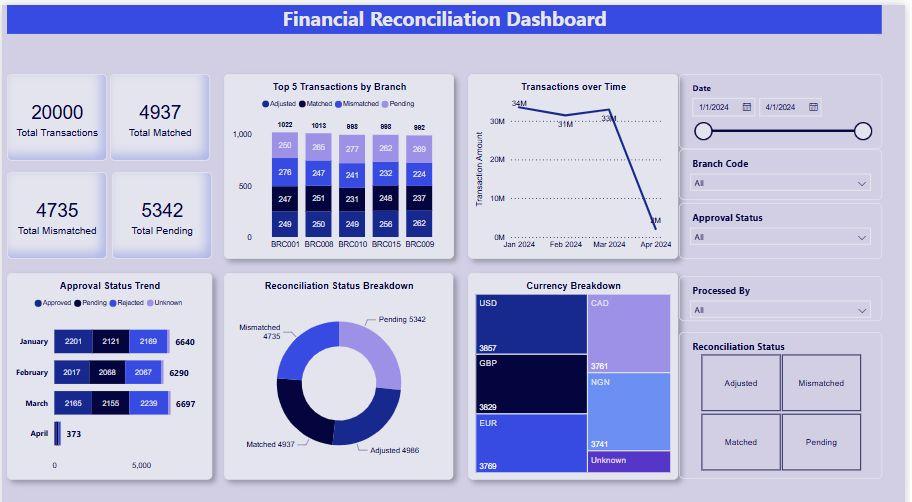
Reconcile Financial Amounts
For finance-related data, compare:
- Gross amount.
- Net amount.
- Tax.
- Discount.
- Refund.
- Payment.
- Outstanding balance.
- Quantity.
- Currency.
Do this by reporting period and relevant entity.
Small differences can reveal:
- Rounding.
- Currency conversion.
- Timezone boundaries.
- Excluded statuses.
- Duplicate transactions.
- Incorrect joins.
Do Not Reconcile Floating-Point Values Naively
Financial reconciliation needs agreed tolerances.
For example:
- Exact match for integer counts.
- Currency match within one cent per transaction.
- Aggregate tolerance only where rounding rules justify it.
Do not accept an unexplained 0.5% difference merely because the percentage sounds small.
For a large revenue base, that can be material.
Test Inserts, Updates and Deletes
Incremental pipelines are often validated with new records but not lifecycle changes.
Create test cases for:
- New row inserted.
- Existing row updated.
- Row deleted.
- Status changed.
- Record restored.
- Key attribute corrected.
Confirm the warehouse reflects each scenario according to the business rule.
Deletes Need an Explicit Policy
A source delete can mean different things.
- Hard delete from warehouse.
- Soft-delete flag.
- Retain history.
- Exclude from active reporting.
- Anonymize.
The correct behavior depends on business and compliance requirements.
Document it.
Then reconcile deleted records specifically.
Late-Arriving Data Must Be Tested
Suppose an invoice dated September 30 enters the source on October 3.
Which reporting period should show it?
The warehouse may use:
- Transaction date.
- Posting date.
- Load date.
- Close date.
A late-arriving record can alter prior-period reporting.
Test these cases before go-live.
Backdated Updates Matter Too
A record may already exist but receive a historical correction.
Examples:
- Customer region corrected.
- Invoice amount adjusted.
- Membership effective date changed.
- Opportunity close date moved.
Confirm the incremental pipeline revisits the required historical window.
A pipeline that processes only newly created rows may miss legitimate updates.
Validate Time Zones
Time-zone errors are common and hard to notice.
Compare:
- Source timestamp timezone.
- Warehouse storage timezone.
- Business reporting timezone.
- Daylight-saving behavior.
- Date derivation.
A transaction at 11:30 PM in New York may fall on a different UTC date.
If the dashboard groups by the wrong date, daily totals will disagree.
Validate Null Handling
Source nulls can become:
- Empty strings.
- Zeros.
- Unknown dimension members.
- Default dates.
- Dropped rows.
Each transformation needs a rule.
Compare null rates for critical fields.
Unexpected changes in null percentage are a useful reconciliation signal.
Validate Enumerations and Status Mapping
Source systems often contain coded values.
Examples:
- A = Active.
- I = Inactive.
- 3 = Approved.
- 4 = Cancelled.
Warehouse transformations may map these to business-friendly categories.
Create a mapping table and reconcile counts before and after mapping.
Every source value should be:
- Mapped.
- Explicitly excluded.
- Or flagged as unknown.
Never silently drop an unfamiliar status.
Reconcile Dimensions
Facts can match while dimensions are wrong.
Test:
- Customer name.
- Region.
- Sales owner.
- Product category.
- Chapter.
- Department.
- Account hierarchy.
- Membership type.
A join to the wrong dimension version can change dashboard segmentation without changing total revenue.
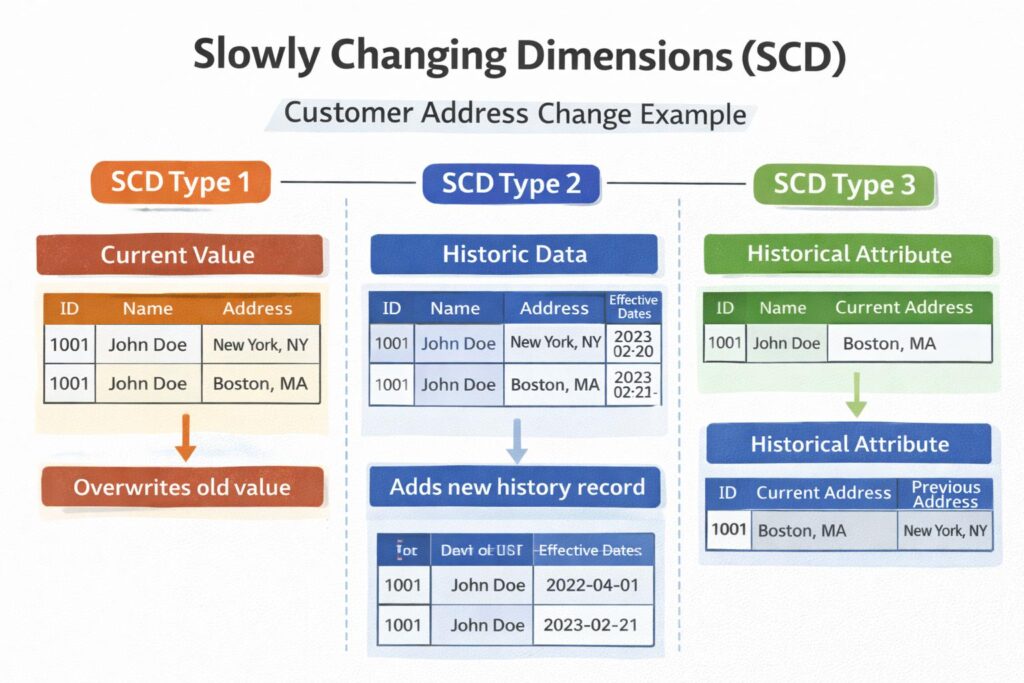
Validate Slowly Changing Dimensions
Historical reporting requires special attention.
Suppose a customer moves from East to West in October.
Should a September sale remain attributed to East?
If yes, the warehouse needs historical dimension behavior.
Test records before and after the change.
Reconcile historical reports against known source snapshots where available.
Validate Join Cardinality
A one-to-many join can multiply facts.
For example:
One invoice joins to two customer-affiliation rows.
Revenue doubles.
Counts may also inflate.
For every major join, test:
- Expected relationship.
- Rows before join.
- Rows after join.
- Distinct fact keys.
- Duplicate fact keys.
- Unexpected fanout.
Join validation should be part of transformation tests.
Check Orphaned Foreign Keys
Find facts that do not match dimensions.
Examples:
- Order with unknown customer.
- Invoice with unknown product.
- Membership with missing chapter.
Decide whether to:
- Reject.
- Use an Unknown member.
- Quarantine.
- Repair upstream.
Never let orphan behavior be accidental.
Reconcile Derived Metrics
Some KPIs do not exist directly in source systems.
Examples:
- Active customer.
- Churn.
- Conversion rate.
- Average order value.
- Qualified pipeline.
- Engagement rate.
For these, reconcile the components.
Document the formula.
Create sample records with expected results.
Have the business owner approve the definition.
A derived metric needs semantic validation, not just data movement testing.
Use Source-System Reports as Evidence Carefully
Existing source reports are useful baselines, but they may contain their own filters and quirks.
Document:
- Report name.
- Filters.
- Timezone.
- Date field.
- Status exclusions.
- Run date.
- Export method.
A Salesforce dashboard and a raw Salesforce object count may legitimately differ.
Reconcile like with like.
Create a Reconciliation Matrix
For each critical dataset, document:
- Measure.
- Source query/report.
- Warehouse query.
- Expected result.
- Actual source.
- Actual warehouse.
- Difference.
- Tolerance.
- Status.
- Owner.
- Comment.
This becomes the acceptance record.
Automate Repeatable Checks
Manual reconciliation is useful during discovery.
Production assurance should automate stable controls.
Examples:
- Daily row-count comparison.
- Revenue totals by date.
- Distinct key counts.
- Duplicate detection.
- Null-rate checks.
- Freshness.
- Source-to-target control totals.
- Alert when thresholds are breached.
Do not make a person re-run fifty spreadsheets every morning.
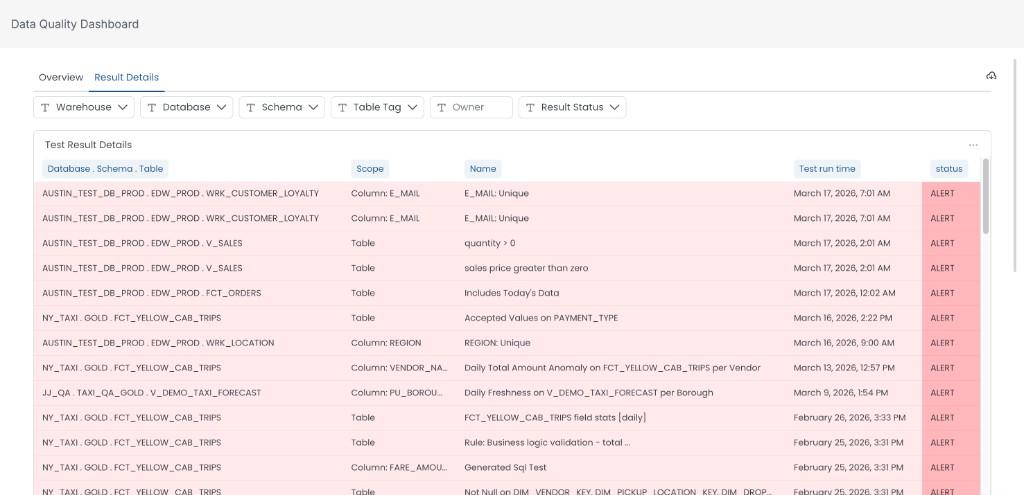
Use Exception Tables
Store mismatches.
Useful fields include:
- Business key.
- Source value.
- Warehouse value.
- Difference type.
- First detected.
- Last checked.
- Status.
- Owner.
- Resolution.
This creates an auditable workflow.
It also helps distinguish new defects from known exceptions.
Classify Differences
A practical classification is:
1. Pipeline defect
Warehouse is wrong.
2. Source issue
Source itself contains bad or inconsistent data.
3. Timing difference
Systems were compared at different freshness points.
4. Business-rule difference
Warehouse intentionally applies a transformation or exclusion.
5. Known source limitation
Source cannot reproduce the requested historical state.
6. Accepted exception
Difference is understood and approved.
Every material mismatch should have a category.
Define Materiality
Not every difference deserves the same escalation.
Agree thresholds with business owners.
For example:
- Financial totals: exact or tightly controlled tolerance.
- Executive KPI: zero unexplained material variance.
- Non-critical descriptive field: defined exception threshold.
Do not let engineering define materiality alone.
Finance and business owners should participate.
Freeze a Validation Window
During final reconciliation, uncontrolled source changes can make comparison difficult.
Where possible:
- Use a fixed timestamp.
- Snapshot source extracts.
- Record query execution times.
- Use transaction cutoffs.
- Compare both systems to the same business window.
Otherwise, differences may simply reflect new transactions arriving between queries.
Parallel Run Before Cutover
Run the old and new reporting processes together for an agreed period.
Compare:
- Daily totals.
- Weekly totals.
- Month-to-date.
- Historical periods.
- Known edge cases.
This gives business users time to identify semantic differences.
A one-day parallel run is rarely enough for complex reporting.
Test Month-End and Other Boundaries
Many defects appear only at boundaries.
Test:
- Month-end.
- Quarter-end.
- Year-end.
- Fiscal period.
- Daylight-saving changes.
- Leap day where relevant.
- Membership renewal.
- Contract renewal.
- Inventory close.
Reporting systems are often most important precisely when edge conditions occur.
Reconcile Historical Loads Separately
Historical migration and ongoing incremental processing are different risk areas.
For history, test:
- Coverage dates.
- Record counts by period.
- Archived statuses.
- Historical dimensions.
- Deleted entities.
- Legacy identifiers.
- Currency.
- Known gaps.
Then separately validate new incremental changes.
Create Business Sign-Off
Engineering should not be the only team declaring success.
For each critical domain, identify a business owner.
Provide:
- Reconciliation results.
- Open exceptions.
- Materiality.
- Known limitations.
- Sample dashboards.
Then obtain explicit acceptance.
This protects both the business and the delivery team.
Do Not Hide Known Differences
A dashboard note is better than a silent discrepancy.
If a source changed historical logic or does not expose deleted records, document it.
If the warehouse intentionally excludes test accounts, state it.
Trust increases when differences are explained.
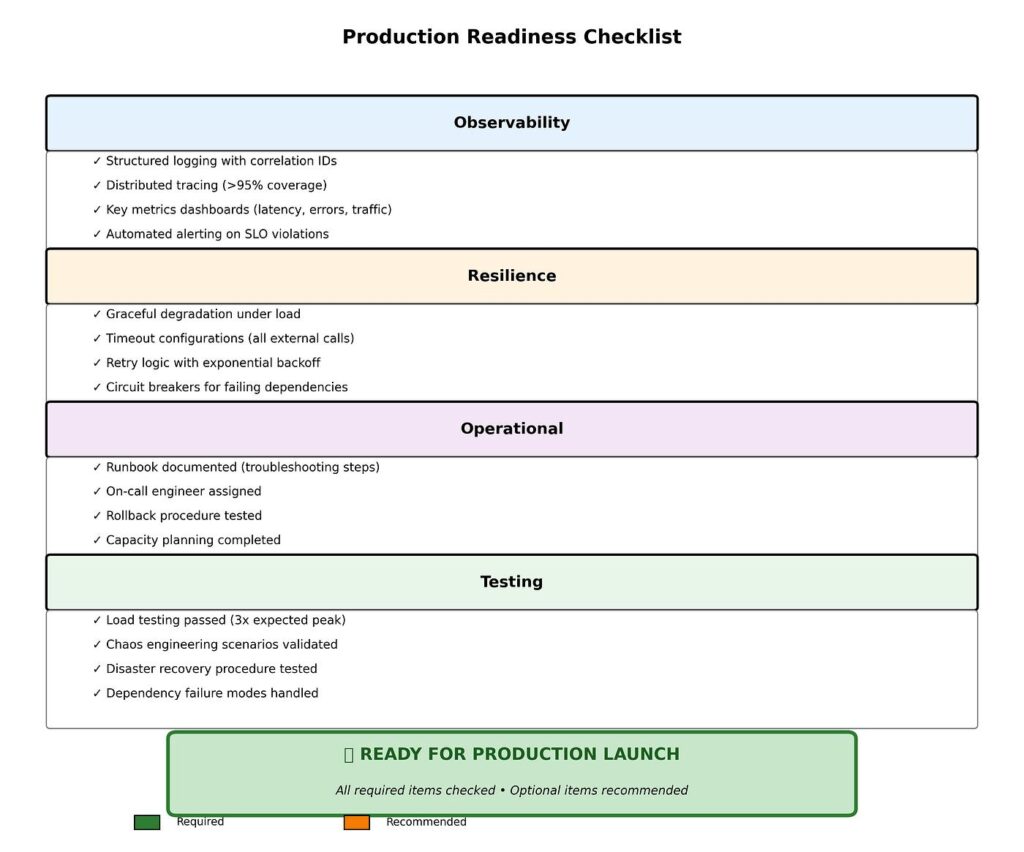
Go-Live Criteria
A warehouse should not go live because “pipelines are green.”
Define acceptance criteria such as:
- All critical source tables loaded.
- No unexplained material financial differences.
- Critical record counts reconciled.
- Deletes tested.
- Updates tested.
- Late-arriving data tested.
- Historical dimensions validated.
- Security tested.
- Freshness SLA met.
- Known exceptions documented.
- Business owners signed off.
- Rollback or correction procedure documented.
A Practical Reconciliation Sequence
- Freeze the comparison window.
- Confirm source-system definitions.
- Compare total and partitioned row counts.
- Compare distinct business keys.
- Compare financial control totals.
- Test inserts, updates and deletes.
- Validate late and backdated changes.
- Validate dimensions and joins.
- Reconcile derived metrics.
- Review exceptions.
- Run old and new reporting in parallel.
- Obtain business sign-off.
- Automate production controls.
Frequently Asked Questions
What is data warehouse reconciliation?
It is the process of comparing warehouse data and metrics with authoritative source systems to prove completeness, accuracy and expected transformation behavior.
Are matching row counts enough?
No. Counts can match while duplicates, missing records, incorrect amounts or wrong dimensions remain. Reconcile keys, totals, lifecycle changes and business metrics.
How much variance is acceptable?
It depends on the measure. Financial data often requires exact or tightly defined tolerances. Any accepted variance should be documented and approved by the appropriate business owner.
How do you reconcile derived KPIs?
Document the formula, validate source components, test sample records and obtain business approval for the semantic definition.
Should reconciliation continue after go-live?
Yes. Automate critical controls for freshness, counts, financial totals, duplicates and other high-risk measures.
How long should a parallel run last?
It depends on reporting cycles and risk. The period should cover important business boundaries and enough normal activity to expose semantic or incremental-processing issues.
Who signs off on reconciliation?
Technical teams validate pipeline behavior, but business owners should approve material business metrics and known exceptions.
Conclusion
Data warehouse reconciliation is the bridge between technically successful pipelines and trusted reporting.
Validate counts, but do not stop there.
Reconcile business keys, financial amounts, deletes, updates, dates, dimensions, historical behavior and derived metrics.
Document every material exception.
Run old and new reporting in parallel.
Then obtain business sign-off.
A warehouse is ready when the organization can explain why its numbers are correct, not merely when every job finishes successfully.
If you are preparing a Snowflake, BigQuery or Redshift warehouse for production, Actiknow can help design the reconciliation framework, automate control checks and validate the BI layer before cutover. Discuss your data warehouse validation requirements with Actiknow.