

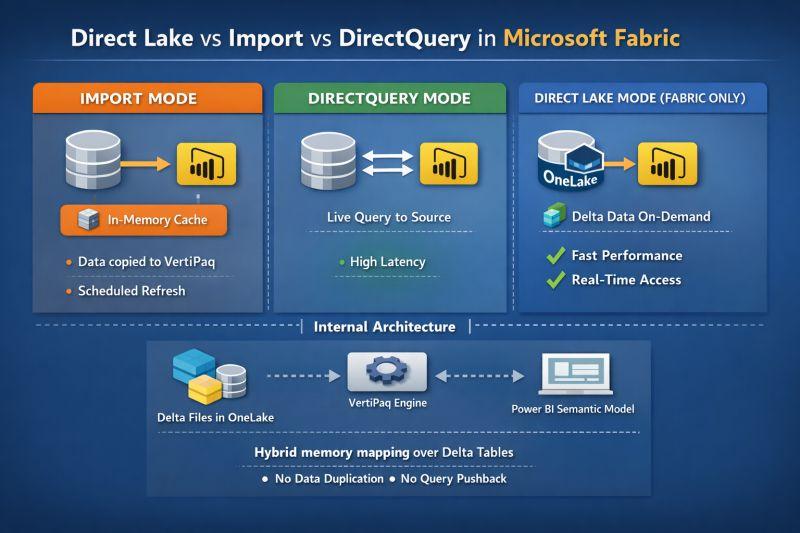
Direct Lake, Import and DirectQuery solve different Power BI architecture problems.
The mistake is choosing one because it sounds newest or most “real time.”
Microsoft’s current guidance still recommends Import as the default for many Power BI scenarios. Direct Lake is designed for large Fabric lakehouse and warehouse workloads where data already lives in OneLake-backed Delta tables. DirectQuery remains useful when data must stay in an external source or when federation and source-side behavior are more important than in-memory performance.
The right decision depends on where the data lives, how fresh it must be, how much data must be queried, what latency users will tolerate and which platform should absorb the compute.
Actiknow’s business intelligence and data engineering work often spans the warehouse, semantic model and reporting layer. Storage mode should therefore be chosen as an architecture decision, not a report setting.
The Short Answer
Choose Import first when:
- Data fits comfortably within the model architecture.
- Scheduled or incremental refresh meets freshness needs.
- Fast interactive performance is important.
- You need broad modeling and transformation flexibility.
Consider Direct Lake when:
- Your analytical data is already in supported Microsoft Fabric/OneLake Delta tables.
- Data volume makes repeated full import impractical.
- You need lower data latency without conventional import refresh cycles.
- Fabric capacity and upstream data engineering are already part of the architecture.
Consider DirectQuery when:
- Data must remain in the source.
- The source changes too quickly for practical import.
- Federation across external systems matters.
- Source-side security or query behavior is required.
- You accept that report performance depends heavily on source and network performance.
Hybrid and composite patterns can also be appropriate. This is not always a three-way winner-takes-all decision.
How Import Mode Works
Import copies selected data into the Power BI semantic model.
Queries are then answered by the in-memory VertiPaq engine rather than repeatedly querying the operational source.
That usually provides excellent interactive performance.
The tradeoff is freshness.
Changes in the source become visible after refresh.
Refresh can be:
- Scheduled.
- On demand.
- Incremental.
- Partition-based.
- Combined with real-time/hybrid patterns in appropriate architectures.
Import remains attractive because it decouples dashboard performance from the source system.
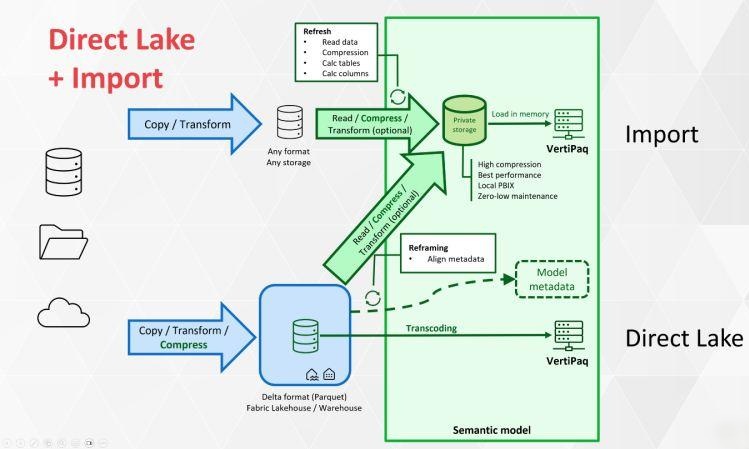
Why Import Is Still the Default Starting Point
Microsoft’s DirectQuery guidance explicitly recommends using Import by default and moving beyond it when constraints such as latency, scale, governance, security or architecture require another mode.
That is a useful design principle.
Do not create a more complex architecture until a real requirement justifies it.
Import works particularly well when:
- The model is manageable.
- Refresh windows are acceptable.
- Users expect fast slicing and filtering.
- The source should not receive interactive BI query load.
- The BI team needs Power Query/modeling flexibility.
Where Import Becomes Difficult
Import can become challenging when:
- The model is extremely large.
- Refresh takes too long.
- Refresh consumes excessive source/capacity resources.
- Data changes faster than the refresh SLA.
- Duplicating the data creates undesirable operational overhead.
Incremental refresh can solve some of these problems.
Do not assume that a large table automatically requires DirectQuery.
How DirectQuery Works
DirectQuery keeps data in the underlying source.
When users interact with a visual, Power BI generates queries that are sent to the source.
That gives DirectQuery an important property:
Freshness is tied closely to the source rather than to a separate imported copy.
But every interaction now depends on more of the stack.
- Report.
- Semantic model.
- Generated query.
- Network.
- Gateway where applicable.
- Source database.
- Concurrency.
- Indexes/partitioning.
- Source workload.
A slow source can become a slow dashboard.
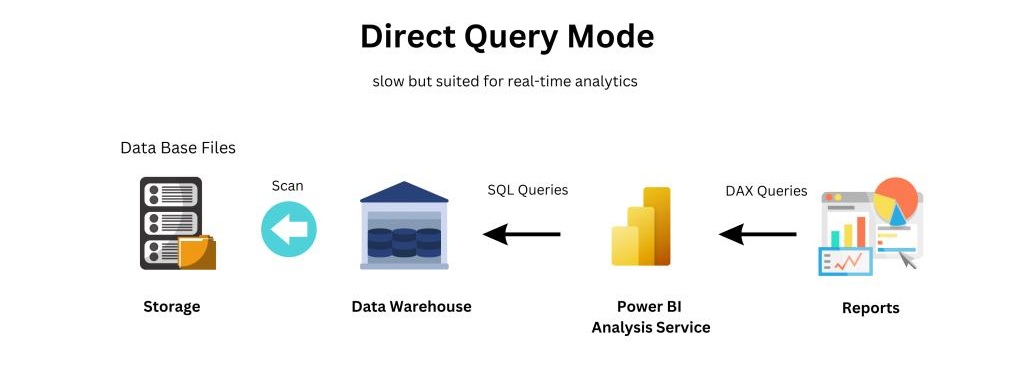
DirectQuery Is an End-to-End Performance Decision
When evaluating DirectQuery, test:
- Visual query count.
- DAX complexity.
- Generated SQL.
- Source execution time.
- Network latency.
- Concurrent users.
- Source workload management.
- Peak-hour behavior.
A dashboard that performs well for one developer may behave very differently for hundreds of users.
Do not benchmark only the semantic model.
When DirectQuery Makes Sense
Common reasons include:
- Data cannot be imported for policy or architectural reasons.
- Users need very recent source changes.
- The source is engineered for analytical concurrency.
- The data is too large or impractical to replicate.
- Multiple external sources need federation.
- Dynamic source-side behavior is required.
Even then, evaluate alternatives such as incremental refresh, hybrid tables, aggregations or Direct Lake if Fabric is available.
How Direct Lake Works
Direct Lake is a Fabric semantic-model storage mode for supported data stored as Delta tables in OneLake.
Microsoft describes Direct Lake as loading required columns into memory from OneLake-backed Delta data rather than creating a separate full Import copy.
Queries are processed by the VertiPaq engine, similar to Import, while avoiding the conventional process of copying the entire dataset into the semantic model during refresh.
That is why Direct Lake can combine low-latency access with strong interactive performance.
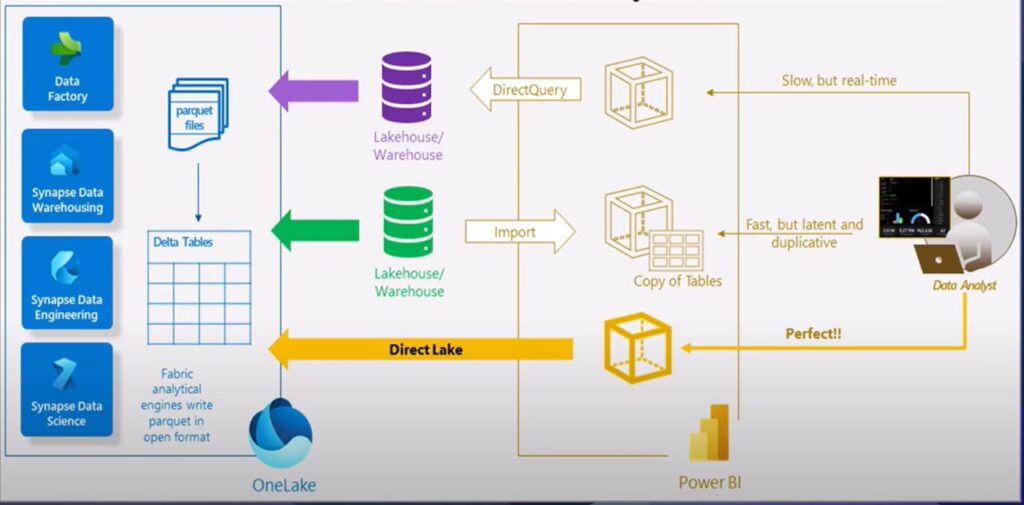
Direct Lake Is Not “DirectQuery but Faster”
Architecturally, it is different.
DirectQuery sends queries to the underlying source.
Direct Lake reads OneLake Delta data and loads required columns for VertiPaq processing.
That distinction affects:
- Performance.
- Capacity.
- Refresh semantics.
- Security.
- Supported sources.
- Data preparation.
- Operational ownership.
Do not treat Direct Lake as a drop-in DirectQuery setting.
Direct Lake Changes Where Data Preparation Happens
With Import, Power Query can perform significant preparation as part of semantic-model refresh.
Direct Lake expects more data preparation upstream in Fabric.
Microsoft explicitly points to Fabric tools such as:
- Spark.
- T-SQL.
- Dataflows.
- Pipelines.
This encourages a reusable analytical layer in the lakehouse or warehouse.
That can be an architectural advantage.
It also means a self-service analyst without write access to the upstream Fabric data product may prefer Import for some tables.
Understand Direct Lake Framing
A Direct Lake refresh is not equivalent to an Import refresh.
Microsoft calls the metadata synchronization process framing.
Instead of recopying the entire dataset into the semantic model, framing updates the model’s references to the latest Delta-table state.
This can make freshness operations much lighter.
It does not mean there is zero work or zero capacity consideration.
Model behavior still depends on table design, capacity and query patterns.
Direct Lake on OneLake vs Direct Lake on SQL
Current Microsoft documentation distinguishes two Direct Lake approaches.
Direct Lake on OneLake connects to supported Fabric data backed by Delta tables and does not use DirectQuery fallback.
Direct Lake on SQL analytics endpoints can fall back to DirectQuery in some situations, such as when SQL views or certain SQL-based security behavior are involved.
This distinction matters.
An architecture review should identify which Direct Lake mode is actually being used rather than saying only “we use Direct Lake.”
Why DirectQuery Fallback Matters
If a Direct Lake on SQL query falls back to DirectQuery, its performance characteristics change.
The query is now being executed through the SQL analytics endpoint rather than served through the normal Direct Lake path.
Microsoft recommends monitoring query processing because fallback can reduce performance.
If your POC appears fast, verify that representative production queries remain in the intended mode.
Do not benchmark only simple visuals.
Capacity Matters for Direct Lake
Direct Lake requires Fabric capacity.
Evaluate:
- Expected data volume.
- Columns accessed.
- Concurrent users.
- Model count.
- Peak query patterns.
- Capacity guardrails.
- Other Fabric workloads sharing capacity.
A storage mode cannot compensate for undersized capacity.
Test with realistic concurrency and representative data.
Freshness: Import vs Direct Lake vs DirectQuery
Import:
Freshness depends on refresh strategy.
Direct Lake:
Can expose changes with low latency through automatic updates or reframing, depending on configuration.
DirectQuery:
Queries the source at interaction time, so it can reflect current source data.
But “freshest” is not automatically “best.”
Executive reporting may prefer a controlled, reconciled snapshot over continuously changing numbers.
Define the business freshness SLA first.
Performance: Import vs Direct Lake vs DirectQuery
Import generally offers excellent interactive performance because data is in VertiPaq.
Direct Lake also uses VertiPaq processing and is designed for high-performance interaction with large Fabric data.
DirectQuery performance depends more directly on source execution and network behavior.
That does not mean DirectQuery is always slow.
A well-designed analytical source can perform very well.
But the performance dependency is different.
Source Load
Import creates load during refresh.
DirectQuery creates load as users interact.
Direct Lake shifts the architecture toward OneLake/Fabric capacity and avoids conventional full-model import refresh.
Ask where you want compute to occur.
This is often more useful than asking which mode is “fastest.”
Transformation Flexibility
Import can be attractive for self-service because analysts can use Power Query as part of the semantic model workflow.
Direct Lake encourages upstream transformation and reusable curated tables.
DirectQuery transformation choices are constrained by the need to preserve query folding and source performance.
For enterprise analytics, upstream transformation is often desirable.
For agile departmental analysis, Import may be simpler.
Security Considerations
All three modes can participate in Power BI semantic-model security, but architecture details differ.
Review:
- Semantic-model RLS.
- Object-level security.
- Source security.
- Identity propagation.
- Fixed identity versus SSO.
- Direct Lake mode.
- DirectQuery fallback.
- Workspace permissions.
Do not assume that switching storage mode preserves every security behavior automatically.
Test each user persona.
Large Data Does Not Automatically Mean DirectQuery
This is a common architecture mistake.
Before choosing DirectQuery only because a table is large, evaluate:
- Column reduction.
- Aggregation.
- Incremental refresh.
- Partitioning.
- Hybrid tables.
- Direct Lake.
- Upstream summarization.
The real question is how much data each user query needs and how frequently the model must change.
When Direct Lake Is a Strong Fit
Direct Lake is compelling when:
- Fabric is already the analytical platform.
- Curated Delta tables exist in OneLake.
- Data volume is large.
- Import refresh overhead is material.
- Low data latency matters.
- The organization can manage Fabric capacity.
- Transformation logic belongs upstream.
It is especially natural for a governed medallion/lakehouse architecture where Power BI consumes a curated gold layer.
When Import Is a Strong Fit
Import remains strong when:
- The model fits.
- Refresh SLA is acceptable.
- Users need fast interactive reports.
- Source systems should be protected from query load.
- Analysts need flexible semantic-model preparation.
- The organization does not need Fabric-specific architecture.
Do not migrate a healthy Import model solely to use a newer storage mode.
When DirectQuery Is a Strong Fit
DirectQuery is appropriate when:
- The source must remain authoritative at query time.
- Data cannot be copied.
- Very current source values are required.
- The source is designed for analytical queries.
- Federated access is important.
- Source-side behavior is part of the requirement.
Model and report design need to account for its performance characteristics.
Consider Hybrid Tables
Some workloads have two different freshness requirements.
Historical data changes rarely.
Recent data changes frequently.
A hybrid approach can keep historical partitions imported while querying the recent partition more directly.
This can reduce the need to choose pure DirectQuery for an entire large fact table.
Consider Composite Models
Power BI supports architectures that combine storage modes.
Current Fabric capabilities also allow Direct Lake on OneLake models to be extended with Import tables in supported modeling experiences.
This is useful when:
- Core enterprise data is in OneLake.
- A small reference dataset comes from another source.
- An analyst needs local enrichment.
- Different tables have different storage requirements.
But every additional mode increases operational complexity.
Use composite architecture for a requirement, not because it is available.
Decision Question 1: Where Does the Data Live?
External SaaS/database:
Import or DirectQuery may be natural.
Fabric lakehouse/warehouse with Delta tables:
Direct Lake becomes a strong candidate.
Multiple sources:
Consider whether ingestion into a governed warehouse is preferable to federation.
Storage mode should follow the broader data architecture.
Decision Question 2: What Is the Real Freshness SLA?
Ask the business:
- Seconds?
- Minutes?
- Hourly?
- Daily?
Then ask whether the metric itself is valid at that frequency.
There is little value in second-level dashboard freshness if upstream finance data reconciles nightly.
Avoid paying architectural complexity for freshness nobody uses.
Decision Question 3: What Is the Query Concurrency?
A report used by five analysts differs from one embedded for thousands of customers.
Test:
- Peak users.
- Visuals per page.
- Queries per interaction.
- Source/capacity concurrency.
- Caching behavior.
Architecture decisions should be based on production load.
Decision Question 4: Who Owns Data Preparation?
If central data engineering owns a curated Fabric gold layer, Direct Lake can fit naturally.
If analysts need to combine and transform many independent sources themselves, Import may offer more agility.
If source systems must execute the logic, DirectQuery may be required.
Ownership matters as much as technology.
Decision Question 5: What Happens During Failure?
For each mode, document:
- If refresh fails.
- If Fabric capacity is constrained.
- If the source is unavailable.
- If a gateway fails.
- If a Direct Lake query falls back or cannot execute.
- If schema changes upstream.
- If permissions change.
Architecture quality is visible during failure, not only during demos.
Build a Proof of Concept
Microsoft recommends prototyping Direct Lake for relevant workloads.
Use production-like:
- Data volume.
- Model complexity.
- Security.
- Concurrency.
- DAX.
- Report pages.
Compare:
- P50/P95 visual render time.
- Capacity consumption.
- Source load.
- Freshness.
- Refresh/reframing operations.
- Failure behavior.
- Operational effort.
Do not compare architectures using one card visual.

A Practical Decision Matrix
Choose Import when the priority is:
Maximum interactive performance with a manageable cached model and acceptable refresh latency.
Choose Direct Lake when the priority is:
Large Fabric-resident analytical data with low-latency access and reduced conventional import-refresh overhead.
Choose DirectQuery when the priority is:
Keeping data in the source and querying it at interaction time despite greater dependency on source performance.
Choose a hybrid/composite design when:
Different tables or time ranges have genuinely different requirements.
Migration Advice
If you already have Import:
Measure the actual pain before redesigning.
If refresh duration and freshness are acceptable, keep it.
If you already have DirectQuery:
Profile source queries and report performance.
Determine whether Direct Lake, hybrid tables, aggregations or selective Import can reduce source dependency.
If you are adopting Fabric:
Design the curated OneLake layer first.
Then test Direct Lake against representative workloads rather than assuming it should replace every existing semantic model.
Frequently Asked Questions
Is Direct Lake faster than DirectQuery?
Often it can provide stronger interactive performance because Direct Lake normally uses VertiPaq processing rather than executing every report interaction against the underlying source. Actual performance depends on model, capacity, data and query design.
Does Direct Lake replace Import?
No. Microsoft continues to identify Import as appropriate for many scenarios, particularly self-service and workloads where refresh and model size are manageable.
Does Direct Lake require Microsoft Fabric?
Yes. Direct Lake is a Microsoft Fabric semantic-model storage mode and requires Fabric capacity.
Does Direct Lake need scheduled refresh?
Its refresh semantics differ from Import. Direct Lake uses framing to update metadata references to current Delta-table state and can support automatic updates. Upstream data pipelines still need to produce the data.
Does Direct Lake always fall back to DirectQuery?
No. Current Microsoft documentation distinguishes Direct Lake on OneLake, which does not use DirectQuery fallback, from Direct Lake on SQL analytics endpoints, which can fall back in specific scenarios.
Is DirectQuery always real time?
It queries the source when visuals execute, but end-to-end freshness also depends on the source, caching and upstream data availability. Define the actual business SLA.
Should we move every Power BI model to Direct Lake after adopting Fabric?
No. Evaluate each model based on scale, freshness, transformation, capacity and operational requirements.
Sources and Further Reading
- Microsoft Learn: Direct Lake overview.
- Microsoft Learn: How Direct Lake works.
- Microsoft Learn: DirectQuery in Power BI.
Conclusion
Direct Lake, Import and DirectQuery are not maturity levels.
They are different execution architectures.
Import is often the simplest and fastest starting point.
Direct Lake is compelling when Fabric and OneLake are already the analytical foundation and the organization needs scale with lower refresh overhead.
DirectQuery remains valuable when data must stay in the source or source-time execution is a core requirement.
Start with business freshness, scale and performance requirements.
Then test the architecture with production-like data and concurrency.
If you are redesigning a Power BI or Microsoft Fabric reporting architecture, Actiknow can help evaluate the warehouse, semantic-model and dashboard layers together. Discuss your Power BI architecture with Actiknow.