
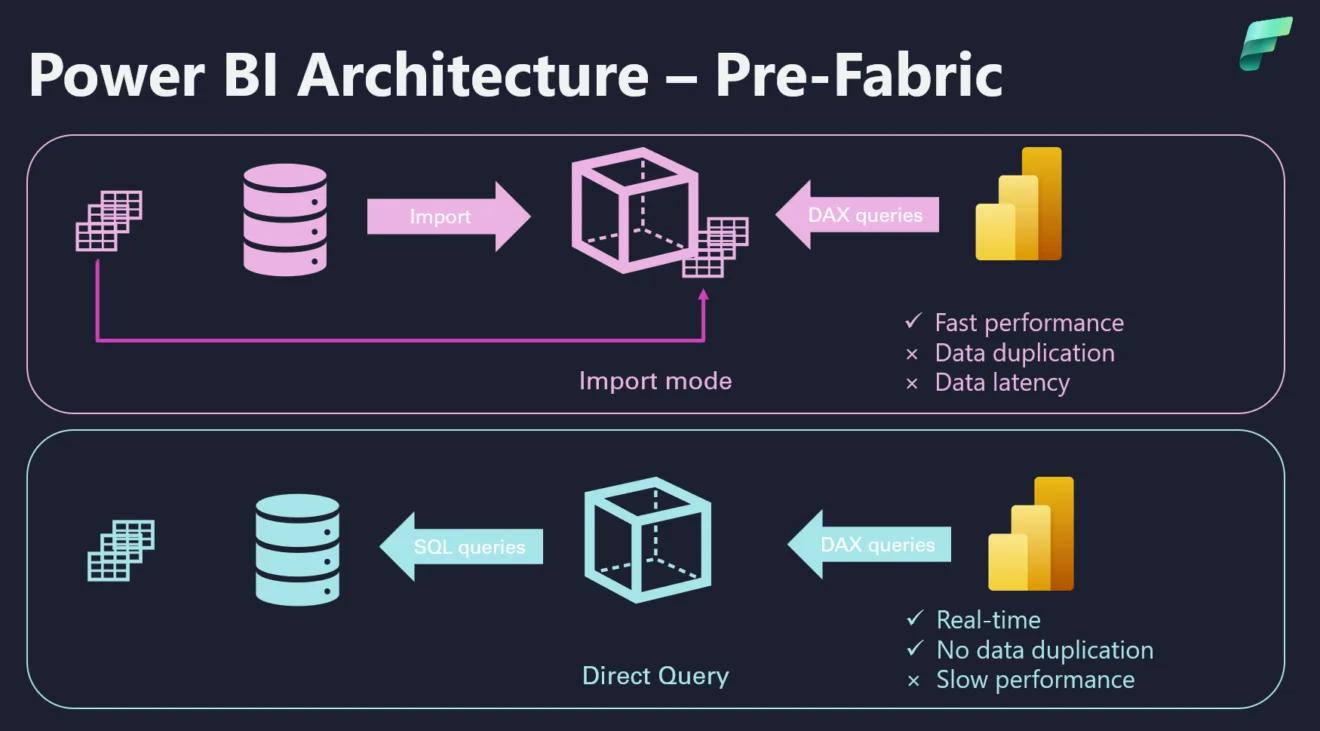
Power BI architecture discussions often reduce Import and DirectQuery to one question:
“How fresh does the data need to be?”
Freshness matters, but it is only one part of the decision.
DirectQuery changes where queries execute, which system absorbs user concurrency, how report performance behaves, how transformations are designed and who owns operational performance.
Import changes the refresh model, semantic-model size and how quickly source changes become visible.
Neither mode is automatically more enterprise-ready.
The right choice depends on the reporting workload.
What Power BI Import Does
With Import mode, Power BI loads data into the semantic model.
Report queries are then answered primarily from Power BI’s in-memory engine rather than repeatedly querying the operational source for every visual interaction.
This generally provides strong interactive performance and broad modeling flexibility.
The trade-off is freshness.
Source changes do not appear until the semantic model is refreshed.
What DirectQuery Does
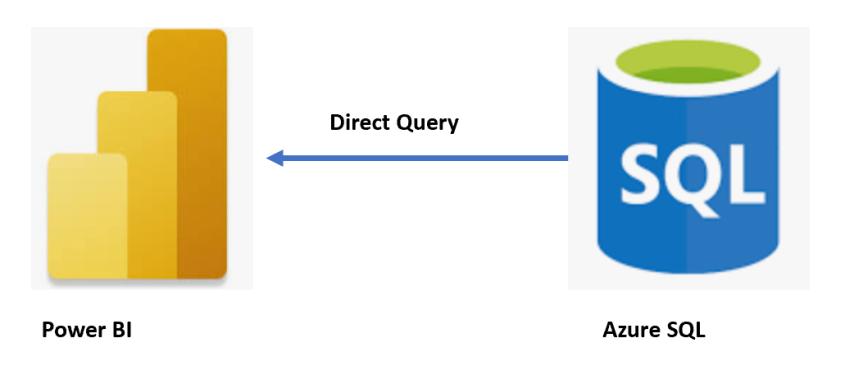
With DirectQuery, Power BI keeps the data in the source rather than importing it into the semantic model.
When users open a report or interact with visuals, Power BI sends queries to the underlying source.
Microsoft’s current guidance makes the architectural consequence clear: visual performance depends on source performance and network or gateway overhead, and user interactions can generate additional source queries.
That means DirectQuery is not simply “Import with fresher data.”
It moves part of the BI serving workload back to the source platform.
Actiknow’s Power BI services cover dashboard development, data integration and enterprise reporting. Storage-mode decisions should be made as part of the complete data architecture rather than selected only inside Power BI Desktop.
Start With the Business Freshness Requirement
Ask how old the data is allowed to be when a decision is made.
Examples:
- Executive financial reporting may tolerate daily refresh.
- Sales operations may need hourly data.
- A call-center supervisor may need changes within minutes.
- An operational control room may need near-real-time information.
Do not use DirectQuery because stakeholders say they want “live data.”
Convert that request into an explicit freshness target.
For example:
95% of dashboard data should be less than 30 minutes old during business hours.
That requirement can then be tested against Import refresh, incremental refresh, hybrid architecture and DirectQuery.
Import Is Usually the Performance Baseline
Microsoft’s current DirectQuery decision guidance recommends considering Import first when maximum interactivity and transformation flexibility are priorities.
That is an important default.
Import mode allows Power BI to answer many analytical queries from its optimized in-memory storage.
The source system does not receive a new analytical query for every slicer click.
For executive dashboards with many users, this separation can be valuable.
DirectQuery Performance Starts at the Source
A DirectQuery report cannot consistently outrun a slow source.
Microsoft recommends validating that common source queries return fast enough for interactive reporting and notes that report experience degrades as query time increases.
Before selecting DirectQuery, test the underlying database with realistic filters, joins and aggregations.
Evaluate:
- Query latency.
- Concurrency.
- Indexing or physical design.
- Warehouse sizing.
- Network latency.
- Gateway overhead.
- Security predicates.
- Peak workload.
A query that performs well for one developer may behave differently with hundreds of report users.
Concurrency Changes the Decision
Import largely shifts interactive analytical work into the Power BI capacity.
DirectQuery can create repeated workload on the source.
One report page may contain many visuals. Each visual can generate one or more queries. Filters and cross-highlighting can generate more.
Now multiply that by concurrent users.
Microsoft specifically warns that DirectQuery source load depends on report users and can increase further with row-level security.
If the source also serves operational applications, protect it from unpredictable BI demand.
DirectQuery Can Be Appropriate for Very Large Data
Full Import may not be practical when the semantic model would be too large or refresh windows are unacceptable.
DirectQuery can query large datasets in place.
But “the table is large” does not automatically mean every row must be DirectQuery.
Alternatives include:
- Filtering the imported scope.
- Aggregating data.
- Incremental refresh.
- Hybrid tables.
- Composite models.
- Direct Lake where Fabric architecture applies.
Choose the smallest amount of remote querying required to meet the business need.
Model Size Is Not the Same as Source Size
A multi-terabyte warehouse does not necessarily require a multi-terabyte Power BI semantic model.
Power BI models usually select a subset of columns, rows and aggregation levels.
Estimate the compressed semantic-model size using a representative model before ruling out Import.
Wide text columns and unnecessary high-cardinality fields can inflate model size without improving reporting.
Data modeling remains important regardless of storage mode.
Refresh Windows Matter for Import
Import models need a reliable refresh process.
Measure:
- Source extraction time.
- Transformation time.
- Model processing time.
- Gateway time where applicable.
- Refresh queueing.
- Failure recovery.
- Incremental-refresh behavior.
Total time from source change to report availability.
If a full refresh cannot meet the required freshness window, incremental refresh may solve the problem without moving the entire model to DirectQuery.
DirectQuery Is Not Automatically Real Time
DirectQuery retrieves data from the source when Power BI re-queries it, but users can still encounter caches and report behavior that means a visual does not continuously update itself.
Microsoft explicitly notes that DirectQuery visuals can show previous results until refreshed and that dashboard tiles have their own refresh behavior.
Define what “real time” means operationally.
If the requirement is an automatically updating control-room screen every few seconds, confirm that Power BI and the source architecture are appropriate for that workload rather than assuming DirectQuery alone solves it.
Transformation Flexibility Favors Import
DirectQuery transformations need to remain efficient at the source.
Query folding is particularly important.
Complex Power Query logic that cannot be translated into efficient source queries can cause poor performance or be unsupported.
Microsoft recommends keeping DirectQuery transformations simple and materializing complex transformations in the source where appropriate.
This often means a mature DirectQuery implementation requires stronger data-engineering ownership upstream.
DirectQuery Moves More Responsibility to the Data Platform
With Import, Power BI can absorb much of the analytical serving workload.
With DirectQuery, database architecture becomes part of report performance.
The team operating the source may need to manage:
- Indexes or clustering.
- Statistics.
- Materialized transformations.
- Compute sizing.
- Concurrency.
- Query monitoring.
- Workload isolation.
- Network.
- Gateway configuration.
- Cost.
A Power BI design decision therefore becomes a shared responsibility between BI and data-platform teams.
Security Requirements Can Influence Storage Mode
Some organizations need source-enforced security.
DirectQuery can support scenarios where user identity is passed through to the source when the connector and configuration support it.
Import instead stores data in the Power BI semantic model and commonly applies Power BI security such as row-level security there.
Neither is inherently more secure.
The decision depends on the organization’s data boundary, identity architecture and governance requirements.
DirectQuery also does not mean absolutely no data is ever cached anywhere. Microsoft notes that visual and tile caches can contain results.
Report Design Matters More in DirectQuery
A report page with twenty visuals is expensive even if it looks simple.
In DirectQuery, each interaction can trigger remote work.
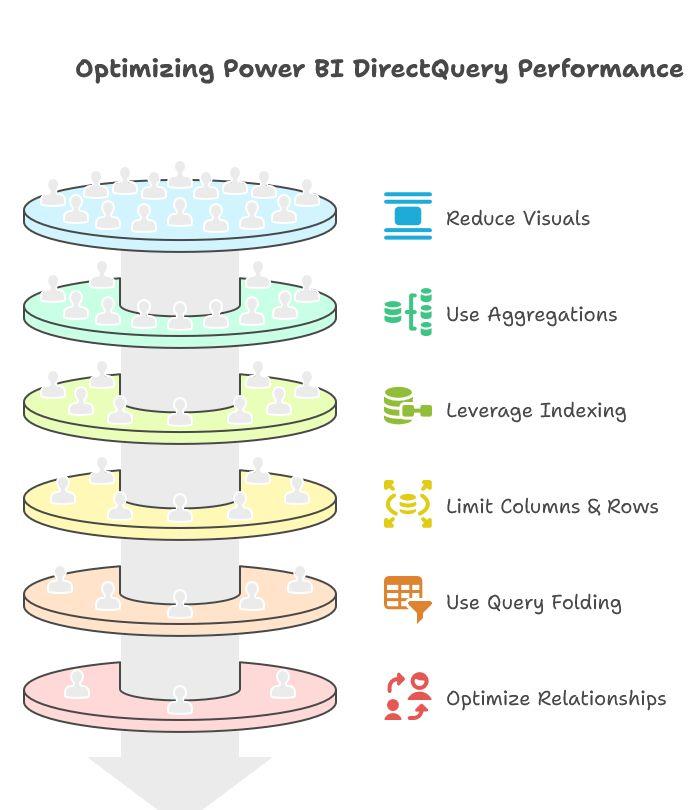
Microsoft recommends reducing unnecessary visuals and interactions for DirectQuery models.
Design techniques can include:
- Fewer visuals per page.
- Apply buttons for slicers.
- Early filters.
- Limited high-cardinality selections.
- Careful totals.
- Simpler relationships.
- Aggregation tables.
The report designer needs to understand query behavior, not only visual design.
Import Provides More Predictable User Experience
If an Import model fits within capacity and refresh requirements, report response is generally less dependent on the moment-to-moment health of the source system.
That can make performance easier to govern.
DirectQuery performance can vary with:
- Source workload.
- Warehouse state.
- Network.
- Gateway.
- Concurrent BI users.
- Query complexity.
- Security context.
This does not make DirectQuery unreliable. It means more components participate in every interaction.
Cost Can Shift Between Platforms
Architecture affects where compute cost occurs.
Import uses Power BI capacity for model processing and interactive queries, while also consuming source resources during refresh.
DirectQuery can generate ongoing source compute as users interact.
For cloud warehouses with consumption-based pricing, report design and concurrency can affect warehouse cost.
Model expected usage.
Consider:
- Users.
- Pages per session.
- Visuals per page.
- Interactions.
- Refresh frequency.
- Source compute pricing.
- Power BI capacity.
Do not evaluate only Power BI licensing.
Composite Models Can Avoid an All-or-Nothing Choice
A model can combine storage modes.
For example, frequently used dimensions can be cached while large fact data remains remote.
Microsoft also supports Dual storage mode in relevant composite-model scenarios.
Composite architecture can improve performance, but it adds modeling complexity.
Use it because a specific workload requires it, not simply because the feature exists.
Hybrid Tables Can Separate Hot and Historical Data
Microsoft recommends hybrid tables for scenarios where recent fact data needs near-real-time access while historical data can remain imported.
This pattern can provide a useful middle ground.
Recent data uses DirectQuery.
Historical partitions use Import.
That can reduce remote query volume while keeping current data fresher.

Incremental Refresh Can Change the Import Decision
Teams sometimes choose DirectQuery because full Import refresh takes too long.
Before doing that, evaluate incremental refresh.
If only a small percentage of historical data changes each day, refreshing recent partitions may dramatically reduce refresh time.
This can preserve Import performance while meeting a tighter freshness SLA.
Test the actual pipeline rather than assuming the entire model must reload.
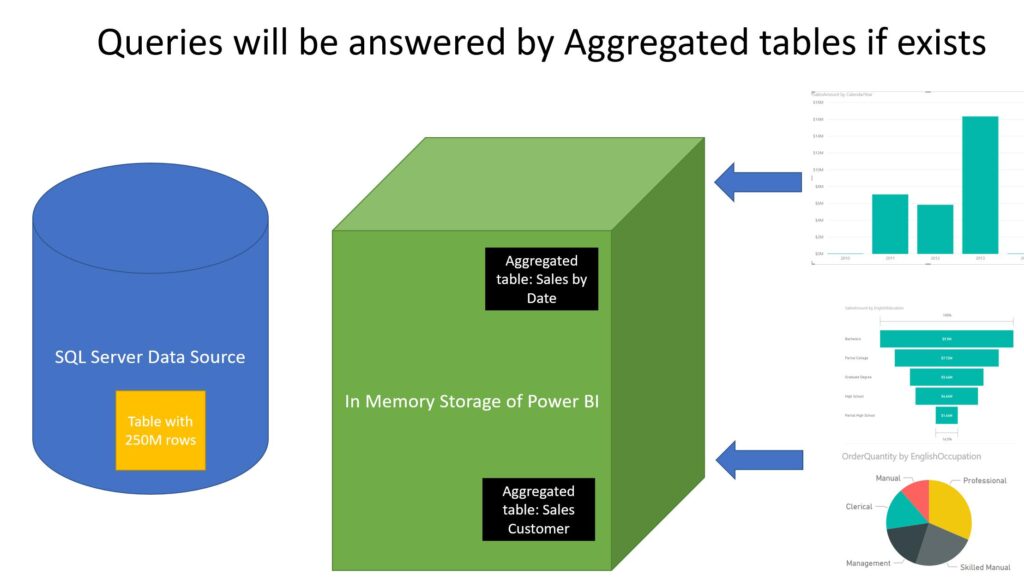
Use Aggregations for High-Volume DirectQuery
If detailed data must remain DirectQuery, aggregation tables can answer common summarized queries from cached data.
Microsoft identifies aggregations as a way to improve DirectQuery performance.
For example, executives may usually query revenue by month, region and product category.
Those queries can potentially hit an imported aggregation while detailed drillthrough reaches the remote source.
This architecture requires deliberate model design but can reduce latency and source load.
Operational Ownership Should Decide the Architecture Too
Ask who will own each failure mode.
If an Import refresh fails:
- Who is alerted?
- Who can rerun it?
- How stale can the dashboard become?
If DirectQuery becomes slow:
- Who diagnoses Power BI?
- Who diagnoses the gateway?
- Who diagnoses the source?
- Who can scale source compute?
- Who pays for the additional workload?
Architecture is easier to support when ownership is explicit.
A Practical Decision Framework
Choose Import first when:
- Interactive performance is a high priority.
- The required data fits the semantic-model strategy.
- Refresh can meet the freshness SLA.
- Rich transformations and modeling are important.
- You want to isolate report interactions from the source.
- User concurrency is high and source load should be controlled.
Consider DirectQuery when:
- Data must remain primarily in the source.
- Import size is impractical.
- Freshness requirements cannot be met by an appropriate Import strategy.
- Source-enforced security is important and supported.
- The source is engineered for interactive analytical concurrency.
- The organization can operate the additional source workload.
Consider a hybrid or composite approach when:
- Recent data needs different freshness from history.
- Common aggregates can be cached.
- Only part of the model is too large to import.
- Different tables have different storage requirements.
Questions to Ask Before Choosing
- What is the actual data freshness SLA?
- How large will the Power BI model be after selecting only required data?
- Can incremental refresh meet the SLA?
- How many concurrent users are expected?
- How many visuals and interactions will common report pages generate?
- Can the source handle that query concurrency?
- What is the source query latency?
- Is a gateway involved?
- Where should row-level security be enforced?
- What happens when the source is unavailable?
- What happens when an Import refresh fails?
- Which team owns performance troubleshooting?
- How does each architecture affect cloud compute cost?
- Can aggregations or hybrid tables solve the hardest requirement?
- How will the architecture be load tested before production?

Frequently Asked Questions
Is DirectQuery better than Import in Power BI?
Not generally. Import is often preferred for interactive performance and modeling flexibility when model size and refresh requirements permit it. DirectQuery is useful when data should remain in the source or Import is not practical.
Does DirectQuery show real-time data?
DirectQuery queries the source when Power BI issues queries, but report and dashboard caching behavior still matters. Define the required freshness and refresh behavior explicitly rather than treating DirectQuery as continuous real-time streaming.
Is DirectQuery slower than Import?
It often has higher and more variable latency because queries must reach the source. Actual performance depends on the source, network, gateway, model and report design.
When is Power BI Import too large?
There is no single business threshold independent of licensing and capacity. Estimate the compressed semantic-model size, required history, refresh duration and capacity constraints.
Can I combine Import and DirectQuery?
Yes. Power BI supports composite models and other architectures that combine storage approaches. Use them when different parts of the workload genuinely have different requirements.
Can incremental refresh replace DirectQuery?
Sometimes. If the reason for DirectQuery is that full refresh is too slow, incremental refresh can reduce the amount of data processed. It does not provide the same source-query behavior, so test it against the freshness requirement.
What is a hybrid table?
A hybrid table can combine imported historical partitions with a DirectQuery partition for recent data, supporting scenarios that need both historical performance and fresher recent records.
Does DirectQuery reduce Power BI capacity requirements?
It changes the workload rather than making resource requirements disappear. The source system, gateway, Power BI capacity and concurrency all need to be considered.
Conclusion
Power BI Import vs DirectQuery is an architecture decision, not a freshness toggle.
Import usually provides the simplest path to fast interactive analytics when data size and refresh requirements allow it.
DirectQuery is valuable when data must remain in the source, the dataset is impractical to import, or specific freshness and security requirements justify remote querying.
But DirectQuery also makes source performance, concurrency, gateway behavior and report design part of every user interaction.
Start with the business SLA. Measure model size. Test refresh. Test source latency and concurrency. Evaluate hybrid options. Assign operational ownership.
Then choose the storage architecture that produces a reliable reporting experience at the required freshness and cost.
If you are designing or reworking a Power BI architecture, Actiknow can help evaluate semantic-model design, data pipelines, source performance and refresh strategy before the reporting workload reaches production. Discuss your Power BI requirements with Actiknow.