
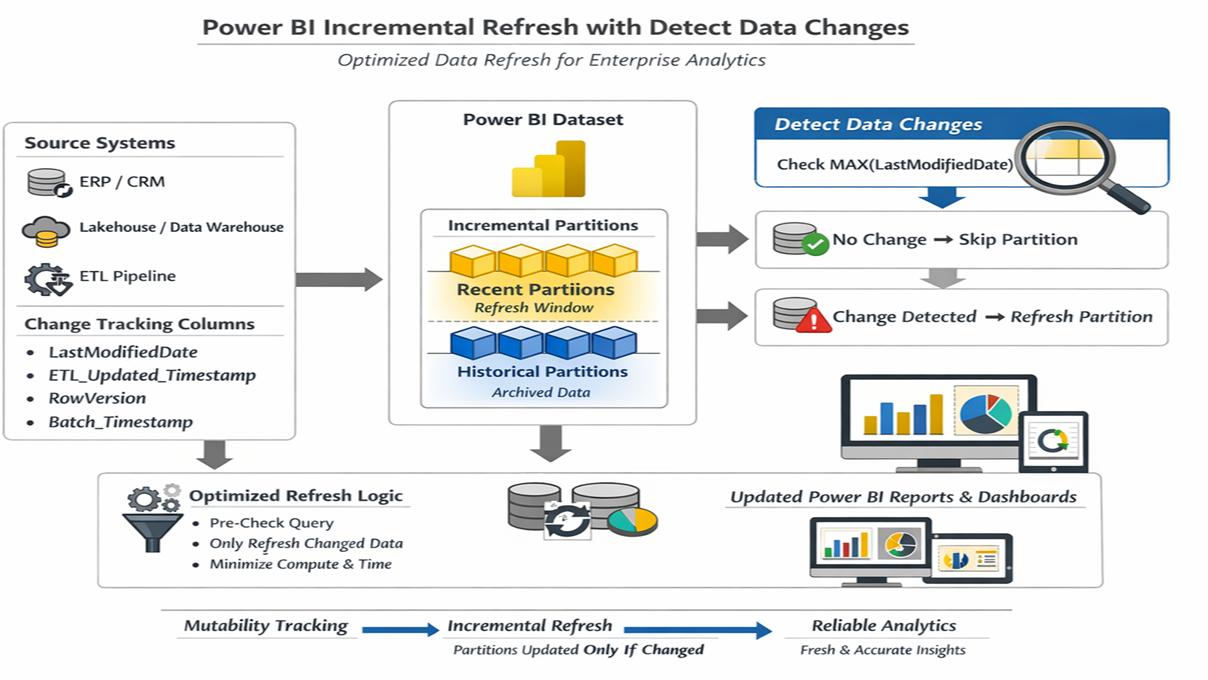
A Power BI model with five years of transaction history does not necessarily need to reload five years of data every morning.
That is the problem incremental refresh is designed to solve.
Instead of repeatedly processing the entire table, Power BI can partition time-based data and refresh only the recent portion that is expected to change.
When the source and model are designed appropriately, this can materially reduce refresh duration and source workload.
But incremental refresh is not a universal performance switch.
If filtering does not reach the source, historical records continue changing unpredictably, the table is small, or the real bottleneck is elsewhere, the improvement may be limited.
This guide explains when incremental refresh helps and what should be validated before using it.
What Power BI Incremental Refresh Does
Power BI incremental refresh uses a policy to divide eligible table data into partitions based on time.
You define two important windows:
- How much historical data to store.
- How much recent data to refresh.
For example, a model might retain five years of sales but refresh only the last ten days during routine refresh.
Older partitions remain in the model without being reprocessed every time.
Microsoft’s current guidance describes incremental refresh as a way to automate partition creation and management for tables that frequently load new or updated data.
Actiknow’s business intelligence services include Power BI semantic models, data engineering and automated pipelines. Incremental refresh works best when the Power BI policy and upstream data architecture are designed together.
The Business Case
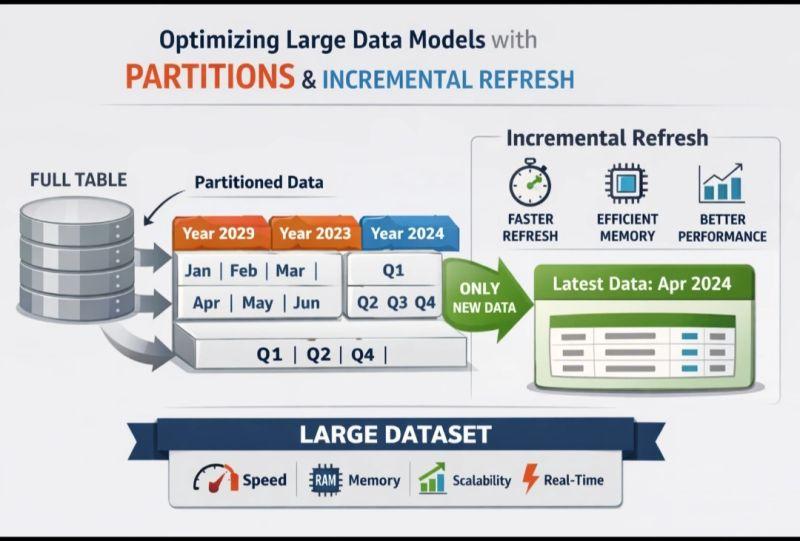
The benefit is easiest to see with append-heavy data.
Suppose a fact table contains 500 million historical rows.
Only the most recent 2 million rows are likely to be inserted or changed each day.
A full reload repeatedly reads and processes the other 498 million rows even though they are stable.
Incremental refresh can reduce that unnecessary work.
Potential benefits include:
- Shorter refresh windows.
- Lower source workload.
- Reduced network transfer.
- Less processing of unchanged history.
- Ability to retain more historical data.
- More predictable refresh operations.
The actual benefit depends on how efficiently the source can return only the required partitions.
RangeStart and RangeEnd
Power BI incremental refresh uses reserved parameters named RangeStart and RangeEnd.
These parameters are applied in Power Query to filter the table on a date or date-time column.
During service refresh, Power BI uses the policy to substitute time ranges for individual partitions.
The critical point is not merely creating the parameters.
The filter should be applied in a way that allows the source to efficiently return the requested time range.
Query Folding Is Critical
For many relational sources, the most important technical prerequisite is query folding.
Query folding means Power Query transformations are translated into a query that the source can execute.
If the RangeStart and RangeEnd filter folds to the source, the database can retrieve only the required date range.
If it does not, Power BI may need to retrieve far more data before filtering it.
That can remove much of the expected benefit.
Microsoft explicitly recommends verifying query folding for incremental-refresh queries where folding is expected.
Before production, confirm what query reaches the source.
Do not assume that because the Power Query preview looks filtered, the source is doing the filtering.
Choose the Partition Column Carefully
The partition column should support the refresh logic.
Common choices include:
- Transaction date.
- Created timestamp.
- Event timestamp.
- Load timestamp.
The right field depends on how records change.
If a record created two years ago can be edited today, partitioning only by creation date can create a problem.
The record belongs to an old partition that routine refresh may no longer process.
Understand Update Behavior
Ask:
- Can historical records change?
- How far back can corrections occur?
- Are late-arriving transactions common?
- Can records be deleted?
- Are backdated adjustments created?
- Does the source expose a reliable last-modified timestamp?
The refresh window should reflect real business behavior.
If finance regularly posts corrections up to 45 days after month end, refreshing only the last seven days is unsafe.
The goal is not to make the refresh window as small as possible.
The goal is to make it no larger than necessary while still capturing legitimate changes.
Use Change Detection When Appropriate
Power BI supports an option to detect data changes using a date/time column.
Microsoft describes this as a way to avoid refreshing a period when the maximum value of the configured change-detection column has not changed.
This can reduce unnecessary partition processing.
The change-detection column should represent meaningful source updates.
It must also be trustworthy.
If upstream systems fail to update the modified timestamp consistently, change detection can incorrectly treat changed data as unchanged.
Validate the source behavior before relying on it.
Incremental Refresh Does Not Mean Incremental Source Logic Is Automatically Correct
Power BI controls which time partitions it requests.
It does not fix flawed source semantics.
For example, suppose an order from January is cancelled in September but the source record retains its January transaction date.
If your policy refreshes only recent transaction dates, that change may not be captured.
You need a strategy.
Possible approaches include:
- Refresh a sufficiently large lookback window.
- Partition by a field aligned with update behavior.
- Use a reliable modification timestamp.
- Handle corrections upstream.
- Periodically refresh older partitions.
The correct design depends on the source system.
Initial Refresh Can Still Be Expensive
Incremental refresh does not eliminate the first historical load.
The service must create and populate the required partitions.
For a very large model, initial refresh can be substantial.

Plan for:
- Source load.
- Refresh duration.
- Capacity.
- Gateway stability where applicable.
- Timeouts.
- Historical data quality.
Do not judge the steady-state architecture only by the initial load, but do not ignore initial-load feasibility either.
Incremental Refresh Works Best for Large, Time-Based Fact Tables
Typical candidates include:
- Sales transactions.
- Web events.
- Sensor readings.
- Invoices.
- Orders.
- Support events.
- Usage records.
- Audit logs.
- Marketing events.
These tables often grow continuously and contain large amounts of stable history.
Small dimension tables usually do not need incremental refresh.
Refreshing a 50,000-row lookup table fully may be simpler and operationally cheaper than adding partition complexity.
Do Not Use It Merely Because the Feature Exists
Incremental refresh adds operational concepts.
The team must understand:
- Partition windows.
- Historical retention.
- Refresh windows.
- Change detection.
- Source filters.
- Late-arriving data.
- Backfills.
- Schema changes.
- Troubleshooting.
If a full refresh completes comfortably inside the SLA with low source impact, there may be no business reason to complicate the model.
Refresh Duration Is Only One Metric
A shorter refresh is useful, but also measure:
- Source CPU or warehouse usage.
- Rows scanned.
- Network transfer.
- Power BI capacity impact.
- Failure rate.
- Data freshness.
- Recovery time.
- Operational complexity.
An architecture that saves ten minutes but makes data corrections difficult may not be an improvement.
Incremental Refresh and Data Freshness
Incremental refresh reduces the amount of data processed.
It does not by itself define how often the model refreshes.
A model refreshing once each morning is still approximately daily data even if the refresh itself takes only five minutes.
Define two separate metrics:
- Refresh duration: how long processing takes.
- Freshness latency: how old the data can be when users view it.
The business SLA should focus on freshness.
The engineering design should make that SLA achievable.
Incremental Refresh Can Enable More Frequent Refresh
Reducing refresh duration can make a higher refresh frequency practical.
For example, a full refresh taking two hours may only run overnight.
An incremental refresh taking fifteen minutes may fit a more frequent schedule, subject to licensing, source capacity and business requirements.
This is where incremental refresh can improve both operating efficiency and data freshness.
Hybrid Tables for Near-Real-Time Data
Microsoft supports real-time DirectQuery partitions with incremental-refresh policies in appropriate Premium scenarios.
This creates a hybrid table.
Historical data can remain imported while the latest period is queried through DirectQuery.
This can be useful when:
- History is large.
- Historical performance matters.
- Recent data must be fresher than scheduled Import refresh can provide.
The architecture is more complex than standard incremental refresh, so use it only when the freshness requirement justifies it.
Source Performance Still Matters
Incremental refresh reduces the volume requested, but the source still needs to process the query efficiently.
A poorly indexed database or under-sized warehouse may still be slow.
Evaluate:
- Filter performance on the partition column.
- Joins.
- Views.
- Computed columns.
- Source transformations.
- Concurrency.
- Warehouse sizing.
- Gateway.
If each partition query is inefficient, splitting the table into partitions does not magically make the source fast.
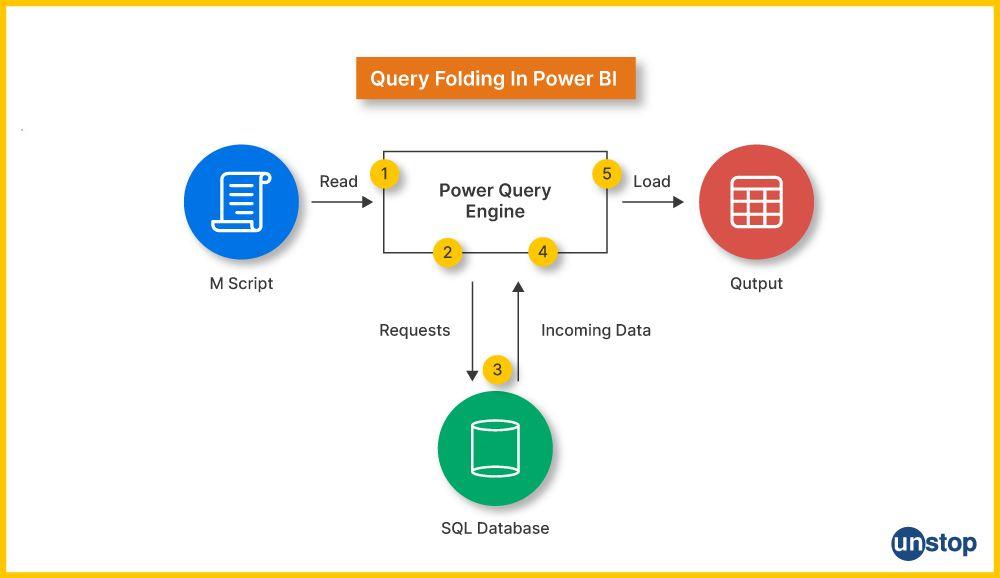
Watch for Non-Folding Transformations
A common failure pattern is:
- Filter by RangeStart and RangeEnd.
- Then perform a transformation that breaks folding.
- Or perform non-folding transformations before the date filter.
The result can cause more data movement than expected.
Keep source-side transformations efficient.
Where practical, materialize complex logic upstream in the database or data warehouse.
Then let Power BI query a clean analytical structure.
Data Engineering Can Be the Better Fix
Sometimes the real problem is not Power BI refresh architecture.
The source may expose a complex operational schema requiring expensive transformations.
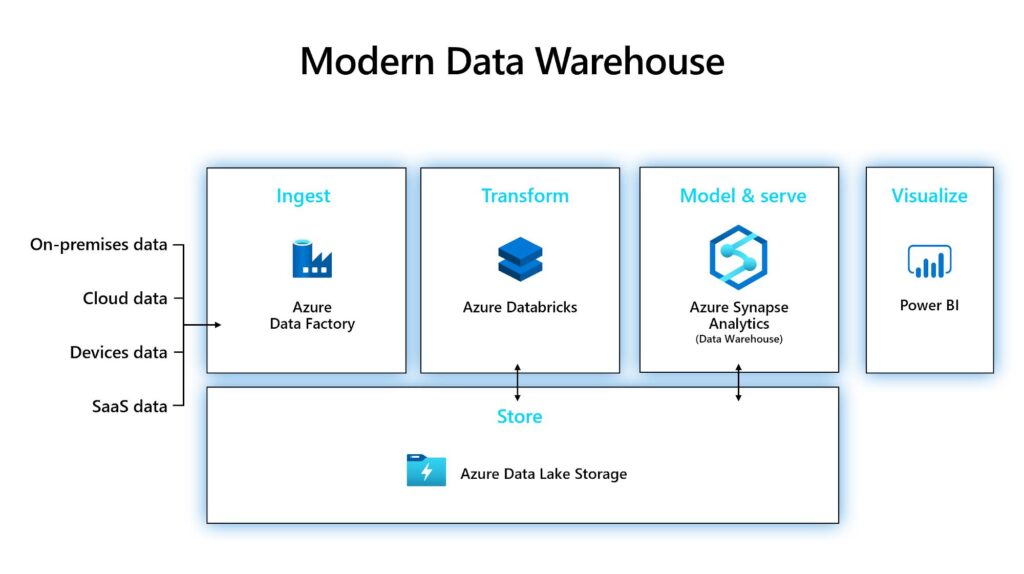
In that case, create an analytical layer upstream.
For example:
Operational database → warehouse staging → curated fact table → Power BI
This can provide:
- Cleaner incremental keys.
- Stable data types.
- Precomputed business logic.
- Better query performance.
- Reusable data across reports.
Actiknow’s data-engineering work focuses on pipelines and cloud warehouse layers for BI. Incremental refresh should complement that architecture, not replace it.
Backfills Need a Procedure
Eventually someone will discover that historical data needs correction.
Plan how older partitions will be refreshed.
Examples:
- A source-system defect affected three months last year.
- A new business rule must be applied historically.
- Late data arrived outside the normal refresh window.
- A dimension mapping changed.
Document how the team can trigger a broader historical refresh safely.
If the only operating procedure is “the old partitions never refresh,” the model will eventually become difficult to correct.
Schema Changes Need Testing
Changing columns or Power Query logic can affect partitioned models.
Treat significant model changes as deployments.
Test them in non-production.
Confirm:
- Partition behavior.
- Historical consistency.
- Refresh duration.
- Source load.
- Report calculations.
Do not make structural changes directly in a critical production model without understanding how existing partitions will be affected.
Gateway Reliability Can Still Be the Bottleneck
For on-premises sources, incremental refresh may reduce transferred data but still depends on the gateway.
A failing or under-sized gateway can continue causing refresh problems.
Monitor:
- Gateway CPU.
- Memory.
- Network.
- Concurrent refreshes.
- Service health.
- Data-source connectivity.
- Credentials.
Incremental refresh is not a substitute for reliable connectivity architecture.
Common Reasons Incremental Refresh Does Not Help Enough
- Query folding is not occurring.
- The source still scans large amounts of data.
- The refresh window is nearly as large as the stored history.
- Historical records change frequently.
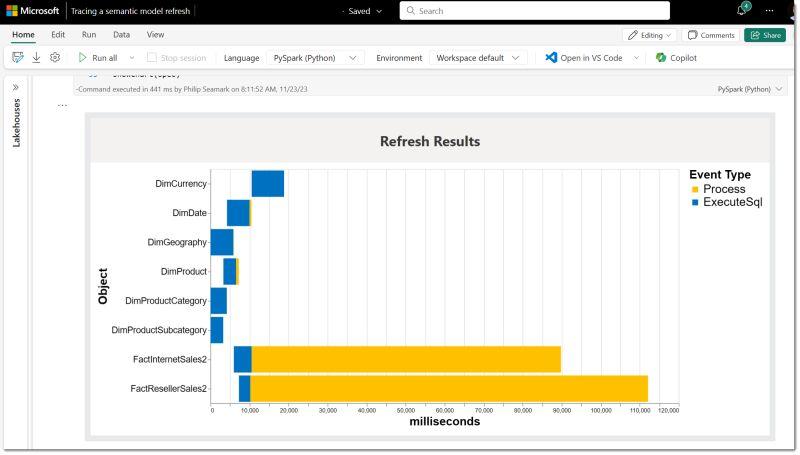
- Most refresh time is spent on another table.
- The gateway is the bottleneck.
- Complex transformations dominate processing.
- Capacity is constrained.
- The table is too small for partitioning to matter.
- The business requires data fresher than the refresh schedule can provide.
Diagnose the refresh before changing architecture.
A Practical Implementation Checklist
1. Before implementation:
- Identify the large tables driving refresh time.
- Measure current refresh duration and source load.
- Confirm the table has an appropriate date or date-time field.
- Understand late-arriving and historical updates.
- Define the historical retention period.
- Define the refresh window.
- Decide whether change detection is appropriate.
- Verify source support and query folding.
2. During implementation:
- Create RangeStart and RangeEnd.
- Apply the filter correctly.
- Configure the incremental-refresh policy.
- Test representative source queries.
- Validate row counts around partition boundaries.
- Test updates and late-arriving records.
- Measure refresh duration.
- Measure source workload.
3. Before production:
- Plan the initial historical refresh.
- Confirm gateway and capacity readiness.
- Define monitoring.
- Define backfill procedure.
- Document refresh ownership.
- Confirm business freshness SLA.
4. After production:
- Track refresh duration.
- Track failures.
- Track freshness.
- Review partition behavior.
- Test historical correction procedures.
- Revisit the refresh window if business behavior changes.
Frequently Asked Questions
What is Power BI incremental refresh?
It is a policy that partitions eligible time-based data so Power BI can refresh recent partitions instead of repeatedly processing all stored history.
Does incremental refresh require a date column?
The policy uses RangeStart and RangeEnd date/time parameters to filter the data. The table therefore needs an appropriate date or date-time field for the partition strategy.
Why is query folding important?
Query folding allows the source system to apply the partition filter. Without efficient source filtering, Power BI may retrieve much more data than intended, reducing the benefit.
Can incremental refresh capture updates to old records?
Only if the refresh strategy includes those records. If old partitions are not refreshed, historical changes can be missed unless the architecture handles them through change detection, lookback windows, upstream logic or targeted backfills.
Does incremental refresh make Power BI real time?
No. It reduces the amount of data processed during refresh. Freshness still depends on refresh frequency and architecture. Hybrid tables can address some near-real-time scenarios.
Should every table use incremental refresh?
No. It is most useful for large time-based tables where only part of the data changes regularly. Small tables can often refresh fully with less complexity.
Can incremental refresh reduce database load?
Yes, when the source can efficiently return only the required partitions. Measure actual source workload to confirm the improvement.
What happens when historical data needs to be corrected?
The operating process should support a broader refresh or targeted partition refresh as appropriate. Plan this before the first historical correction is needed.
Conclusion
Power BI incremental refresh is valuable when a large table contains mostly stable history and a smaller recent period changes regularly.
The biggest gains come when the RangeStart and RangeEnd filters reach the source efficiently, the refresh window matches real update behavior, and the team has a procedure for late data and historical corrections.
Do not use incremental refresh as a generic fix for every slow model.
Measure where refresh time is going. Verify query folding. Understand the source. Define the freshness SLA. Then decide whether partitioned refresh, upstream data engineering, DirectQuery or a hybrid architecture is the right solution.
If you are trying to reduce Power BI refresh times or redesign a large semantic model, Actiknow can help diagnose the refresh pipeline, optimize the data model and implement a maintainable refresh strategy. Discuss your Power BI requirements with Actiknow.