
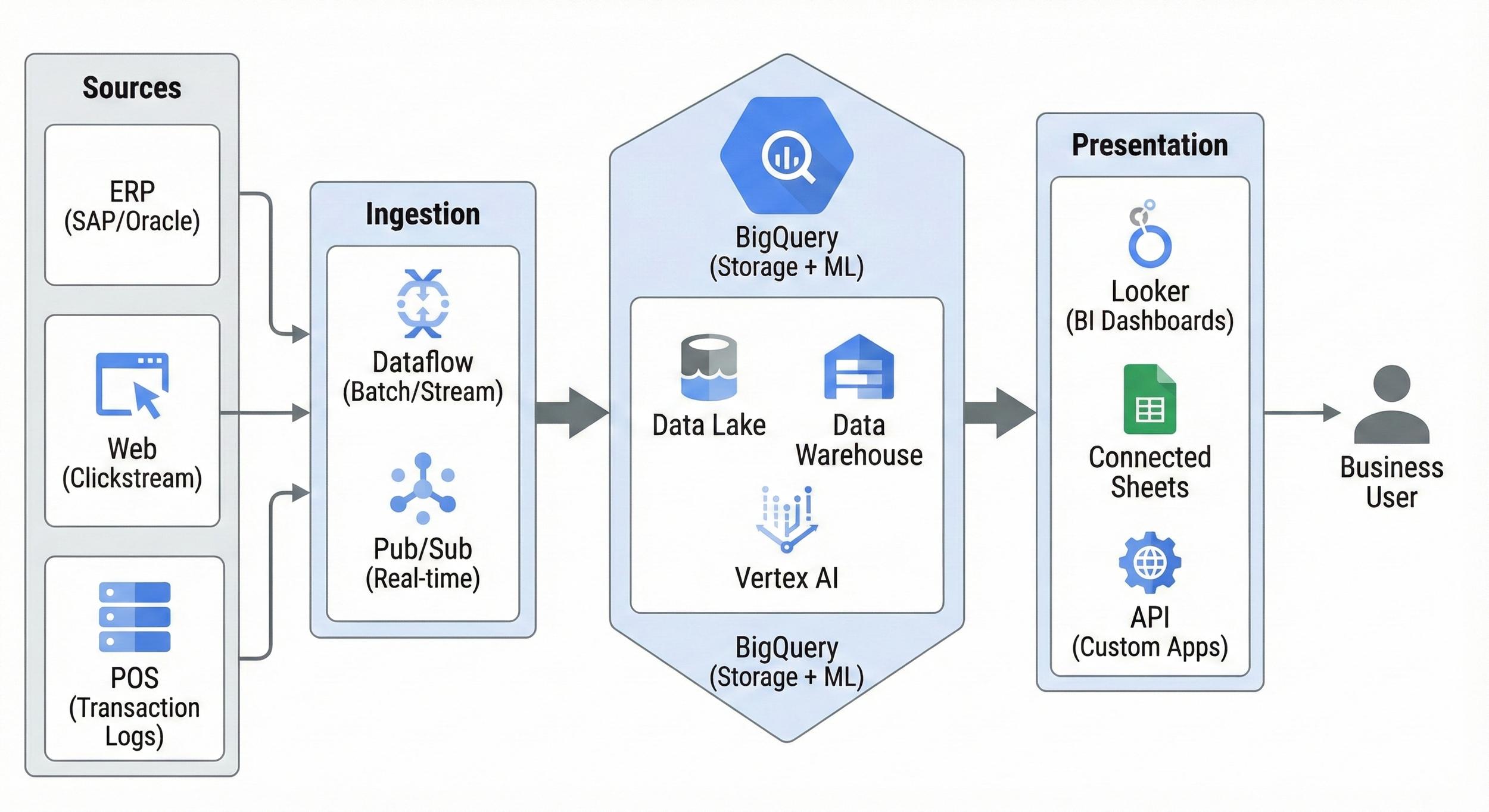
Not every real-time requirement needs a separate stream-processing platform.
BigQuery continuous queries let teams run SQL continuously over incoming BigQuery data and write or export results as new data arrives. Current Google Cloud documentation supports outputs including BigQuery tables, Apache Iceberg managed tables, Pub/Sub, Bigtable and Spanner.
That creates a useful middle ground.
If data already lands in BigQuery and the required processing can be expressed within the supported continuous-query SQL model, a team may be able to avoid building another processing tier purely to filter, enrich, aggregate or route fresh data.
But continuous queries are not a general replacement for every streaming engine.
They have specific SQL limitations, capacity requirements, identity rules, runtime limits and security constraints. The right question is therefore not “Can BigQuery stream?”
It is:
Can this particular real-time workload be operated more simply as continuous SQL inside the analytical platform?
Actiknow’s data engineering and business intelligence work treats streaming as an architecture choice driven by latency and operational requirements, not as a default badge of sophistication.
The Short Answer
BigQuery continuous queries are a strong candidate when:
- Incoming data already lands in BigQuery.
- Near-real-time rather than ultra-low-latency processing is acceptable.
- Transformation can be expressed using supported continuous-query SQL.
- Output belongs in BigQuery, Iceberg managed tables, Pub/Sub, Bigtable or Spanner.
- The organization already operates BigQuery capacity.
- A SQL-centric data team will own the workload.
Use a separate streaming platform when:
- Processing must happen before data reaches BigQuery.
- Millisecond-level event handling is required.
- You need unsupported stateful/event-time patterns.
- Complex custom code is central.
- You need unsupported sources or sinks.
- Row/column security limitations make the source unsuitable.
- Event processing is an application runtime rather than an analytics workflow.
The key benefit is simplification, not simply speed.
What Is a BigQuery Continuous Query?
A continuous query is a BigQuery SQL job that keeps running and processes newly arriving data.
Instead of:
Run query.
Finish.
Wait.
Schedule again.
the job remains active and processes new records.
Google Cloud documents continuous queries for near-real-time analysis of incoming BigQuery data.
They can write results into BigQuery/Iceberg tables or export them to supported downstream Google Cloud services.
This turns BigQuery into more than a passive destination.
A Simple Mental Model
Think of a normal query as:
“Analyze the data that exists now.”
Think of a continuous query as:
“Keep applying this logic as new data arrives.”
That is useful for:
- Filtering.
- Routing.
- Continuous enrichment.
- Windowed aggregation.
- Real-time correlations.
- Operational activation.
- AI processing on incoming records.
The workload remains SQL-oriented.
Why This Can Simplify Architecture
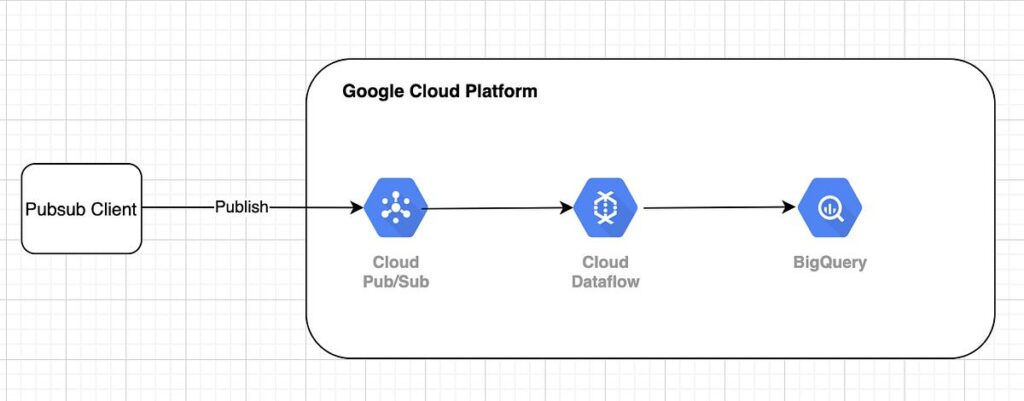
A traditional pattern might be:
Producer→ Pub/Sub→ Dataflow→ BigQuery→ transformation→ downstream system
If the business event already arrives in BigQuery and the only reason for the extra processing system is to react to that new data, continuous SQL can sometimes simplify the design:
Producer→ BigQuery→ continuous query→ destination
Fewer components can mean:
- Less deployment.
- Less monitoring.
- Fewer skill sets.
- Simpler lineage.
- Fewer failure boundaries.
But only when the query semantics fit.
Where the Input Data Comes From
Google documents continuous queries over data written to standard BigQuery tables through mechanisms including:
- Storage Write API.
- Batch loads.
- INSERT statements.
- Results of other queries.
- Pub/Sub BigQuery subscriptions.
- Other continuous-query outputs.
That means the upstream ingestion architecture can remain independent.
Continuous queries begin once the data is in an eligible BigQuery table.
APPENDS and Change Processing
Continuous queries use time-oriented functions to determine where processing begins.
For append-oriented workloads, APPENDS lets the query process data added after a specified starting timestamp.
Google also documents CHANGES for applicable mutation-aware scenarios, including preview functionality for certain Pub/Sub export use cases.
This starting point is important for recovery.
The system needs to know what interval to replay after a restart.
Design Restartability From Day One
A continuous job can stop.
Reasons include:
- Runtime limits.
- Configuration changes.
- Failures.
- Capacity issues.
- Deployment changes.
The operational design should record:
- Last safe processing point.
- Output watermark.
- Restart timestamp.
- Duplicate handling.
- Replay window.
Do not treat “continuous” as “runs forever without operational intervention.”
Runtime Limits Matter
Current Google documentation states that a continuous query run under a user account can run for up to two days.
With a service account, it can run for up to 150 days.
That means long-lived production workloads need automation around restart/retry even when using service accounts.
Build that lifecycle into the design.
Use Service Accounts for Production
A production data process should not depend on a human identity.
Service accounts provide a clearer ownership model for:
- Permissions.
- Audit.
- Rotation.
- Deployment.
- Longer runtime.
Google also requires a service account for continuous queries that export to Pub/Sub.
Use least-privilege IAM for both source access and destination write/export permissions.
Continuous Queries Require Capacity Reservations
This is a major architecture constraint.
Google currently requires an Enterprise or Enterprise Plus BigQuery reservation with a CONTINUOUS job-type assignment.
Continuous queries do not use the on-demand compute model.
So the question is not only:
“Does the SQL work?”
It is also:
“Does our BigQuery capacity architecture support this workload economically?”
Evaluate baseline and autoscaling requirements before adopting the pattern broadly.
Concurrency Needs Capacity Planning
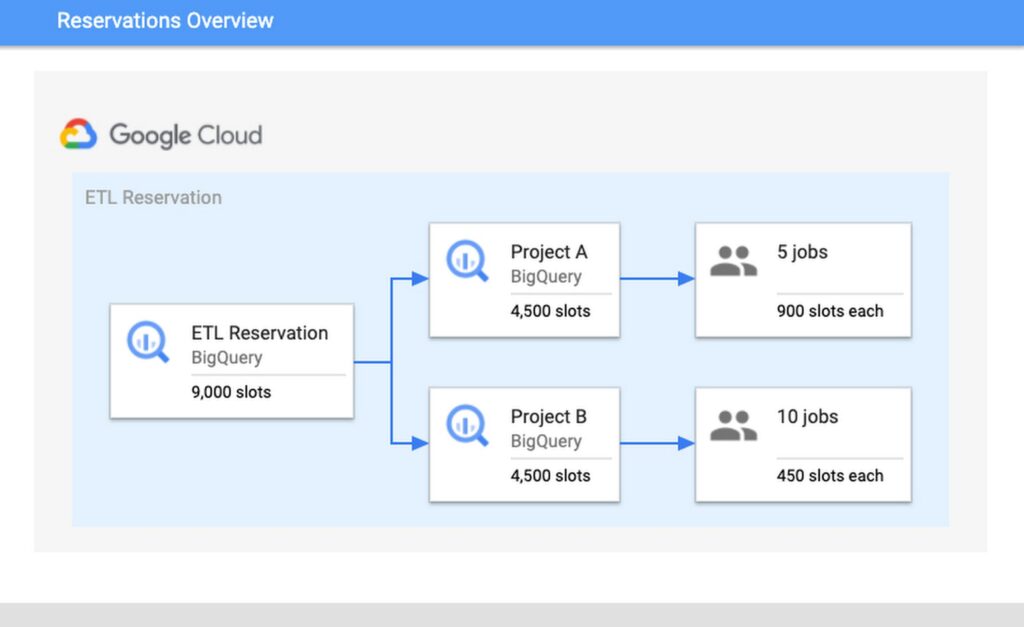
Google uses reservation capacity to determine how many continuous queries can be admitted concurrently.
Its documentation currently describes a baseline admission threshold associated with slots per continuous job and recommends autoscaling for varying workloads.
For architecture planning, model:
- Number of simultaneous queries.
- Peak incoming rate.
- Complexity per query.
- Lag tolerance.
- Other reservation commitments.
A design with dozens of tiny always-on queries may be less efficient than consolidating logic.
Monitor Output Watermark Lag
Continuous processing has a critical operational metric:
How far behind incoming data is the query?
Google documents failure behavior if a continuous query falls too far behind its input watermark.
Monitor:
- Latest source event time.
- Latest processed time.
- Output watermark.
- Rows per minute.
- Slot consumption.
- Destination errors.
A running job can still be operationally unhealthy if lag keeps growing.
Duplicates Are Possible
Google explicitly warns that temporary issues and automatic reprocessing can result in duplicate output.
Therefore downstream design should be idempotent.
Options include:
- Deterministic event IDs.
- Deduplication keys.
- MERGE/upsert downstream.
- Unique business keys.
- Replay-safe consumers.
Do not promise exactly-once business outcomes merely because the SQL job is managed.
Supported Outputs Make Different Architectures Possible
BigQuery table: Useful for continuously materialized derived datasets.
Iceberg managed table: Useful when output should remain in an open-table storage architecture supported by BigQuery.
Pub/Sub: Useful when processed analytical events should trigger applications or downstream event workflows.
Bigtable: Useful for low-latency key-based serving scenarios.
Spanner: Useful for operational activation/reverse ETL into transactional applications.
The destination should follow the consuming workload.
Continuous SQL to Pub/Sub
This is an interesting reverse-ETL/event pattern.
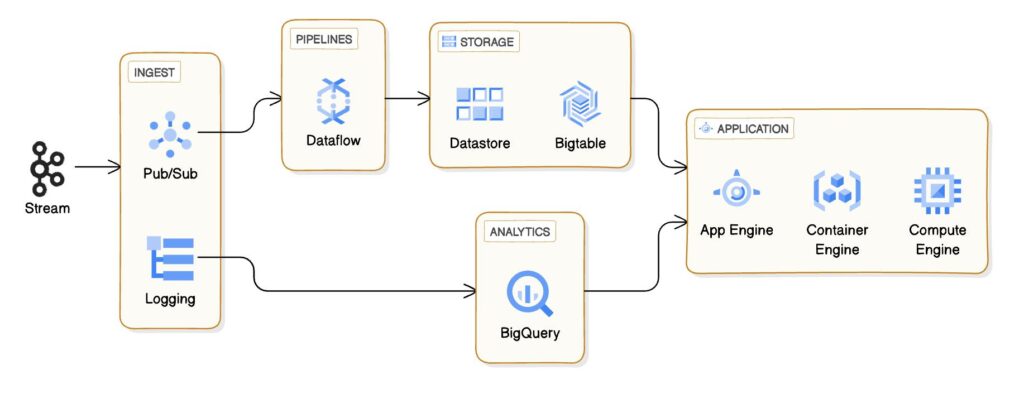
A continuous query can:
- Read new BigQuery data.
- Filter/enrich it.
- Serialize a message.
- Publish it to Pub/Sub.
Then applications subscribe.
Example business uses:
- Flag a high-value event.
- Publish a customer segment change.
- Route an anomaly.
- Trigger downstream processing.
This can be simpler than building a separate service that repeatedly polls BigQuery.
Continuous SQL to Spanner
Google documents continuous-query export to Spanner as a reverse-ETL pattern.
That can be useful when curated analytical data needs to update an operational store.
Examples:
- Customer attributes.
- Scores.
- Segments.
- Derived statuses.
But treat this as an operational integration.
Define:
- Key strategy.
- Idempotency.
- Conflict behavior.
- Latency.
- Destination quotas.
- Ownership.
Do not casually write analytics outputs into transactional systems.
Continuous SQL to Bigtable
Bigtable can serve low-latency operational lookup patterns.
A continuous query can continuously transform incoming analytical data into a structure appropriate for Bigtable.
This is useful when the analytical computation is naturally expressed in SQL but serving requires a different datastore.
Again, evaluate quotas and regional constraints.
Continuous AI Processing
Current BigQuery documentation supports selected AI functions in continuous queries.
This opens patterns such as:
- Classify incoming text.
- Generate embeddings.
- Extract information.
- Generate text outputs.
But AI functions introduce another quota and reliability boundary.
Monitor:
- Model/API quotas.
- Failed records.
- Cost.
- Latency.
- Output validation.
Do not assume an always-on SQL statement eliminates AI-service constraints.
SQL Support Is Not Unlimited
Continuous queries support a subset of BigQuery SQL.
Current Google documentation lists unsupported capabilities and specific constraints.
Examples include restrictions around:
- Certain query operators.
- Some subqueries.
- User-defined functions.
- DDL.
- Most DML beyond supported INSERT behavior.
- Some window-function behavior.
- External tables.
- Materialized views.
- CDC upsert sources.
Supported stateful operations are evolving.
Verify the current documentation for the exact SQL pattern before designing around it.
Joins and Aggregations Need Careful Review
Google now documents supported joins, aggregations and windowing in continuous queries.
That does not mean every arbitrary batch SQL query can become continuous by checking a box.
Stateful streaming semantics are inherently different.
Test:
- Time bounds.
- Late data.
- State retention.
- Cardinality.
- Memory/capacity.
- Out-of-order records.
Use the continuous-query-specific supported patterns.
Security Constraints Can Be a Deal Breaker
Current Google documentation states that continuous queries do not support row-level and column-level security features.
That matters for enterprise datasets.
If the source table relies on those controls, do not assume the same security model applies.
Options may include:
- A dedicated ingestion table.
- Pre-filtered source.
- Separate project/dataset.
- Alternative processing architecture.
Security requirements should be evaluated before the POC.
Continuous Queries vs Scheduled Queries
Scheduled queries are better when:
- Minutes/hours of latency are acceptable.
- Workload is naturally batch.
- Complex SQL is needed.
- Cost should occur only periodically.
- Business metrics should update on controlled intervals.
Continuous queries are better when:
- Processing should remain active.
- New rows should be handled quickly.
- SQL logic is supported.
- Capacity is justified.
Do not replace a five-minute scheduled query with continuous infrastructure unless the business benefits from the difference.
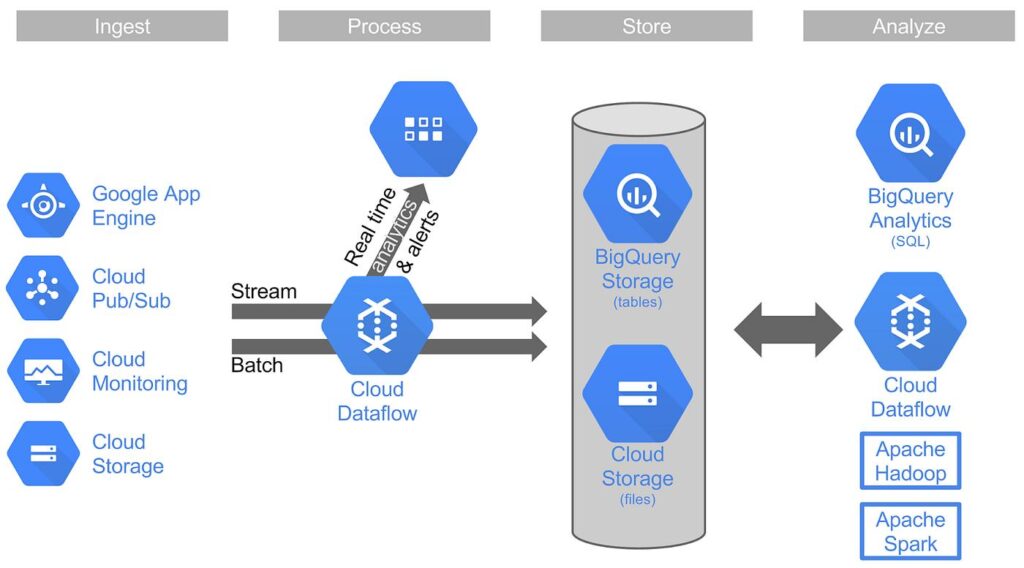
Continuous Queries vs Dataflow
Dataflow is a broader stream/batch processing platform.
Prefer Dataflow or another stream processor when you need:
- Complex event-time processing.
- Custom code/transforms.
- Sophisticated streaming state.
- Processing before BigQuery.
- Multiple non-BigQuery inputs.
- Advanced streaming patterns.
- Very low latency.
Prefer continuous queries when:
- BigQuery is already the center of gravity.
- SQL is sufficient.
- Supported sinks match.
- Operational simplicity matters.
They can also coexist.
Continuous Queries vs Application Code
Do not embed analytical polling into application services if BigQuery can safely publish the required derived event.
But application code remains appropriate when:
- Business transaction must be synchronous.
- Request/response latency matters.
- Processing is tightly coupled to application state.
- Failure semantics must be transactional.
Analytics infrastructure should not become a substitute for core application logic.
Continuous Queries vs Reverse ETL Platforms
If the use case is simply:
“Push selected warehouse attributes into operational tools,”
a dedicated reverse-ETL platform may offer:
- Prebuilt SaaS destinations.
- Identity mapping.
- Business-user workflows.
- Operational UI.
BigQuery continuous queries are attractive when the destination is one of its supported services and engineering teams are comfortable owning the SQL and integration.
Evaluate operational ownership, not only license cost.
A Good Use Case: Real-Time Event Filtering
Suppose product events stream into BigQuery.
Only high-risk events need immediate downstream action.
A continuous query can:
- Read appended events.
- Apply SQL rules.
- Enrich from supported data.
- Publish qualifying messages to Pub/Sub.
A downstream service handles action.
This keeps analytical filtering in SQL while leaving application execution to the application layer.
A Poor Use Case: Complex Multi-System Orchestration
Suppose a workflow must:
- Call three APIs.
- Wait for callbacks.
- Maintain long-lived state.
- Retry external side effects.
- Compensate transactions.
- Send notifications.
- Update several systems.
That is workflow/application orchestration.
A continuous query is not the right abstraction.
A Good Use Case: Continuously Derived Table
If a dashboard or downstream model needs a lightweight derived dataset updated as new rows arrive, a continuous INSERT into a target table can reduce repeated batch scanning.
Validate cost and supported SQL first.
A Poor Use Case: Daily Finance Close
If finance intentionally closes data once per day after reconciliation, continuous processing adds little value.
Batch is a feature in that case.
It creates a stable reporting boundary.
Operational Checklist
Before production, define:
- Query owner.
- Service account.
- Reservation.
- Autoscaling.
- Source table.
- Starting/restart logic.
- Destination.
- Idempotency key.
- Lag alert.
- Runtime restart automation.
- Quota alerts.
- Schema-change handling.
- Deployment process.
- Rollback.
- Reconciliation.
If these are missing, the workload is not production-ready.
Cost Evaluation
Compare:
- Continuous reservation capacity.
- Other BigQuery capacity sharing.
- Destination service charges.
- Data ingestion/storage.
- Engineering time.
- Alternative Dataflow cost.
- Alternative scheduled-query cost.
- Alternative platform licensing.
A continuous query can simplify the stack but still be uneconomic for a low-frequency workload.
Measure expected throughput.
Observability Dashboard
Track:
- Job status.
- Runtime age.
- Output watermark lag.
- Input rows.
- Output rows.
- Processing rate.
- Reservation usage.
- Destination errors.
- Restart count.
- Duplicate/replay indicators.
- End-to-end business freshness.
This dashboard is more useful than an alert that says only “query failed.”
Deployment and Change Management
Google notes that SQL cannot simply be modified while a continuous query is running.
Treat a query change as a deployment.
A safe pattern:
- Version SQL.
- Test against representative data.
- Start new job from a controlled timestamp.
- Validate overlap.
- Cut over.
- Stop old job.
- Reconcile duplicates/gaps.
Do not edit production streaming logic casually.
A Practical Decision Framework
Use continuous queries when all five are true:
- Data is already in eligible BigQuery tables.
- Near-real-time processing creates business value.
- Required SQL is supported.
- Supported destination fits.
- Capacity and operations are justified.
If one is false, evaluate batch, Dataflow, application code or another streaming platform.
Frequently Asked Questions
Are BigQuery continuous queries real time?
Google describes them as near-real-time continuous processing of incoming BigQuery data. End-to-end latency still depends on ingestion, query workload, capacity and destination.
Do continuous queries use on-demand BigQuery pricing?
No. Current Google documentation requires Enterprise or Enterprise Plus capacity with a CONTINUOUS reservation assignment.
Can a continuous query run forever?
No. Current documented maximums are up to two days under a user account and up to 150 days using a service account, so production systems need restart automation.
Can continuous queries publish to Pub/Sub?
Yes. Google supports Pub/Sub export from continuous queries, and a service account is required for that export pattern.
Can continuous queries write to BigQuery?
Yes. Supported continuous INSERT patterns can write output into BigQuery tables and supported Iceberg managed tables.
Do continuous queries guarantee no duplicates?
No. Google notes that reprocessing can create duplicate output, so downstream consumers should be designed for idempotency.
Do continuous queries support row-level security?
Current Google documentation states that row-level and column-level security features are not supported for continuous queries.
Do continuous queries replace Dataflow?
No. They can replace some SQL-oriented real-time transformations when data already resides in BigQuery, but Dataflow supports broader streaming and custom processing patterns.
Sources and Further Reading
- Google Cloud: Introduction to BigQuery continuous queries.
- Google Cloud: Create continuous queries.
- Google Cloud: Export BigQuery data to Pub/Sub.
Conclusion
BigQuery continuous queries are valuable because they can remove an unnecessary architectural layer.
When data is already in BigQuery, the logic is SQL-friendly and the destination is supported, continuously running SQL may be simpler than operating another stream processor.
But “simpler” still requires engineering discipline.
Plan identity.
Capacity.
Restart.
Lag.
Duplicates.
Security.
Deployment.
Reconciliation.
Use continuous queries where they collapse complexity.
Use a dedicated streaming stack where the workload actually requires one.
If you are deciding between BigQuery batch, continuous SQL and a separate streaming architecture, Actiknow can help map the latency requirement, processing pattern and downstream BI/operational needs into a practical design. Discuss your BigQuery data architecture with Actiknow.