

A historical data correction sounds simple:
Reload the last six months.
In production, that instruction can change executive KPIs, rewrite customer history, multiply facts, overload compute and create a Monday morning argument about why last quarter’s revenue moved.
A backfill is not just a large pipeline run.
It is a controlled change to published history.
What a Data Backfill Is
A data backfill reprocesses historical data to correct, enrich or reconstruct warehouse outputs.
Common reasons include:
- A transformation bug.
- A missing source field.
- Incorrect mapping.
- Late-arriving records.
- New business logic.
- A newly available source history.
- Schema changes.
- A failed historical load.
A backfill may affect a few records or years of data.
The risk comes from changing information users already trust.
Actiknow’s business intelligence and data engineering services include warehouse migration, incremental pipelines and source-to-target reconciliation. Historical corrections should use the same rigor as production releases.
Define the Reason First
Before touching data, write the defect clearly.
For example:
Orders from July through September assigned the current customer region instead of the region effective at order date.
That statement identifies:
- Affected object.
- Affected period.
- Incorrect behavior.
- Expected behavior.
Do not start with “reload everything.”
Define the smallest scope that fixes the problem.
Estimate the Blast Radius
Identify:
- Tables affected.
- Date range.
- Business entities.
- Metrics affected.
- Dashboards affected.
- Exports affected.
- Downstream APIs.
- Snapshots.
- Machine-learning features if relevant.
- Finance or regulatory reports.
A backfill in one warehouse table can propagate widely.
Use lineage to find consumers before running it.

Freeze the Business Definition
A backfill should correct a known rule.
Do not mix unrelated metric redesign into the same operation.
If the objective is to fix region history, do not also change revenue recognition and customer segmentation.
One controlled change is easier to validate and explain.
Capture the Current State
Before modifying production data, capture evidence.
Depending on platform and architecture:
- Snapshot affected tables.
- Clone tables where supported.
- Export control totals.
- Record row counts.
- Record business metrics.
- Record dashboard values.
- Capture current transformation version.
This gives you a before-state for validation and rollback.
Create a Backfill Run ID
Every historical correction should be traceable.
Record:
- Run ID.
- Reason.
- Requested by.
- Approved by.
- Code version.
- Source range.
- Target range.
- Start time.
- End time.
- Rows affected.
- Validation result.
- Release status.
This turns an emergency script into an auditable operation.
Do Not Backfill Directly Into Published Tables First
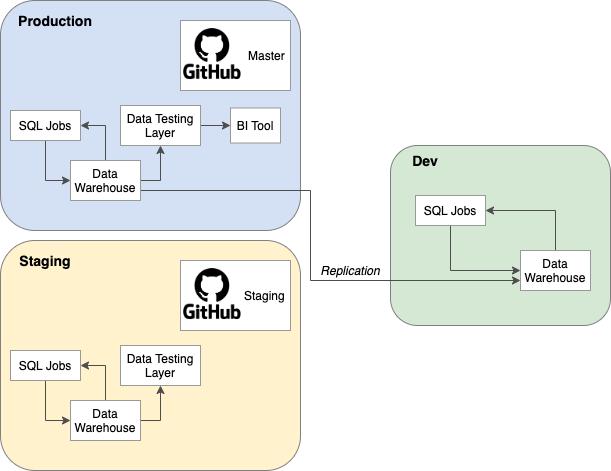
Where practical, process the historical correction into an isolated target.
Examples:
- Temporary schema.
- Clone.
- Shadow table.
- Versioned mart.
- Staging partition.
Then validate it.
Only after reconciliation should the corrected data replace or merge into the published dataset.
Isolation reduces the risk of exposing half-processed history.
Scope by Business Time and Technical Time
A backfill may need two different filters.
1. Business date
Which historical transactions should change?
2. Technical update date
Which source records have been corrected or changed?
For example, a customer update made today may affect transactions from last year.
Do not assume one timestamp captures the entire correction.
Understand Incremental Logic
Production pipelines often process only recent windows.
A historical backfill may need to bypass normal incremental filters.
Document:
- Normal incremental predicate.
- Backfill predicate.
- Merge key.
- Delete behavior.
- Late-arriving logic.
Do not permanently weaken the production incremental model just to run one correction.
Parameterize the backfill path.
Use Idempotent Processing
A backfill should be safe to rerun.
If the operation fails halfway and you execute it again, it should not duplicate records or double amounts.
Use:
- Stable keys.
- MERGE/upsert patterns.
- Deterministic transformations.
- Partition replacement.
- Transactional swaps where appropriate.
Idempotency dramatically simplifies recovery.
Control Deletes Explicitly
Historical corrections may remove records that should no longer exist.
Decide how deletes propagate.
Options:
- Hard delete.
- Soft delete.
- Partition rebuild.
- Full scoped replacement.
- Tombstone processing.
Validate deleted business keys separately.
Missing delete handling is a common reason backfills leave old incorrect rows behind.
Watch Slowly Changing Dimensions
Historical reloads often interact with dimension history.
Suppose customer region changed in October.
A September order should usually join to the September dimension version if historical reporting requires point-in-time accuracy.
Backfilling facts against the current dimension can rewrite history incorrectly.
Test effective-date joins.
Preserve Snapshot Semantics
Some reports intentionally preserve what was known at a point in time.
Examples:
- Month-end finance snapshot.
- Pipeline snapshot.
- Membership count at reporting date.
- Inventory close.
A backfill should not automatically rewrite snapshots.
Ask:
- Is this table meant to reflect current corrected truth?
- Or historical published truth?
Those are different products.
Define the policy before processing.
Communicate KPI Restatements
If a backfill legitimately changes historical KPIs, tell users.
Document:
- Metric.
- Periods affected.
- Previous value.
- New value.
- Reason.
- Approval.
- Release date.
Do not let executives discover a restatement by noticing a chart changed.
Throttle Large Backfills
Historical processing can compete with production workloads.
Plan:
- Compute capacity.
- Query queues.
- Warehouse sizing.
- Batch size.
- Concurrency.
- Business hours.
- Source-system impact.
A three-year reload should not make today’s dashboard unusable.
Run during controlled windows or use isolated compute where possible.
Protect the Source System
Backfills can create heavy extraction load.
If re-reading an operational database:
- Use replicas where appropriate.
- Limit batch size.
- Monitor locks.
- Coordinate with application owners.
- Respect API rate limits.
- Avoid peak hours.
A warehouse correction should not become an application outage.
Estimate Cost Before Running
Historical jobs can be expensive.
Estimate:
- Rows.
- Bytes.
- Partitions.
- Warehouse hours.
- API calls.
- Storage.
- Temporary tables.
- Cross-region transfer.
Set a budget threshold.
Unexpected cost is easier to manage before execution.
Validate Row Counts
Compare before and after:
- Total affected rows.
- Rows by date.
- Distinct keys.
- Inserted rows.
- Updated rows.
- Deleted rows.
- Unchanged rows.
The expected shape should be known.
If a one-month correction unexpectedly changes three years of records, stop.
Validate Business Totals
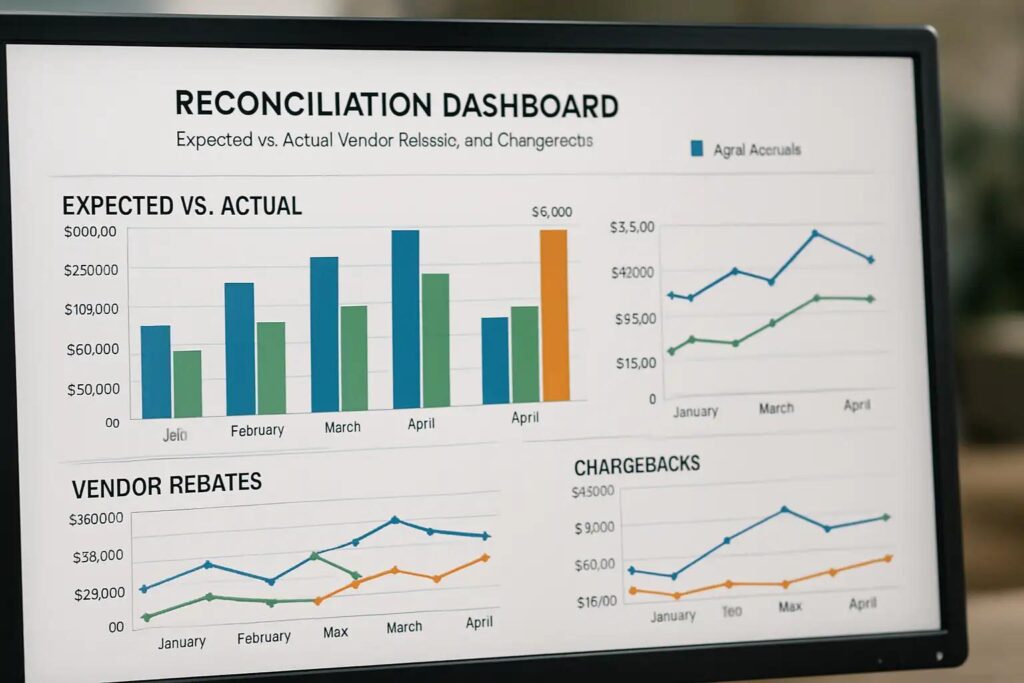
Reconcile the corrected output against the authoritative source or approved business calculation.
Examples:
- Revenue.
- Invoice balance.
- Orders.
- Active customers.
- Membership count.
- Hours.
- Units.
Validate at multiple grains.
Do not approve a backfill solely because SQL completed.
Validate Unaffected Data
A scoped backfill should not alter unrelated history.
Create negative tests.
For example:
- Rows before July unchanged.
- Rows after September unchanged.
- Other business units unchanged.
- Other currencies unchanged.
This catches predicates that are too broad.
Compare Old and New Outputs
Create a diff.
For each affected business key:
- Old value.
- New value.
- Expected change.
- Unexpected change.
This is especially useful for dimensional attributes and derived metrics.
Large aggregate comparisons can hide record-level defects.
Validate Dashboard Behavior
After warehouse validation, test the consumption layer.
Check:
- Filters.
- Totals.
- Trend charts.
- Prior-period comparisons.
- Exports.
- Drilldowns.
- Cached extracts.
- Semantic models.
A corrected warehouse table may not appear in BI until refresh.
Or a dashboard calculation may behave differently with corrected data.
Plan Cache and Semantic Refreshes
A backfill release may require:
- Power BI semantic-model refresh.
- Tableau extract refresh.
- Looker cache invalidation.
- Application cache clearing.
- Materialized view refresh.
- Downstream export regeneration.
Include these steps in the release plan.
Otherwise users may see a mixture of old and new history.
Use a Controlled Release
A good release sequence is:
- Finish isolated backfill.
- Complete technical validation.
- Complete business reconciliation.
- Obtain approval.
- Pause affected downstream refresh if needed.
- Merge/swap corrected data.
- Refresh downstream models.
- Run smoke tests.
- Notify users.
- Monitor.
This is safer than letting dashboards update continuously during a multi-hour correction.

Define Rollback
Before release, know how to reverse it.
Options:
- Restore snapshot.
- Swap back cloned table.
- Restore affected partitions.
- Replay previous version.
- Re-run prior transformation.
Rollback should be tested conceptually before execution.
If you cannot explain how to undo the change, the backfill is not ready.
Keep Production Incremental Loads in Mind
What happens if new data arrives while the backfill runs?
Potential strategies:
- Pause incremental processing.
- Run in isolation then catch up.
- Separate date partitions.
- Record a high-water mark.
- Merge new changes after historical processing.
The correct pattern depends on architecture.
Avoid losing current changes during historical correction.
Handle Backfills as Code
Do not rely on one-off SQL pasted into a console without review.
Store:
- Backfill script.
- Parameters.
- Transformation version.
- Validation queries.
- Execution notes.
This supports audit, repeatability and peer review.
Require Approval for Material Changes
For backfills affecting executive or financial metrics, define approvers.
Examples:
- Data owner.
- Finance owner.
- BI owner.
- Engineering owner.
Approval should cover both:
- Technical correctness.
- Business interpretation.
Monitor After Release
For the next reporting cycle, monitor:
- Freshness.
- Row counts.
- Business totals.
- Duplicates.
- User issues.
- Performance.
- Unexpected downstream changes.
Some problems appear only after normal incremental processing resumes.

A Backfill Checklist
1. Before execution:
- Defect is clearly defined.
- Scope is minimized.
- Downstream impact is known.
- Current state is captured.
- Backfill is parameterized.
- Processing is idempotent.
- Source impact is understood.
- Compute cost is estimated.
- Rollback exists.
2. Before release:
- Counts reconcile.
- Business totals reconcile.
- Unaffected periods are unchanged.
- Record-level diffs are reviewed.
- Dashboards are tested.
- Business owner approves.
- Downstream refresh plan is ready.
- User communication is prepared.
3. After release:
- Incremental pipelines resume correctly.
- Freshness is normal.
- KPI changes match expectation.
- No duplicates appear.
- Incident/support channels are monitored.
- Backfill record is archived.
Frequently Asked Questions
What is a data pipeline backfill?
It is the reprocessing of historical data to correct, enrich or reconstruct warehouse outputs after the original processing period.
Why are backfills risky?
They can alter already-published history, compete with production workloads, duplicate records, mishandle historical dimensions or silently change executive metrics.
Should I pause dashboards during a backfill?
Often it is safer to isolate the correction and control the final release. Whether dashboards need to pause depends on architecture and how partial results would appear.
How do you make a backfill idempotent?
Use stable keys, deterministic logic and merge or scoped-replacement patterns so rerunning the same historical range produces the same result without duplication.
Should a backfill rewrite historical snapshots?
Not automatically. Decide whether the snapshot represents corrected current truth or what was known at the historical reporting date.
How do you validate a backfill?
Compare row counts, distinct keys, source control totals, old-vs-new record diffs, unaffected periods and downstream dashboard outputs.
Do backfills need rollback plans?
Yes, especially for material historical changes. Capture the pre-change state and define how affected data can be restored.
Conclusion
A data backfill is a production release that happens to target history.
Treat it accordingly.
Minimize scope. Isolate processing. Preserve the current state. Make the operation idempotent. Reconcile business totals. Test unaffected periods. Control the downstream release. Communicate KPI restatements. Prepare rollback.
The safest backfill is not the one that runs fastest.
It is the one whose impact is understood before users see it.
If you need to correct historical warehouse data without destabilizing live reporting, Actiknow can help design the backfill, reconciliation and controlled release process. Discuss your data warehouse backfill requirements with Actiknow.