
A central data warehouse creates a governance challenge.
Finance, sales, operations and customers may all need access to the same underlying data, but they should not necessarily see the same rows or columns.
BigQuery provides several mechanisms for controlled access.
Two commonly compared options are row-level security and authorized views.
They can both restrict what users see, but they solve different problems.
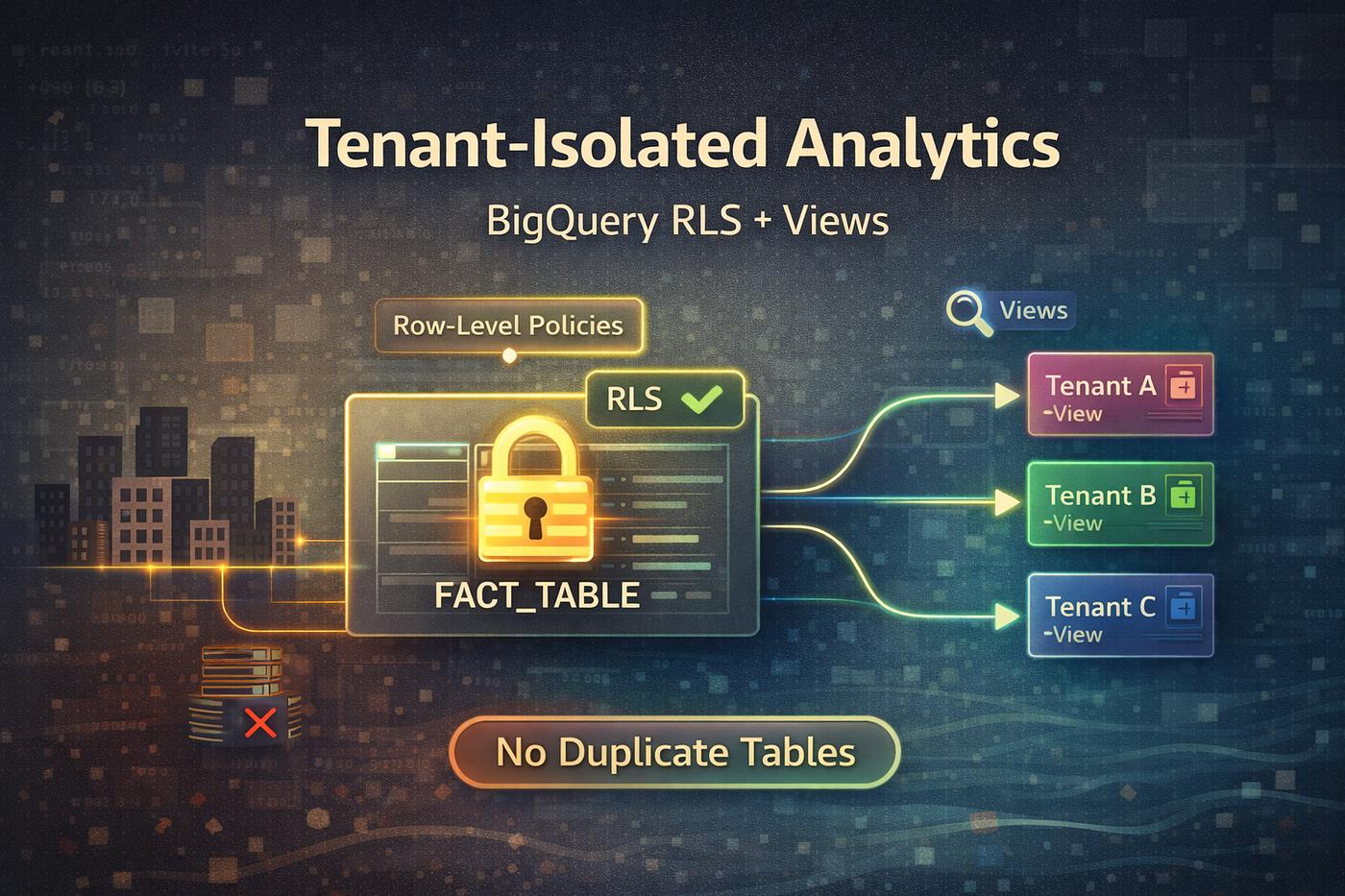
Row-level security attaches filtering policies to a table.
Authorized views expose a curated query result without giving consumers direct access to the underlying dataset.
The right choice depends on whether the requirement is identity-based row filtering or a stable curated data product.
What BigQuery Row-Level Security Does
BigQuery row-level security uses row access policies on a table.
A policy contains a filter expression and a list of principals.
Users query the table, but BigQuery filters the rows they are permitted to see.
Examples:
- Regional managers see their region.
- Sales teams see assigned territories.
- Business units see their own records.
- Internal users receive different row subsets through one shared table.
This can be simpler than creating a separate physical table for every audience.
What an Authorized View Does
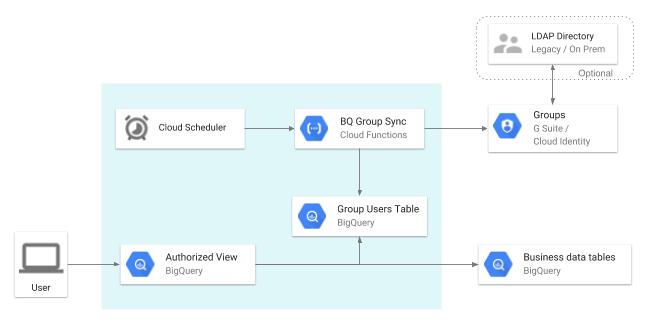
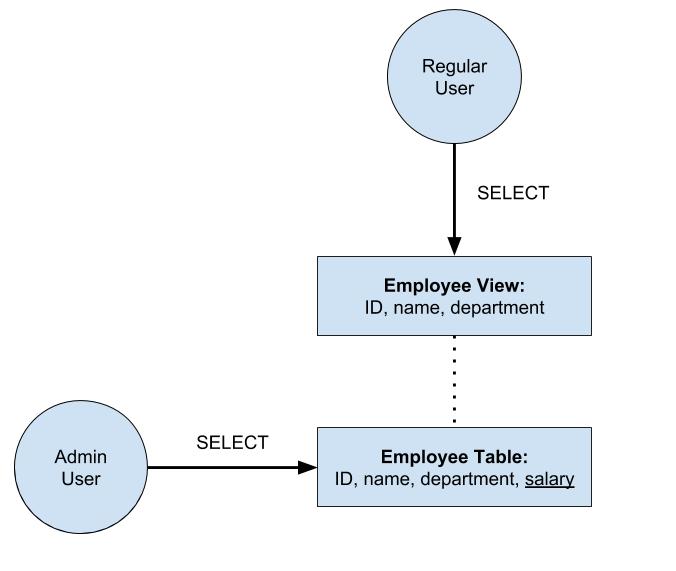
An authorized view is a BigQuery view that is permitted to query underlying data while the consumer is given access to the view rather than the source dataset.
The view SQL defines what is exposed.
It can:
- Filter rows.
- Exclude columns.
- Rename fields.
- Aggregate data.
- Join approved sources.
- Present a stable consumer schema.
This is useful when the consumer should see a curated dataset rather than interact directly with the base table.
Actiknow’s business intelligence and data engineering services include BigQuery warehouse design, security-aware reporting layers and governed data access. The access pattern should reflect the audience and data contract, not simply whichever feature is quickest to configure.
Use Row-Level Security for Identity-Based Filtering
Row-level policies are a natural fit when many users query the same table structure but should see different records.
For example:
- One sales fact table.
- Same columns for everyone.
- Access determined by user or group.
This keeps one table as the common analytical object.
The security logic travels with the table.
Use Authorized Views for Curated Exposure
Authorized views are a strong fit when you want to define exactly what a consumer can query.
For example, an external customer might receive:
- Customer ID.
- Month.
- Usage.
- Invoice amount.
But not:
- Internal margin.
- Other customers.
- Operational notes.
- Employee identifiers.
The view becomes the data contract.
This is often easier to reason about than granting direct table access plus several independent security layers.
Internal vs External Sharing Matters
Google’s current row-level security best-practice guidance recommends using row-level security within an organization rather than across organizations.
For external partners, stronger isolation patterns such as curated authorized views or separate tables may be more appropriate depending on sensitivity.
This is an important architectural boundary.
A policy that works well for departments inside one enterprise is not automatically the right way to distribute data to customers.

Security Strength Is Not Identical
Google compares authorized views, row-level policies and separate tables as different balances of flexibility and security.
Separate physical tables provide stronger isolation because users cannot infer information from inaccessible rows in the same table.
Row-level security and authorized views can have side-channel considerations if misconfigured or attacked through repeated observations.
For highly sensitive cross-company data, evaluate whether physical isolation is justified.
Do not assume the most convenient logical control is always the strongest security boundary.
With row-level security, consumers can work against the same table definition.
This is useful for:
- Shared dashboards.
- Standard semantic models.
- Central metrics.
- Internal self-service analysis.
Users do not need a separate view for each department if policies can express the access rules.
That can reduce object proliferation.
Authorized Views Can Transform the Schema
An authorized view is more than a row filter.
It can present a different schema.
This is useful when consumers should receive:
- Fewer columns.
- Different names.
- Aggregated data.
- Derived metrics.
- Joined reference attributes.
A stable contract independent of internal table design.
If the requirement is “show customer A only customer A’s rows,” row-level security may fit.
If the requirement is “publish a carefully designed customer dataset,” an authorized view is often conceptually cleaner.
Column Security May Be Needed Too
Row-level security controls rows.
It does not by itself solve sensitive-column access.
BigQuery supports column-level security and data masking.
A design can combine row and column controls.
For example:
- Regional manager sees only their region.
- Salary column is separately protected.
- PII is masked for analysts.
Security should be modeled by data dimension rather than trying to make one feature solve every access requirement.
Authorized Views Can Exclude Sensitive Columns
An authorized view can simply omit columns that consumers should not see.
This can be easier for external or purpose-specific datasets.
However, if the same sensitive column appears across many views, centralized column-level policy may be more maintainable.
Choose controls based on how broadly the rule applies.
Performance Has Important Differences
Row-level access policies can affect performance.
Google documents that policy filters do not participate in partition or clustering pruning in the same way as normal user query filters.
Tables with row-level policies also have compatibility limitations with features such as BI Engine acceleration.
This can matter for high-concurrency dashboards.
Test performance with security enabled, not only with administrator access.
Row-Level Security Can Affect Materialized-View Benefits
Google documents that when an underlying table has row-level access policies, queries against derived materialized views do not receive the normal materialized-view performance benefit in the same way.
This matters if your performance architecture depends heavily on materialization.
Security design and performance design cannot be evaluated independently.
Authorized Views Have Their Own Operational Overhead
A large organization can accumulate hundreds of authorized views.
Without governance, this creates:
- Duplicated SQL.
- Inconsistent filters.
- Unclear ownership.
- Schema drift.
- Difficult deprecation.
Use naming standards, datasets and ownership.
BigQuery also supports authorized datasets, allowing a collection of views to be authorized to access a shared dataset.
This can simplify administration when many governed views are required.
Dynamic Entitlements Favor Row-Level Policies
Suppose access is based on a mapping table:
- User A → Region East.
- User B → Regions West and North.
- User C → All regions.
A row-level policy can use supported logic to apply dynamic access.
This avoids creating a separate view for every user.
The design should use groups and scalable entitlement models where possible rather than embedding long lists of individual emails.
Stable Consumer Products Favor Views
Suppose a partner contract promises a specific dataset.
The partner should not care how internal warehouse tables evolve.
An authorized view can preserve:
- Column names.
- Definitions.
- Filters.
- Aggregations.
- Version.
The provider can change upstream implementation while maintaining the published interface.
This is data-product thinking.
Use Groups, Not Individuals, Where Practical
Access is easier to govern through groups.
Examples:
- sales-emea@example.com
- finance-analysts@example.com
- customer-acme-data@example.com
Then employee or customer access is managed through group membership rather than repeated SQL policy changes.
This improves offboarding and auditability.
Review Privileged Roles
Security controls are only meaningful if users cannot bypass them through broader permissions.
Review:
- Project roles.
- Dataset roles.
- Table roles.
- Policy administration.
- View creation permissions.
- Service accounts.
- Billing metadata access where relevant.
A user with broad administrative access may be able to see or change more than intended.
Security testing must include IAM.
Audit Logging Matters
Google recommends monitoring suspicious activity with audit logging for row-level and authorized-view scenarios.
Track:
- Access-policy changes.
- View changes.
- Dataset permissions.
- Unexpected query patterns.
- Privileged access.
- Security incidents.
For sensitive environments, access governance should be monitored continuously rather than reviewed only during initial setup.
Test With Real User Identities
Do not test only as the project owner.
Create representative personas.
Examples:
- Sales manager.
- Finance analyst.
- Executive.
- External customer.
- Service account.
For each persona, test:
- Expected rows visible.
- Unexpected rows hidden.
- Sensitive columns.
- Export behavior.
- BI dashboard behavior.
- Direct BigQuery queries.
- Error messages.
- Performance.
Security acceptance tests should be part of deployment.
Think About BI Tool Identity
A BI tool can connect using:
- Viewer credentials.
- A shared service account.
- An embedded identity model.
The BigQuery policy sees whichever identity reaches the warehouse.
If every dashboard query uses one shared service account, warehouse row-level policies may not know which human is viewing the report.
Design the identity path end to end.
Do not assume a BigQuery policy automatically maps to BI users.
Customer-Facing Embedded Analytics Needs Special Care
For external customers, the application may authenticate users independently from Google Cloud IAM.
In that case, BigQuery row-level policies may not be the natural customer authorization layer.
Possible architectures include:
- Application-enforced access.
- Customer-specific authorized views.
- Separate datasets or tables.
- Semantic-layer security.
- Controlled service accounts.
The right pattern depends on scale and sensitivity.
Do not expose warehouse identities directly to customers merely to make row policies convenient.
Separate Tables for Highest Isolation
Sometimes the safest answer is physical separation.
Google’s own comparison identifies separate tables as the strongest of the three patterns for isolation.
Consider separate tables or datasets when:
- External parties are involved.
- Row counts themselves are sensitive.
- Contractual segregation is strict.
- Side-channel risk is unacceptable.
- Regulatory boundaries require stronger separation.
- Operational simplicity for a small number of customers outweighs duplication.
Security architecture is about acceptable risk, not minimizing object count.
A Practical Decision Framework
1. Choose row-level security when:
- Users are primarily internal.
- Many users share the same table schema.
- Access differs mainly by rows.
- Identity or group membership maps naturally to data entitlements.
- Centralized table-level policy is easier than many views.
- Performance limitations are acceptable.
- Consumers need a curated dataset.
- Columns or aggregations differ from the source.
- You do not want to grant access to underlying tables.
- The view should act as a stable data contract.
- You are sharing controlled data with another team or consumer.
3. Choose separate tables or datasets when:
- Isolation is more important than convenience.
- External consumers require strong segregation.
- Sensitive metadata must not be inferable.
- Contractual or regulatory requirements favor physical separation.
A Governance Checklist
Before production, confirm:
- The consumer population is defined.
- Internal and external users are separated.
- Row and column requirements are documented.
- IAM roles have been reviewed.
- BI-tool identity behavior is understood.
- Policy or view logic has peer review.
- Representative personas have been tested.
- Performance is tested with security enabled.
- Export behavior is understood.
- Audit logging is enabled and owned.
- Schema changes have a process.
- Access revocation has a process.
- External sharing has a stronger isolation review.
Frequently Asked Questions
What is BigQuery row-level security?
It uses row access policies to filter table rows according to the querying principal and policy expression.
It is a view that can access underlying BigQuery data while consumers receive access to the view without needing direct access to the source dataset.
Which is better for departments inside one company?
Row-level security can be a good fit when departments use the same table structure but need different row subsets. Authorized views can be better when each audience needs a curated schema.
Which is better for external customers?
Google recommends row-level security primarily for within-organization use. Authorized views or stronger isolation such as separate tables may be more appropriate for external consumers depending on sensitivity.
Can row-level security hide columns?
Its primary purpose is row filtering. Use column-level security, masking or curated views for column restrictions.
Does row-level security affect BigQuery performance?
It can. Google documents limitations around pruning and acceleration features. Test representative workloads with policies enabled.
Yes. BigQuery security mechanisms can be layered, but complexity should be justified and tested carefully.
Conclusion
BigQuery row-level security and authorized views solve different governance problems.
Use row-level policies when many internal users should query the same table but see different records.
Use authorized views when you want to publish a curated data interface without exposing the underlying dataset.
Use stronger physical isolation when the risk or contractual boundary demands it.
The best access model is the one that users can understand, administrators can audit and engineering teams can test reliably.
If you are designing BigQuery access for internal teams, embedded analytics or external data consumers, Actiknow can help define the entitlement model, reporting layer and governance architecture. Discuss your BigQuery and BI requirements with Actiknow.