Most businesses do not start out thinking they need custom software.
They start with tools that already exist. A CRM manages customers. An accounting platform handles finance. Spreadsheets fill the gaps. Teams use email, forms, project management tools, and perhaps a few industry-specific applications.
For a while, this works.
Then the business becomes more complex.
A logistics company finds that its dispatch team is maintaining delivery information in one system whiledrivers receive updates through WhatsApp. A healthcare business has scheduling software, but staff stillneed spreadsheets to handle workflows the software cannot accommodate. A sales team has a CRM, yetemployees export data every week because the reporting they actually need cannot be produced inside it.
At this point, the problem is rarely that the business has no software. The problem is that the software does not fully match how the business operates.
This is where custom application development becomes relevant.
What Is Custom Application Development?
Custom application development is the process of designing and building software specifically
around the requirements, workflows, users, and systems of a particular organization.
Instead of adapting the business to the limitations of an existing product, the application is designed around the business.
That distinction matters.
Consider a company managing equipment inspections across hundreds of customer locations. An off-the-shelf field-service application may provide scheduling, work orders, and technician management.
But the company may also need technicians to:
- scan a QR code attached to each asset,
- photograph equipment data plates,
- complete different inspection workflows depending on equipment type,
- work offline at certain locations,
- capture customer approval,
- automatically identify failed inspections,
- generate a specific PDF report,
- update an ERP,
- and notify another team when replacement parts are required.
If existing products can handle those requirements economically, buying software is usually preferable.
If they cannot, a custom application may make sense.
That is the fundamental purpose of custom development: solving a business requirement that standard software cannot solve adequately.
Custom Software Does Not Mean Building Everything From Scratch
This is an important distinction.
Custom application development does not normally mean recreating every piece of technology yourself.
A modern custom application might use:
- Microsoft or Google for authentication,
- Stripe for payments,
- Salesforce for CRM,
- QuickBooks or Xero for accounting,
- AWS, Azure, or Google Cloud for infrastructure,
- Twilio for SMS,
- existing mapping services for location functionality,
- Power BI or Tableau for analytics,
- and APIs from several other platforms.
The custom application becomes the layer that connects these technologies and implements the organization’s specific business logic.
For example, there is little reason to build your own accounting system simply because you need a custom operations platform.
A better architecture may be:
Custom Operations Application → Accounting Platform
The custom application handles the processes unique to the company. The accounting platform continues doing what it already does well.
This hybrid approach is common. In Stack Overflow’s 2024 Developer Survey, 60% of respondents said they endorsed a combination of building and buying technology rather than a purely build or purely buy approach. That reflects how modern business applications are often constructed: custom development where differentiation is required, established products where the problem has already been solved well.
Source: Stack Overflow Developer Survey 2024
Good custom development is therefore not about writing the maximum amount of code.
It is about deciding what needs to be custom and what should remain standard.
How Does Custom Application Development Work?
The technology stack is important, but it should not be the first decision.
A successful project normally starts with understanding the business.
1. Business and Requirements Discovery
Before discussing React, Node.js, Python, .NET, AWS, Azure, databases, or mobile frameworks, the development team needs to understand the process being solved.
That means asking questions such as:
- Who will use the application?
- What are they doing today?
- Where does the existing process fail?
- What information enters the process?
- What decisions or business rules are applied?
- Which systems already contain relevant data?
- What needs to happen automatically?
- Which actions require human approval?
- What reports or outputs are required?
- What happens when something goes wrong?
This stage often reveals that the original request is not actually the underlying problem.
A company might initially ask for “a dashboard.”
During discovery, it becomes clear that employees manually combine five spreadsheets every week beforethe dashboard can even be produced.
The real requirement is therefore not simply visualization. It may involve data integration, validation, workflow automation, business rules, and reporting.
Building the dashboard without addressing those underlying issues would merely put a better interface on top of a broken process.
2. Scope and Architecture
Once the problem is understood, it needs to be converted into a realistic scope.
This is where decisions are made about:
- application modules,
- user roles and permissions,
- integrations,
- data structure,
- APIs,
- security requirements,
- cloud infrastructure,
- mobile versus web requirements,
- reporting,
- expected transaction volumes,
- and future scalability.
This is also the stage where unnecessary functionality should be removed.
Trying to build every conceivable feature in version one is one of the most common reasons software projects become expensive and difficult to manage.
A strong first release should solve the core business problem while leaving room for the product to evolve.
Architecture matters here because today’s shortcuts can become tomorrow’s constraints.
McKinsey reports that CIOs estimate technical debt can represent 20% to 40% of the value of an organization’s technology estate. The same research found that 10% to 20% of technology budgets intended for new products can be diverted to resolving technical-debt issues.
Source: McKinsey, Tech debt: Reclaiming tech equity
That does not mean every application needs an elaborate enterprise architecture. Overengineering create sits own problems. It means architecture should account for realistic future requirements without making the first release unnecessarily complex.
3. UX and UI Design
Custom software still needs to be easy to use.
The interface should reflect how different users actually work.
An administrator sitting at a desktop may need detailed controls and reporting. A warehouse employee using a tablet may need large buttons, barcode scanning, and very few fields. A technician working from a phone may need an entirely different experience.
Good UX is not simply making screens attractive.
It is reducing the effort required to complete a task correctly.
4. Development and Integration
Once the workflows, architecture, and interfaces are defined, development begins.
This may include a web application, mobile application, backend services, databases, APIs, authentication, integrations, automated workflows, and reporting components.
Integration is often one of the most important parts of a business application.
A new application rarely exists in isolation. It may need to communicate with a CRM, ERP, accounting platform, payment gateway, warehouse system, marketing platform, data warehouse, or other internal applications.
The importance of APIs is reflected in Stack Overflow’s 2024 Developer Survey. 75% of developers said access to APIs made them more likely to endorse a technology purchase.
Source: Stack Overflow Developer Survey 2024
For a business evaluating software, that matters. A product may solve today’s requirement perfectly but become a constraint later if getting data into or out of it is difficult.
Integrations should therefore be considered during architecture, not added as an afterthought.
5. Testing
Testing should cover much more than whether a button works.
Business applications need to be tested against real operational scenarios.
What happens if:
- the same transaction arrives twice?
- an API is temporarily unavailable?
- a user enters incomplete information?
- two people update the same record?
- a user without permission attempts to access sensitive information?
- a workflow fails halfway through?
- thousands of records need to be processed instead of ten?
These are not theoretical engineering questions. They become operational problems once employees or customers depend on the application.
Testing these situations before deployment is considerably cheaper than discovering them after the application becomes operationally important.
6. Deployment and Security
After testing, the application moves into production.
Modern applications are typically deployed on cloud infrastructure such as AWS, Microsoft Azure, or Google Cloud, although the appropriate environment depends on the organization’s requirements.
Deployment should address monitoring, backups, access controls, logging, security, and recovery procedures.
Security should also be considered during architecture rather than added immediately before launch.
IBM’s Cost of a Data Breach Report 2025 puts the global average cost of a data breach at $4.44 million.
Source: IBM, Cost of a Data Breach Report 2025
Of course, that does not mean every small business application carries a $4.44 million risk. IBM’s figure is an average across organizations studied globally. The more useful point is that security failures have measurable business consequences.
The appropriate security architecture depends on what information the application stores, who can accessit, regulatory requirements, integrations, and the potential consequences of unauthorized access.
7. Maintenance and Continuous Improvement
A custom application is rarely “finished” when it launches.
Businesses change.
Processes change. Regulations change. APIs change. New employees and customers use the system in ways nobody predicted. Volumes increase. New integrations become necessary.
Maintenance is therefore not an optional extra that should be considered after development.
It is part of the application’s lifecycle.
This is also where technical debt becomes important.
McKinsey’s analysis of 220 companies found that organizations in the bottom 20% of its Tech Debt Score were 40% more likely to have incomplete or cancelled IT modernization programs than organizations in the top 20%.
Source: McKinsey, Demystifying digital dark matter: A new standard to tame technical debt
The lesson is not simply “spend more on maintenance.”
It is to make software maintainable from the beginning through sensible architecture, documentation, testing, monitoring, controlled dependencies, and code that another developer can understand several years later.
What Can Custom Applications Be Used For?
Custom development can address a wide range of business requirements, but several categories appearfrequently.
Internal Operations Applications
These replace spreadsheets, emails, manual approvals, and fragmented internal workflows with acontrolled system.
Examples include procurement platforms, inventory management systems, order-processing applications, field-service systems, rebate management platforms, approval workflows, and operational portals.
Customer and Partner Portals
Businesses may need customers, distributors, suppliers, contractors, or other partners to interact with them digitally.
A custom portal can provide secure access to relevant information and workflows without exposing internalsystems directly.
Workflow Automation
Some processes involve predictable sequences of activities:
Receive information → validate it → apply rules → request approval → update systems → notify
stakeholders → generate output
When these workflows happen frequently, custom applications can automate significant portions whilepreserving human intervention where judgment is required.
System Integration
Sometimes the biggest problem is not the absence of software but the number of disconnected applications already being used.
A custom integration layer can connect CRM, ERP, finance, operations, e-commerce, warehouse, marketing, and reporting systems so information does not have to be manually transferred between them.
Industry-Specific Applications
Some organizations have workflows that general-purpose SaaS products were simply not designed tohandle.
Healthcare, logistics, manufacturing, construction, education, financial services, professional services, andother industries frequently have specialized operational requirements.
Custom Mobile Applications
Mobile applications become particularly valuable when users work away from desks.
Field technicians, drivers, sales representatives, inspectors, warehouse employees, and customers may need capabilities such as camera access, QR or barcode scanning, GPS, notifications, offline operation, or digital signatures.
Data and Reporting Applications
A custom application can bring information from multiple sources into one environment and provide operational dashboards, alerts, reporting, or decision-support functionality.
Increasingly, these systems can also incorporate AI for tasks such as document extraction, classification, summarization, anomaly detection, search, or assisting users with large volumes of information.
The important question is not whether AI can be added.
It is whether AI meaningfully improves the workflow.
A deterministic rule is often better than AI when the output needs to be predictable and auditable. AI becomes more valuable where the input is unstructured or where interpretation is required.
Custom Application vs. Off-the-Shelf Software
Custom software is not automatically better than off-the-shelf software.
In many cases, buying is the smarter decision.
If a mature SaaS platform already solves 90% or 95% of the requirement at a reasonable cost, recreating that functionality may provide little business value.
The calculation changes when the missing 5% is critical.
Imagine a company with 200 employees spending 20 minutes every working day moving information between systems because its existing software cannot support a particular workflow.
That sounds like a relatively small software limitation.
Across 200 employees and approximately 250 working days, however, it represents more than 16,000 hours of work per year.
That figure is simply arithmetic, not an industry statistic. The point is that seemingly small inefficienciesbecome material when they occur frequently and at scale.
The correct comparison is therefore not:
Custom software cost vs. SaaS subscription cost
It is:
Total cost and limitations of the current process vs. total cost and value of the proposed solution.
That includes software licenses, development, maintenance, employee time, manual errors, integration costs, operational delays, scalability, and potentially lost revenue.
This is also why technical debt deserves consideration when evaluating existing systems. McKinsey’s research suggests companies can pay an additional 10% to 20% on top of project costs
to address technical debt.
Source: McKinsey, Breaking technical debt’s vicious cycle to modernize your business
Custom software can reduce some of these inefficiencies when designed well.
Poorly designed custom software can create an entirely new layer of technical debt.
That distinction matters.
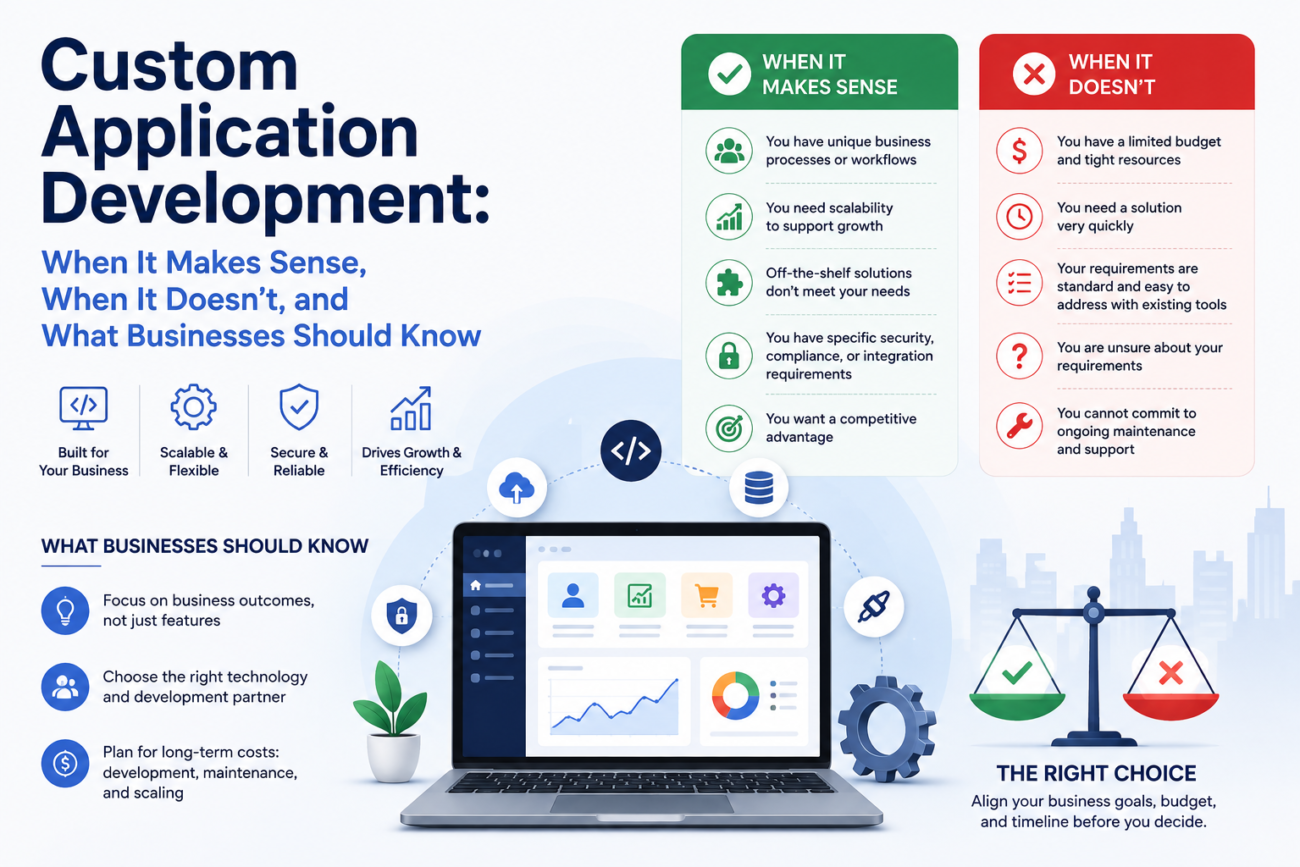
When Does Custom Application Development Make Sense?
There is no universal threshold, but several situations deserve investigation.
Custom development may make sense when:
- an important business process cannot be handled properly by existing software,
- employees spend significant time transferring information manually,
- multiple systems need to operate as one workflow,
- spreadsheets have become business-critical applications,
- existing software requires excessive workarounds,
- customers or partners need an experience that standard platforms cannot provide,
- the business has proprietary processes that create competitive advantage,
- existing technology cannot scale with transaction or user growth,
- or the long-term cost of inefficiency exceeds the cost of solving the problem.
Notice that none of these reasons is simply “we want our own app.”
There should be a business case behind the technology.
McKinsey estimates that as much as 71% of the impact from business transformations depends on
technology. That does not mean technology creates the transformation by itself. It does show why technology architecture increasingly affects whether broader operational changes succeed.
Source: McKinsey, Breaking technical debt’s vicious cycle to modernize your business
Five Mistakes to Avoid Before Building Custom Software
1. Starting With Features Instead of the Problem
“We need an app with 25 screens” is not a business requirement.
Start by defining the problem, users, process, constraints, and desired outcome. Features should follow from those decisions.
2. Trying to Build Everything in Version One
A long feature list increases development time, cost, testing requirements, and project risk.
Identify the smallest useful version that solves the core problem. Real users will quickly show which features should come next.
3. Ignoring Existing Systems
If the application eventually needs information from Salesforce, SAP, NetSuite, Xero, Microsoft Dynamics, or another platform, understand those integrations before development begins.
Integration constraints can materially affect architecture.
4. Treating Maintenance as an Afterthought
Software needs monitoring, security updates, backups, bug fixes, infrastructure management, and periodic upgrades.
Budget for the application’s lifecycle, not just its launch.
5. Designing Only for Today’s Business
There is a balance here.
You should not engineer a system for 10 million users when you have 500.
But if the business reasonably expects transaction volumes, users, locations, products, or integrations to increase, the architecture should not make that growth prohibitively difficult.
The objective is practical scalability, not speculative over engineering.
Questions to Ask Before Speaking to a Custom Application Development Company
Before approaching a development partner, try to answer these questions:
- What specific business problem are we trying to solve?
- Who will use the application?
- How is the process handled today?
- What is inefficient, risky, expensive, or impossible about the current process?
- Which existing systems must the application integrate with?
- What absolutely needs to be available in the first release?
- What can wait?
- What would make the project commercially worthwhile?
You do not need a complete technical specification.
In fact, defining the technology too early can sometimes constrain the solution unnecessarily.
You need a clear understanding of the business problem.
A good development team should help convert that problem into the appropriate technical architecture.
Frequently Asked Questions About Custom Application Development
What is the difference between custom application development and software development
Software development is the broader discipline of creating software. Custom application development specifically refers to software designed around the requirements of a particular business, organization, or use case.
How much does custom application development cost?
There is no meaningful standard price because complexity varies enormously.
A relatively simple internal workflow application and a multi-tenant SaaS platform with mobile apps, complex integrations, high transaction volumes, advanced security, and AI functionality are fundamentally different projects.
The biggest cost drivers typically include scope, number of workflows, integrations, user roles, UI complexity, mobile requirements, data migration, security requirements, infrastructure, and testing.
A proper estimate should therefore follow requirements discovery rather than precede it.
How long does it take to build a custom application?
Again, it depends on scope.
A focused application or MVP can sometimes be delivered relatively quickly, while large enterprise platforms may require phased development over many months.
For larger requirements, phased releases are often preferable to waiting for every planned feature before putting the software into users’ hands.
Can custom applications integrate with existing software?
Yes. In fact, integration is one of the most common requirements in custom business applications.
Applications can often integrate with CRM, ERP, accounting, payment, e-commerce, marketing, warehouse, analytics, and other platforms through APIs or other integration mechanisms.
The feasibility and quality of an integration depend partly on what the external platform makes available.
Is custom software more secure than SaaS?
Not inherently.
Security depends on architecture, development practices, authentication, authorization, infrastructure, encryption, monitoring, testing, and ongoing maintenance.
A well-designed custom application can provide highly specific security and access controls, but custom software still needs to be actively secured and maintained.
Who owns a custom application?
Ownership depends on the development agreement.
Before starting a project, businesses should explicitly understand who owns the source code, intellectual property, data, cloud accounts, third-party licenses, documentation, and other project assets.
Can AI be integrated into a custom business application?
Yes, when there is a useful business case.
AI can be incorporated for document processing, information extraction, search, classification, summarization, recommendations, conversational interfaces, workflow assistance, and other tasks.
However, AI should be treated as a component of the solution rather than the reason for building the application. Deterministic business rules are often better for processes that require predictable, auditable outcomes.
The Most Important Question Comes Before the Technology
Custom application development can create enormous value when software limitations are creating genuine operational problems.
It can also become an expensive way to solve something that an existing SaaS product already handles perfectly well.
That is why the first conversation should not be:
“What technology should we build this in?”
It should be:
“What business problem are we solving, and is custom software the best way to solve it?”
At ActiKnow, we design and build custom web applications, mobile applications, data platforms, integrations, and AI enabled business solutions. Our approach starts with understanding the workflow and business case before recommending an architecture.
If you are evaluating a custom application, we can help determine what should be built, what should be integrated, what can remain off-the-shelf, and how to structure the first release without over engineering it.
References
- McKinsey & Company: Tech debt: Reclaiming tech equity
https://www.mckinsey.com/capabilities/tech-and-ai/our-insights/tech-debt-reclaiming-tech-equity - McKinsey & Company: Demystifying digital dark matter: A new standard to tame technical debt
https://www.mckinsey.com/capabilities/tech-and-ai/our-insights/demystifying-digital-dark-matter-a-new-standard-to-tame-technical-debt - McKinsey & Company: Breaking technical debt’s vicious cycle to modernize your business
https://www.mckinsey.com/capabilities/tech-and-ai/our-insights/breaking-technical-debts-vicious-cycle-to-modernize-your-business - IBM: Cost of a Data Breach Report 2025
https://www.ibm.com/reports/data-breach - Stack Overflow: 2024 Developer Survey, Work and Technology Purchases
https://survey.stackoverflow.co/2024/work
