

BigQuery Cost Optimization Starts With the Billing Model
BigQuery lets teams analyze large datasets without managing database infrastructure, but flexible consumption can make spending hard to forecast. For finance leaders, the useful questions are what drives the bill, which workloads are predictable, which costs are avoidable, and when reserved compute becomes a better commercial model.
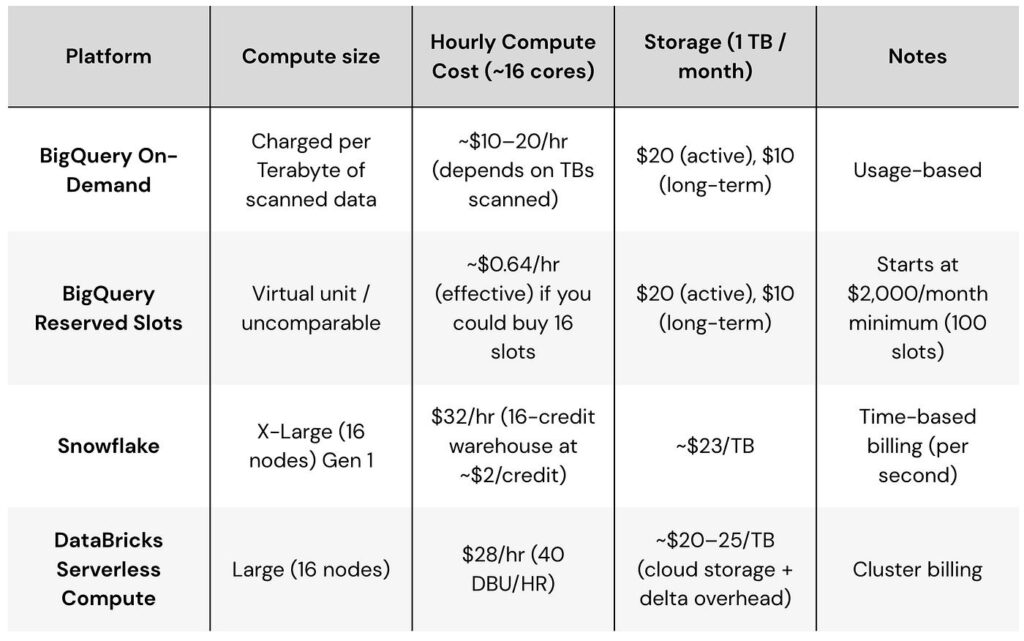
Google Cloud offers two primary compute pricing approaches. On-demand pricing is based on bytes processed by queries. Capacity pricing is based on compute measured in slot-hours and is managed through BigQuery editions and reservations. Capacity can autoscale, while Enterprise and Enterprise Plus can also use longer commitments.
The right answer is not simply that reservations are cheaper at scale. Workload shape matters.
1. Understand What You Are Actually Paying For
Separate BigQuery costs into query compute, storage, ingestion or streaming, data transfer and replication, BI Engine where applicable, and surrounding services.
Under on-demand pricing, query compute is tied to data processed. Under capacity pricing, query compute is tied to slot usage over time. Storage remains a separate concern.
That distinction changes optimization behavior. With on-demand, reducing bytes scanned can directly reduce query charges. With capacity pricing, efficient queries free capacity, improve concurrency, reduce autoscaling pressure, and may allow a lower future capacity requirement.
2. When On-Demand Pricing Makes Sense
On-demand is often the cleanest starting point when usage is modest, irregular, difficult to forecast, seasonal, exploratory, or still evolving. You avoid paying for capacity that the business does not use.
The trade-off is variability. A surge in dashboard refreshes, poorly filtered queries, repeated large scans, or a new analytical workload can increase spend quickly.
On-demand works best with query discipline, budgets, monitoring, and appropriate quotas.
3. When Capacity Pricing Becomes Attractive
Capacity pricing changes the commercial unit from bytes processed to slot-hours. Reservations let organizations allocate capacity to workloads and manage how it is shared.
Evaluate capacity pricing when query volume is consistently high, forecasting matters, workloads run continuously, dashboard concurrency is predictable, workload isolation is useful, or historical usage is stable enough to size capacity sensibly.
Using reservations does not automatically require a long commitment. BigQuery supports pay-as-you-go autoscaling, so teams can observe real behavior before deciding whether longer commitments are justified.
4. Do Not Choose Using Monthly Spend Alone
Two organizations with the same monthly bill can have very different workloads. One may run huge ad hoc queries on a few unpredictable days. Another may refresh stable dashboards throughout every business day.
The second organization may be a stronger candidate for capacity planning because its workload is repeatable. Evaluate cost stability, workload stability, concurrency, and performance requirements. The billing decision should follow workload evidence, not an arbitrary spending threshold.
5. Use Historical Data Before Making the Switch
Do not size a reservation from intuition. Use historical job and billing data to understand bytes processed, slot consumption, query duration, concurrency, peak periods, scheduled-query patterns, BI refresh windows, project attribution, and growth.
Google Cloud provides a BigQuery slot recommender. Current documentation says it analyzes historical slot usage, uses a 30-day observation window for autoscaling estimates, and can compare pay-as-you-go with one-year and three-year commitment options.
Treat recommendations as decision support rather than an automatic purchasing instruction. A 30-day period can be misleading if it includes a migration, launch, holiday period, or one-time backfill.

6. Model the Break-Even Point
A useful CFO-level analysis compares expected annual cost under realistic scenarios.
For on-demand, model normal query volume, expected growth, high-usage months, avoidable scan reduction, and planned workloads. For capacity pricing, model expected slot usage, autoscaling behavior, edition, commitment level, growth headroom, idle capacity, and peak demand.
Compare expected, upside, and downside scenarios. Commitments can improve unit economics, but they reduce flexibility. A commitment purchased just before a major optimization program may lock the company into capacity it no longer needs.
7. Partitioning Is a High-Leverage Control
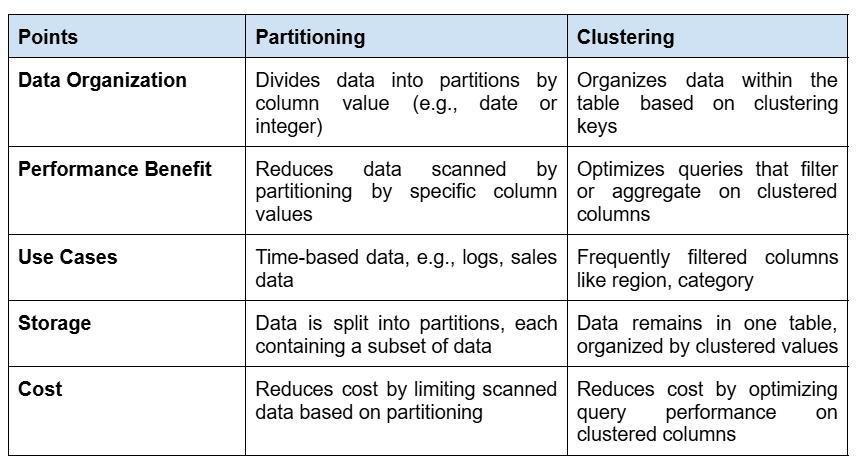
Partitioning divides a table based on a partitioning column or ingestion time. When queries filter appropriately on that field, BigQuery can avoid processing irrelevant partitions.
For an on-demand workload, that can directly reduce bytes processed. A dashboard showing the last 30 days should not repeatedly scan years of history when the model can prune older partitions.
Partitioning only works economically when query patterns use it. Track whether important workloads actually benefit from the table design.
8. Use Clustering for Repeated Filtering Patterns
Clustering organizes data based on selected columns and can reduce data scanned for queries that repeatedly filter or aggregate using those fields.
Useful candidates can include customer, account, region, product, event type, or status. The right choice depends on real query patterns.
Google Cloud also provides partition and cluster recommendations based on workload history. These can identify tables where a structural change may produce savings, though teams should account for the processing and temporary storage costs of applying changes.
9. Stop Reading Data You Do Not Need
Production workloads should request only the fields they need. Wide event, CRM, or transaction tables can contain many columns. A dashboard that needs six measures and dimensions should not scan dozens of unrelated fields every time it refreshes.
This matters especially when BI tools generate SQL automatically. Review generated queries from Power BI, Tableau, Looker Studio, or other reporting layers. A visually simple dashboard can generate expensive warehouse queries if the semantic model or connector is poorly designed.
Cost optimization therefore belongs partly in the BI layer.
10. Treat Dashboard Refresh Frequency as a Financial Decision
A dashboard refreshed every five minutes costs differently from the same dashboard refreshed every four hours. The useful question is not “Can we refresh this frequently?” but “What business decision improves because we refresh this frequently?”
For each dashboard or data product, define required freshness, source-data arrival frequency, number of users, business criticality, query cost, and refresh duration.
Refreshing every 15 minutes when the source updates once each night creates cost without creating information.
11. Separate Interactive, Batch, and Development Workloads
Not all queries have the same urgency. Executive dashboards may need responsive performance during business hours. Nightly transformations may tolerate flexible execution. Development queries may be unpredictable and should not degrade production reporting.
Reservations can help isolate workloads by allocating capacity deliberately. Even on-demand environments should use project structure, labels, controls, and monitoring to distinguish production from experimentation.
12. Put Guardrails Around On-Demand Spend
Google Cloud documents custom query quotas for limiting on-demand query usage at project or user level. Quotas are hard controls, so a badly chosen limit can stop a legitimate workload.
Combine them with softer controls such as billing budgets and alerts, query cost estimation, maximum bytes billed where appropriate, project separation, job labels, usage dashboards, and review of high-cost queries.
The objective is not to discourage analysis. It is to make accidental waste visible before it becomes material.

13. Do Not Confuse Optimization With Cost Suppression
The cheapest warehouse is not necessarily the best warehouse.
A cost reduction that makes executive dashboards slow, delays operational reporting, blocks analysts, or creates manual work elsewhere may destroy more value than it saves.
Evaluate monthly compute cost alongside service outcomes such as dashboard latency, refresh success, concurrency, and analyst wait time.
Optimization should remove waste while preserving the performance the business actually needs.
14. Build Cost Attribution Into the Platform
Cloud bills become difficult to govern when nobody can explain which workload created them.
Use projects, reservations, labels, service accounts, teams, applications, or other dimensions to distinguish production BI, transformations, data science, ad hoc analysis, development, customer-facing analytics, and one-time migrations.
Then assign ownership. An unexplained cost cannot be managed well. An attributed cost can be challenged, budgeted, forecast, or justified.
15. Optimize Before Signing a Long Commitment
Before purchasing long-term capacity, clean up obvious inefficiencies. Otherwise, historical waste becomes the baseline used to size the commitment.
Review large unnecessary scans, duplicate scheduled jobs, over-frequent dashboard refreshes, unused derived tables, poor partition filtering, unhelpful clustering, development workloads mixed with production, and repeated transformations that could be reused.
After optimization, observe the new workload profile and then evaluate capacity requirements.
16. Use a FinOps Review Cadence
BigQuery optimization should not be a one-time project. Create a monthly or quarterly review involving data engineering, BI, platform owners, and finance.
Ask: What did we spend? Why did it change? Which workloads drove the change? What did optimization save or avoid? Are reservations appropriately sized? Are commitments still appropriate? Which expensive workloads lack clear business value? What new workloads are coming? What should next quarter’s spend be?
This turns cloud cost from a technical surprise into an operating metric.
A CFO-Friendly Decision Framework
Use on-demand pricing when workload is uncertain, sporadic, relatively modest, or still evolving. Focus on bytes processed, partitioning, clustering, query discipline, refresh frequency, and cost guardrails.
Evaluate capacity pricing when workloads are consistently large, predictable, concurrent, or need stronger workload management. Use historical slot data and the slot recommender before committing.
Use autoscaling when you want capacity-based management but still need elasticity. Establish sensible maximum capacity rather than assuming every peak deserves unlimited scale.
Consider commitments only after the workload is understood and obvious waste has been removed. Compare pay-as-you-go, one-year, and three-year economics against realistic growth and downside scenarios.
Revisit the decision periodically. BigQuery pricing strategy should change when the workload changes.

Practical BigQuery Cost Optimization Checklist
For finance leaders:
- Can we explain month-over-month BigQuery cost changes?
- Can we attribute compute spend to business workloads?
- Do we have a 6- to 12-month forecast?
- Have we compared on-demand and capacity economics using real usage?
- Would a commitment remain sensible if usage fell?
For data and BI teams:
- Are large tables partitioned appropriately?
- Do important queries prune partitions?
- Are clustering choices based on actual filters?
- Are production queries reading only needed fields?
- Are dashboard refresh schedules aligned with business freshness needs?
- Are high-cost queries reviewed?
- Are development and production workloads distinguishable?
- Are budgets, alerts, quotas, or maximum-byte controls appropriate?
- Have we reviewed slot recommendations?
- Have we optimized the workload before considering a long commitment?
Frequently Asked Questions
What is the difference between BigQuery on-demand and capacity pricing?
On-demand query pricing is based on the amount of data processed by queries. Capacity pricing is based on compute measured in slot-hours and uses BigQuery editions and reservations. Capacity can autoscale, and eligible editions can use longer-term commitments.
Are BigQuery slot reservations always cheaper?
No. The economics depend on workload size, consistency, concurrency, optimization, edition, autoscaling, and commitment choices. Irregular workloads can remain well suited to on-demand pricing.
Should we optimize queries if we already use capacity pricing?
Yes. Efficient queries consume less capacity, improve concurrency, reduce pressure on autoscaling, and may allow the organization to lower future capacity requirements.
How does partitioning reduce BigQuery cost?
Partitioning lets BigQuery avoid processing irrelevant partitions when filters use the partitioning field appropriately. Under on-demand pricing, reducing bytes processed can directly reduce query compute charges.
What is the BigQuery slot recommender?
Google Cloud’s slot recommender analyzes historical slot usage and provides cost or performance recommendations for reservation and on-demand workloads. It can compare different capacity and commitment configurations. Recommendations should still be reviewed against expected future changes.
How often should BigQuery costs be reviewed?
Organizations with material analytical spend should review costs monthly at an operational level, with a broader capacity and pricing review quarterly or whenever workload patterns change significantly.
Call to Action
BigQuery cost optimization works best when cloud billing, data architecture, transformation workloads, and BI refresh behavior are reviewed together.
For implementation support across dashboards, data integration, modeling, and automation, explore Actiknow’s Business Intelligence services. To discuss a BigQuery or reporting requirement, contact Actiknow.