
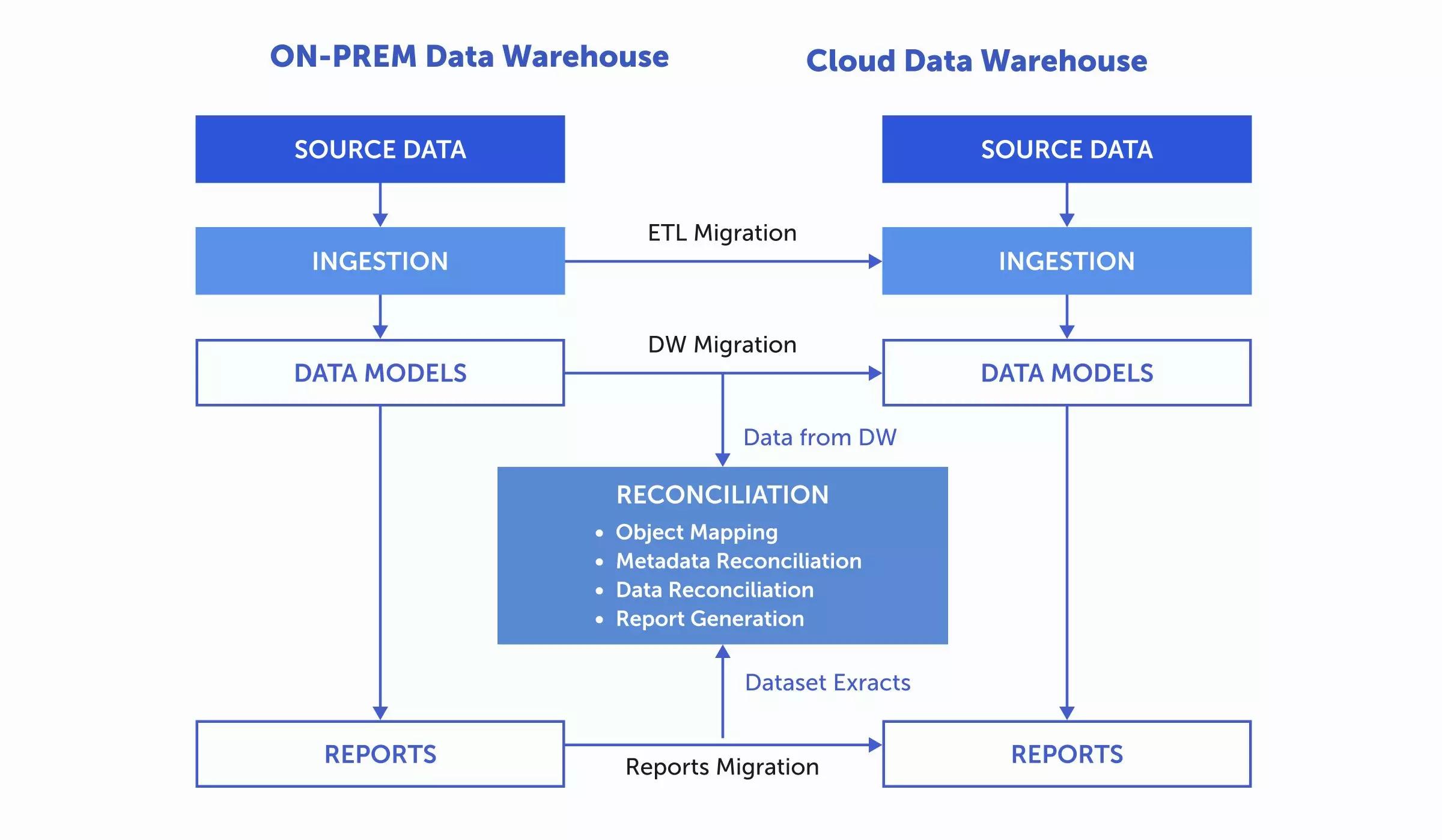
Data Warehouse Migration Checklist: Moving from Redshift to Snowflake
A Redshift to Snowflake migration is not simply a matter of copying tables from one cloud data warehouse to another.
The data itself is only one part of the system.
A production warehouse also contains transformation logic, schedules, roles, BI dependencies, data-quality rules, historical loading patterns, operational alerts and assumptions that may have accumulated over years.
A successful migration therefore has two objectives:
- Reproduce the business outputs that must remain consistent.
- Use Snowflake appropriately rather than recreating every Redshift design decision unchanged.
This checklist covers the work that should happen before, during and after cutover.
1. Define Why You Are Migrating
Start with the business reason.
Common drivers include scalability, workload isolation, operating simplicity, cost management, concurrency, data sharing or alignment with a broader cloud-data strategy.
Write down the expected outcomes.
Examples:
- Reduce BI query contention.
- Separate ingestion, transformation and reporting compute.
- Improve workload scalability.
- Simplify administration.
- Support new data-sharing requirements.
- Improve development and production separation.
- Create clearer cost attribution.
These objectives will influence the target architecture.
Without them, the project can become a technical lift-and-shift with no clear definition of success.
Actiknow’s business intelligence services cover data engineering, cloud data warehouses and BI implementation across platforms including Snowflake, Redshift and BigQuery. A migration should be treated as an end-to-end reporting architecture change, not just a database transfer.
2. Inventory the Existing Redshift Environment
Create a complete inventory before changing anything.
Capture:
- Databases and schemas.
- Tables and views.
- Materialized views.
- Stored procedures.
- User-defined functions.
- External tables.
- Data types.
- Distribution styles and keys.
- Sort keys.
- Constraints.
- Users, groups and roles.
- Permissions.
- ETL and ELT jobs.
- Scheduled queries.
- BI connections.
- Data exports.
- Downstream applications.
- Data-sharing processes.
- Monitoring and alerts.
- Historical retention.
Object counts alone are not enough.
Identify which objects are actively used.
A warehouse often contains abandoned tables, duplicate models and old experiments that should not automatically migrate.
3. Map Upstream and Downstream Dependencies
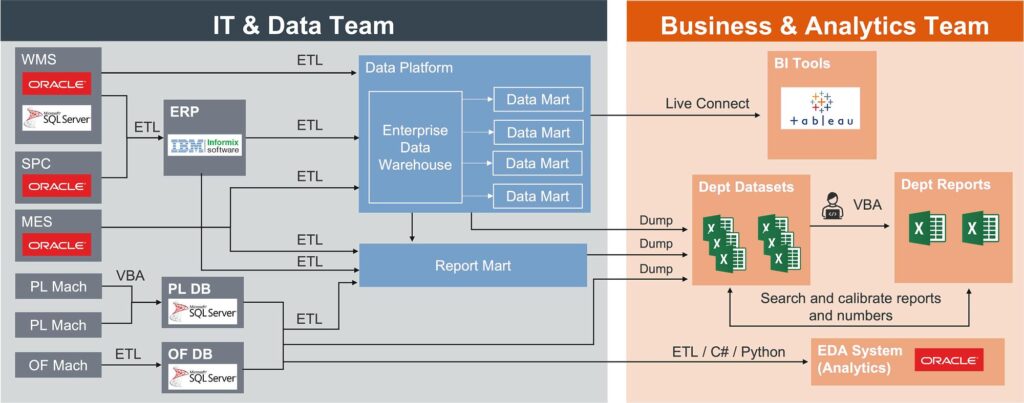
For every important dataset, identify where it comes from and where it goes.
Upstream dependencies can include application databases, SaaS connectors, files, APIs, event streams and object storage.
Downstream dependencies can include Power BI, Tableau, Looker, notebooks, exports, machine-learning jobs, customer applications and operational processes.
This dependency map helps determine migration sequence.
A table that feeds ten executive dashboards is more critical than an unused staging table even if both contain the same amount of data.
4. Classify Objects by Migration Strategy
Do not use one strategy for every object.
Classify each object as:
- Migrate unchanged where practical.
- Translate to Snowflake equivalent.
- Refactor.
- Rebuild.
- Retire.
- Archive only.
For example, a simple dimensional table may move easily.
A Redshift-specific stored procedure or workload-management assumption may require redesign.
An unused temporary table may be retired entirely.
This classification prevents unnecessary migration work.
5. Review SQL Compatibility
Redshift and Snowflake both support SQL, but they are not identical.
Review:
- Data types.
- Date and timestamp functions.
- String functions.
- JSON and semi-structured data logic.
- Window functions.
- Casting behavior.
- Null handling.
- Sequence or identity behavior.
- Stored procedures.
- User-defined functions
- Temporary objects.
- DDL.
- MERGE and upsert patterns.
- System tables.
- Administrative queries.
Do not wait until user acceptance testing to discover that a critical transformation relies on platform-specific behavior.
Build a compatibility register and test high-risk SQL early.
6. Reconsider Physical Design
Redshift physical design commonly includes distribution and sort choices that affect how data is stored and queried.
Do not mechanically translate these into Snowflake structures.
Snowflake has a different storage and compute architecture.
Start with the logical model and workload.
Then decide whether Snowflake-specific optimization such as clustering is actually needed for particular large tables and query patterns.
The migration is an opportunity to remove physical-design decisions that existed only because of the source platform.
7. Design the Snowflake Account Structure
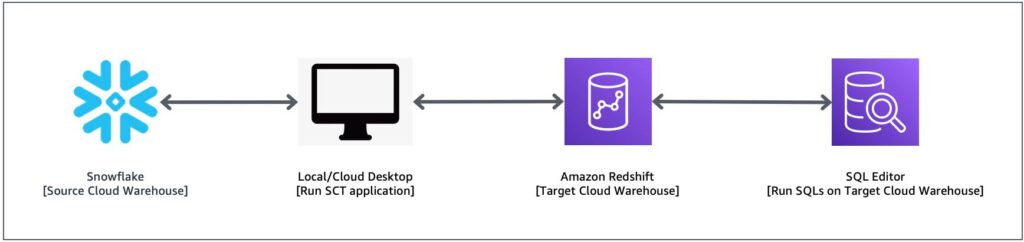
Define the target environment before loading production data.
Decisions may include:
- Accounts or organizations.
- Development, test and production separation.
- Databases.
- Schemas.
- Warehouses.
- Resource monitors.
- Roles.
- Service accounts.
- Network policies.
- Data-retention settings.
- Object ownership.
- Naming standards.
- Tagging.
- Cost attribution.
Keep the architecture understandable.
A complicated environment is not automatically more secure or scalable.
8. Design Role-Based Access Before Cutover
Do not recreate Redshift permissions user by user without review.
Define Snowflake roles around job functions and service responsibilities.
Examples:
- Data ingestion role.
- Transformation role.
- BI read role.
- Analyst role.
- Engineering role.
- Administrative role.
- Service-account roles.
Then grant roles the minimum access required.
Review sensitive schemas and columns separately.
Access migration should include testing, not merely DDL generation.
A successful query from an administrator account does not prove that the production BI service account has the correct permissions.
Actiknow’s security documentation describes least-privilege access, MFA and controlled credentials as core practices. Those principles should be applied to warehouse migration rather than postponed until after go-live.
9. Choose the Historical Data Migration Method
The best approach depends on data volume, network architecture, downtime tolerance and the current data estate.
A common Redshift pattern is to unload data to Amazon S3 and load it into the target platform.
AWS documents that Redshift UNLOAD can export query results to S3 in formats including text, CSV, JSON and Parquet, and can write files in parallel. For large analytical migrations, columnar formats such as Parquet can be useful depending on the target loading strategy.
Plan:
- Export format.
- File sizes.
- Compression.
- Partitioning.
- Encryption.
- S3 location.
- IAM permissions.
- Manifest or file inventory.
- Snowflake stage configuration.
- Load method.
- Validation.
- Cleanup and retention.
Do not begin a multi-terabyte export without first testing the complete path on representative tables.
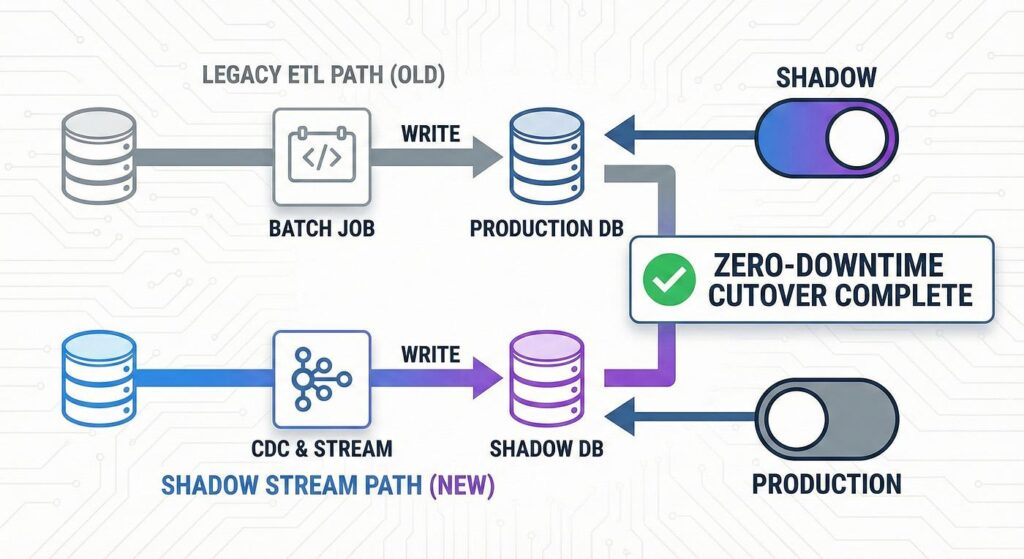
10. Separate Historical Backfill From Ongoing Change
Historical loading and incremental synchronization are different problems.
The historical load may move years of data.
The incremental process needs to capture changes that occur while migration work continues.
Define a point from which ongoing changes will be synchronized.
Options depend on the source systems and pipeline architecture.
The key requirement is that you can explain how every record created or changed during the migration window reaches Snowflake.
Without that plan, the migration can produce a target warehouse that is internally consistent but already stale at cutover.
11. Create a Data Reconciliation Framework
Row counts are necessary but insufficient.
For important tables, validate:
- Row counts.
- Distinct business keys.
- Null counts.
- Minimum and maximum dates.
- Numeric totals.
- Hash or checksum comparisons where appropriate.
- Duplicate counts.
- Referential relationships.
- Known business KPIs.
- Recent-period counts.
- Historical-period counts.
For fact tables, reconcile business totals that users recognize.
For example:
- Orders.
- Revenue.
- Invoices.
- Customers.
- Sessions.
- Applications.
- Transactions.
A technically successful copy can still be wrong if transformation behavior changed.
12. Validate Transformations Independently
Do not validate only final dashboards.
Compare transformation outputs at multiple layers.
For example:
- Raw source.
- Staging model.
- Intermediate transformation.
- Final mart.
- Dashboard metric.
This makes discrepancies easier to isolate.
If a final KPI differs by 2%, the team should be able to determine whether the issue originated in extraction, type conversion, business logic or BI calculation.

13. Rebuild Incremental Logic Carefully
Incremental pipelines often contain hidden assumptions.
Review:
- Watermark columns.
- Updated timestamps.
- Late-arriving records.
- Deletes.
- Hard deletes versus soft deletes.
- Backdated changes.
- Deduplication.
- Merge keys.
- Lookback windows.
- Retry behavior.
- Idempotency.
Do not assume that an incremental query copied from Redshift will behave correctly in the new architecture.
Test updates, inserts, deletes and late changes explicitly.
14. Review Orchestration
Inventory every scheduler and dependency.
This may include dbt, Airflow, Fivetran, custom scripts, cloud schedulers or other tools.
Document:
- Trigger.
- Frequency.
- Dependencies.
- Expected duration.
- Failure alert.
- Retry policy.
- Owner.
- Target warehouse.
- Downstream dependency.
Migration is a good time to remove redundant schedules and make ownership clearer.
15. Reconnect BI Tools Deliberately
Changing the warehouse connection can affect more than credentials.
Check:
- Database and schema names.
- Table and view names.
- Case sensitivity.
- Custom SQL.
- Query parameters.
- Authentication.
- Service accounts.
- Gateway or network configuration.
- Extract schedules.
- Direct-query behavior.
- Timeouts.
- Row-level security.
- Published semantic models.
Test the actual production connection method.
A developer connecting successfully from a desktop does not prove that the BI service will work after cutover.
16. Validate Dashboard Outputs in Parallel
For important reports, run Redshift and Snowflake in parallel.
Compare the same reporting period.
Check:
- Headline KPIs.
- Trend charts.
- Dimensions.
- Filters.
- Drilldowns.
- Exports.
- Edge cases.
- Historical periods.
- Recent periods.
Do not expect every low-level query plan to match.
The goal is business-output equivalence where the business logic is intended to remain the same.
Document accepted differences.
17. Performance Test Real Workloads
Snowflake can scale compute independently, but that does not eliminate the need for workload testing.
Test representative concurrency and query patterns.
Measure:
- Dashboard load time.
- Transformation duration.
- Data-loading duration.
- Concurrency.
- Warehouse utilization.
- Queueing.
- Credit consumption.
- Large ad hoc queries.
Performance tests should use realistic data volumes.
A query that runs quickly against a small migrated sample may behave differently against full history.

18. Establish Cost Guardrails
Snowflake changes the cost model.
Define:
- Warehouse sizes.
- Auto-suspend.
- Auto-resume.
- Resource monitors.
- Workload separation.
- Query monitoring.
- Ownership.
- Budget alerts.
- Tagging or cost attribution.
The objective is not simply to minimize compute.
It is to give each workload enough resources while making consumption visible and controllable.
19. Plan Cutover as a Sequence
A cutover plan should identify the exact order of events.
For example:
- Confirm migration readiness.
- Freeze relevant warehouse changes.
- Complete final incremental synchronization.
- Run reconciliation.
- Switch transformation jobs.
- Switch BI connections.
- Run smoke tests.
- Validate critical dashboards.
- Confirm users can access the environment.
- Monitor production.
- Keep Redshift available during the agreed fallback window.
Assign an owner and expected duration to each step.
20. Define Rollback Before Cutover
Rollback is not “we still have Redshift.”
Define what would cause rollback.
Examples:
- Critical data reconciliation failure.
- Major BI outage.
- Unacceptable performance.
- Permission failure affecting critical users.
- Missing incremental data.
- Severe pipeline instability.
Then define how rollback works.
- Which connections are changed back?
- Which jobs resume?
- How are transactions or data changes handled during the Snowflake window?
- Who makes the decision?
- How long is rollback available?
A rollback plan written during an outage is not a rollback plan.
21. Avoid Dual-Write Ambiguity
During parallel operation, be clear about which platform is authoritative.
If transformations run in both warehouses, ensure users know which outputs are production.
If downstream systems write back or consume exports, avoid uncontrolled switching between sources.
Parallel validation should increase confidence, not create two competing production systems.
22. Keep Redshift Until the Migration Is Proven
Do not decommission the source warehouse immediately after cutover.
Maintain an agreed observation period.
During that time:
- Monitor Snowflake jobs.
- Reconcile key metrics.
- Track user issues.
- Compare performance.
- Confirm historical access.
- Verify scheduled exports.
- Confirm security and access.
Then retire Redshift in controlled stages.
23. Archive What You Need Before Decommissioning
Decide what must be retained from Redshift.
This can include:
- Historical snapshots.
- DDL.
- Permissions.
- Query history where required.
- ETL code.
- Configuration.
- Audit evidence.
- Operational documentation.
- Migration reconciliation results.
Do not retain the entire old environment indefinitely merely because nobody has decided what can be deleted.
24. Update Documentation
At the end of the migration, documentation should describe the system that actually exists.
Update:
- Architecture diagrams.
- Data lineage.
- Database and schema ownership.
- Role model.
- Pipeline schedules.
- BI connections.
- Operational runbooks.
- Recovery procedures.
- Cost ownership.
- Support contacts.
- Known limitations.
Remove obsolete Redshift instructions so engineers do not follow the wrong runbook six months later.
25. Measure Migration Success
Return to the objectives defined at the beginning.
Measure outcomes such as:
- Dashboard performance.
- Pipeline duration.
- Failure rate.
- Concurrency.
- Operating effort.
- Compute cost.
- Data freshness.
- User adoption.
- Support incidents.
- Time to deliver new data products.
A migration is complete when the new platform is stable and delivering the intended business outcomes, not merely when the last table is copied.
Redshift to Snowflake Migration Checklist
Before migration:
- Define business objectives.
- Inventory Redshift objects and dependencies.
- Identify active versus obsolete objects.
- Classify migrate, refactor, rebuild, retire and archive items.
- Test SQL compatibility.
- Design Snowflake databases, schemas, warehouses and roles.
- Define historical and incremental migration methods.
- Define reconciliation criteria.
- Create cutover and rollback plans.
During migration:
- Load representative data first.
- Migrate historical data in controlled batches.
- Run incremental synchronization.
- Translate and test transformations.
- Configure permissions.
- Reconnect non-production BI.
- Reconcile tables and KPIs.
- Performance test realistic workloads.
- Document accepted differences.
Before cutover:
- Complete final synchronization.
- Run critical reconciliation.
- Confirm production credentials and network access.
- Validate BI connections.
- Confirm monitoring and alerts.
- Confirm cost controls.
- Review rollback triggers.
- Assign cutover owners.
After cutover:
- Monitor pipelines and dashboards.
- Track discrepancies.
- Maintain Redshift during the fallback period.
- Reconcile critical KPIs.
- Validate cost and performance.
- Update documentation.
- Archive required source artifacts.
- Decommission Redshift only after formal acceptance.
Frequently Asked Questions
Can Redshift data be exported to S3 for a Snowflake migration?
Yes. Amazon Redshift supports UNLOAD to Amazon S3 in several formats, including Parquet. The migration design still needs to define file structure, security, loading and reconciliation.
Should every Redshift table move to Snowflake?
No. Use the migration to identify obsolete, duplicate and temporary objects. Move what is required for the target operating model.
Will Redshift SQL run unchanged in Snowflake?
Some SQL will be portable, but platform-specific functions, data types, stored procedures, administrative queries and other behavior can differ. Test transformations systematically.
How do we validate a Redshift to Snowflake migration?
Use multiple controls: row counts, keys, nulls, date ranges, numeric totals, duplicates and business KPIs. Validate both historical and recent data.
Should Redshift and Snowflake run in parallel?
For important workloads, a controlled parallel-validation period can reduce cutover risk. Define which system remains authoritative and avoid uncontrolled dual production.
How long should Redshift remain available after cutover?
That depends on business risk and migration complexity. Define a fallback period before cutover and retire Redshift only after data, pipelines, BI and operational processes are accepted.
Should we copy the Redshift physical design into Snowflake?
Not automatically. Re-evaluate the target design based on Snowflake architecture and actual workloads rather than reproducing source-platform optimizations.
What is the biggest migration risk?
For many organizations, the biggest risk is not copying data. It is missing hidden dependencies or changing business logic without detecting the difference. Dependency inventory and parallel reconciliation reduce that risk.
Conclusion
A Redshift to Snowflake migration is a controlled change to the organization’s data platform.
Inventory the real system. Translate platform-specific logic deliberately. Move historical data with verifiable controls. Keep incremental data current. Rebuild access with least privilege. Validate business outputs in parallel. Define rollback before cutover.
Most importantly, do not switch off the source platform simply because the target warehouse is online.
The migration is successful when users trust the data, critical reporting works, pipelines are stable, access is correct, and the new environment can be operated confidently.
If you are planning a Redshift to Snowflake migration, Actiknow can help assess the current warehouse, map dependencies, migrate data and transformations, reconcile BI outputs, and plan a controlled cutover. Discuss your data warehouse migration with Actiknow.