
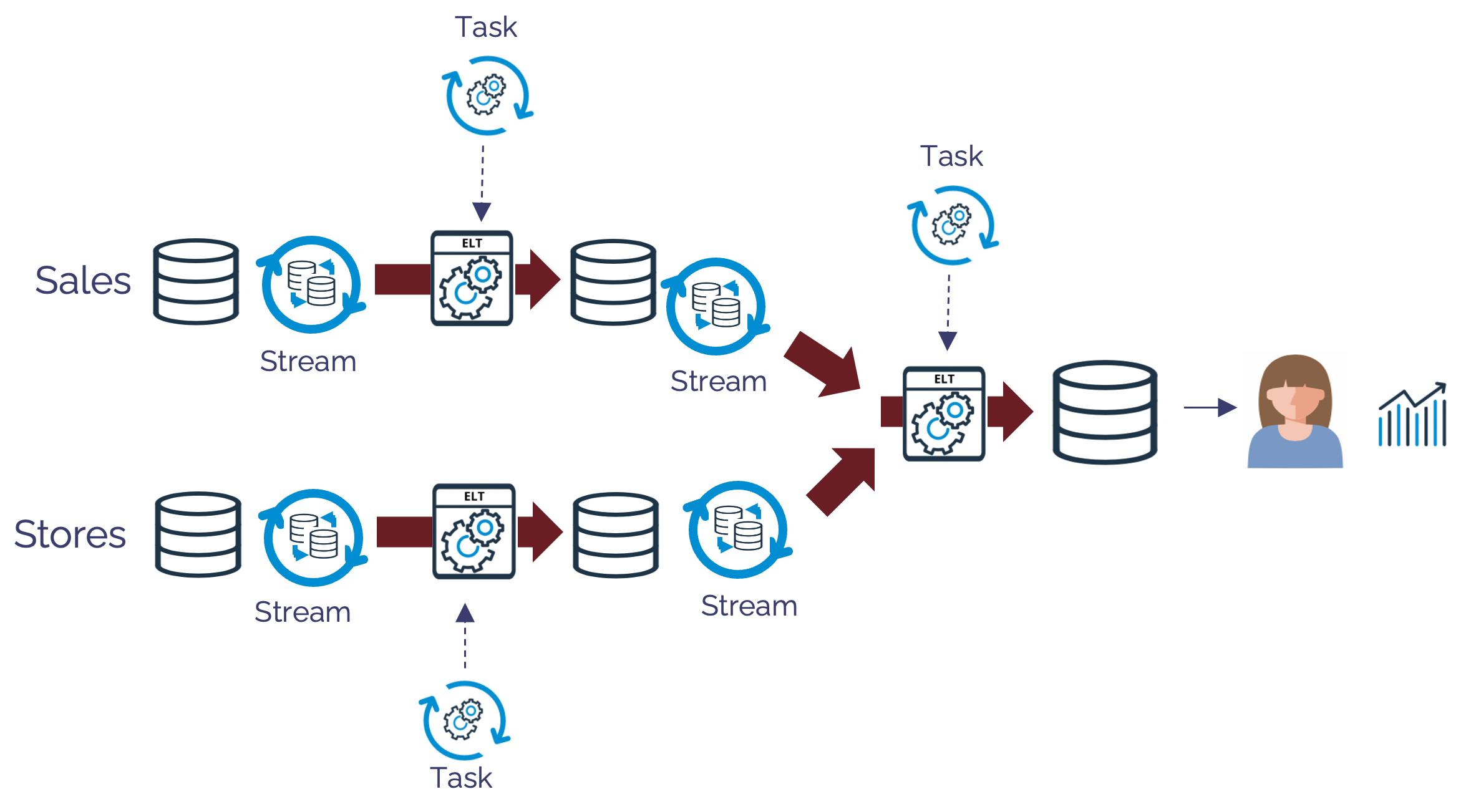
Snowflake now gives data teams several ways to build incremental pipelines. Two of the most important are dynamic tables and the established combination of streams and tasks.
They overlap, but they are not interchangeable.
The simplest distinction is this:
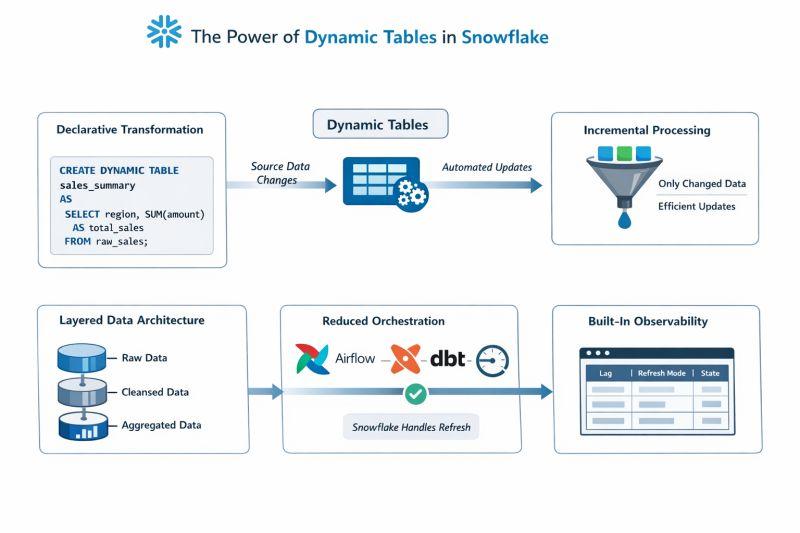
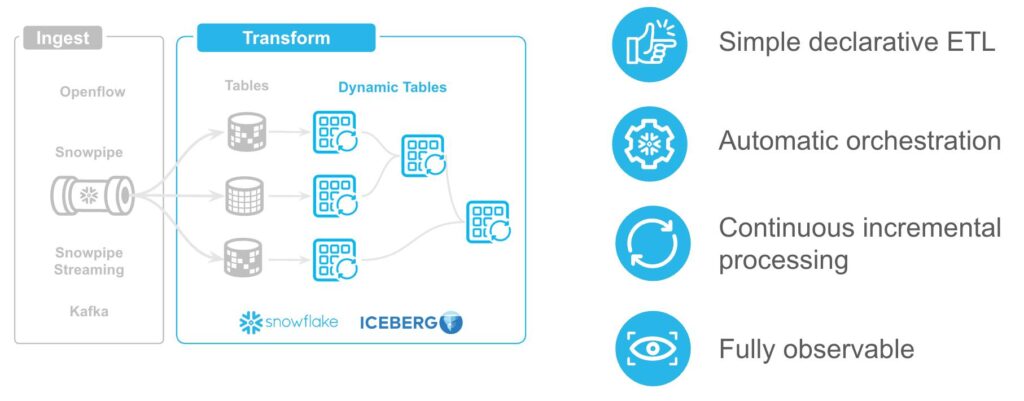
Dynamic tables are declarative. You define the result you want and Snowflake manages refresh behavior.
Streams and tasks are procedural. You explicitly capture changes and define what should happen with them.
The right choice depends on whether your pipeline is primarily a SQL transformation graph or an orchestrated process with procedural steps and side effects.
What Dynamic Tables Change
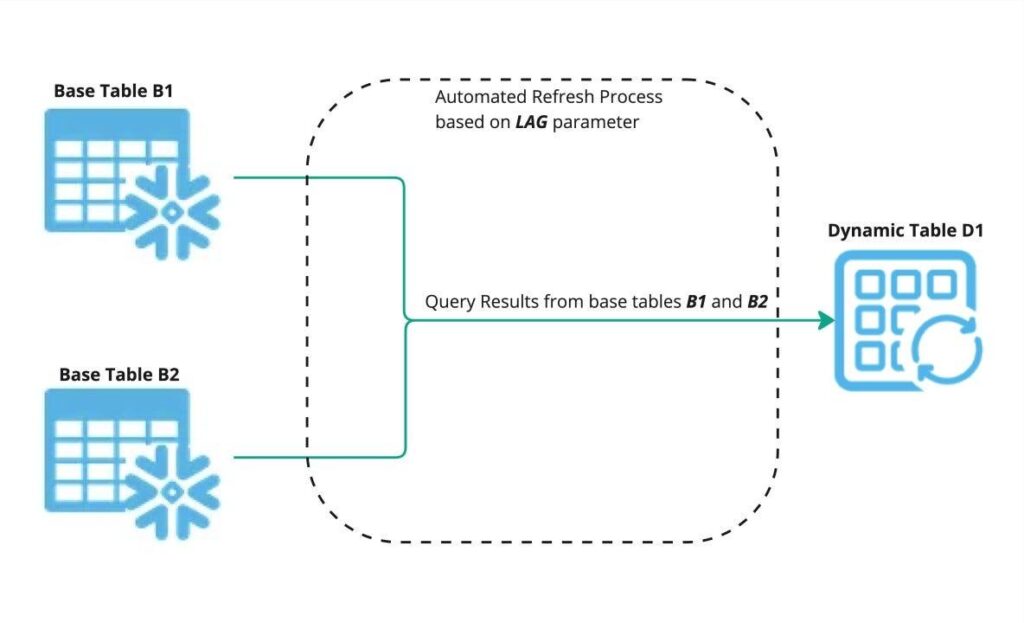
A dynamic table is defined by a query. Snowflake keeps its result refreshed according to the configured target lag and dependencies.
Snowflake’s current guidance recommends dynamic tables for new multi-table SQL pipelines involving joins, aggregations and window functions.
Instead of maintaining a stream, target table, MERGE and scheduled task, a team can often express the desired state as a SELECT.
This can reduce pipeline code and operational components.
Actiknow’s business intelligence and data engineering work includes Snowflake pipelines, warehouse modeling and BI layers. The important design question is not which Snowflake feature is newer, but which operating model makes the pipeline easiest to trust and maintain.
What Streams and Tasks Do
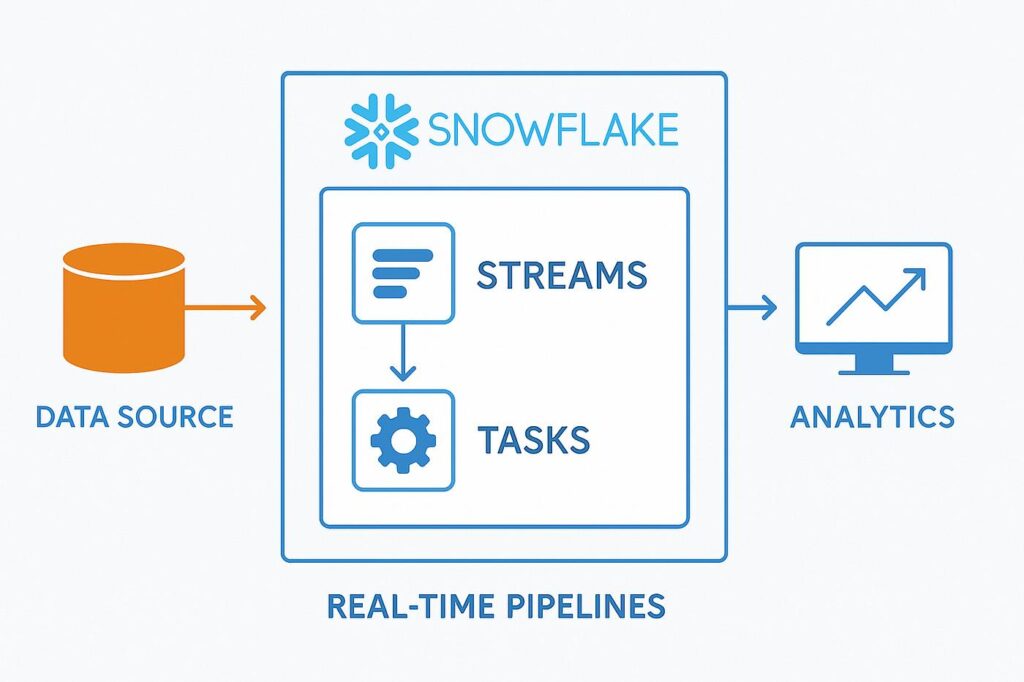
A Snowflake stream tracks row-level changes to a source object. It exposes change data that can then be consumed transactionally.
A task runs SQL, stored procedures or other supported processing on a schedule, through dependencies, or in triggered scenarios.
Together, streams and tasks provide explicit control over:
- Change capture.
- MERGE logic.
- Procedural processing.
- Task dependencies.
- Custom schedules.
- Conditional execution.
- External side effects.
This flexibility is why streams and tasks remain important even as dynamic tables simplify many SQL pipelines.
Use Dynamic Tables for Declarative SQL Pipelines
Dynamic tables are a strong fit when the pipeline can be described as a sequence of SQL results.
Examples include:
- Raw-to-clean transformations.
- Joins across operational datasets.
- Aggregations.
- Deduplication.
- Bronze, silver and gold warehouse layers.
- Curated reporting tables.
- Dimensional transformations that fit supported SQL.
The team defines what each stage should contain rather than coding how every change is applied.
Target Lag Is a Freshness Goal
One important conceptual difference is scheduling.
With a task, you can define an explicit schedule.
With a dynamic table, TARGET_LAG represents a freshness target.
Snowflake decides when refresh work should occur to try to meet that target.
That makes dynamic tables attractive when the business requirement is “keep this dataset within ten minutes of its inputs” rather than “run this SQL at exactly 10:05.”
If exact orchestration timing matters, streams and tasks may be more appropriate.
Use Streams and Tasks for Procedural Logic
Snowflake’s decision guidance favors streams and tasks when pipelines require procedural behavior.
Examples include:
- Stored procedures.
- IF/ELSE logic.
- Loops.
- Explicit MERGE operations.
- Complex upsert workflows.
- Custom retry logic.
- External functions.
- API calls.
- Strict CRON schedules.
- Side effects outside a declarative result table.
A dynamic table describes data state. It is not intended to become a general-purpose workflow engine.
Side Effects Are a Clear Boundary
Suppose a pipeline must identify completed orders and then call an external service.
The transformed order dataset may fit a dynamic table well.
The API call does not.
This is where a hybrid design becomes useful.
Snowflake supports streams on incrementally refreshed dynamic tables. A downstream task can consume those changes and perform work that the dynamic-table definition cannot express.
That allows teams to keep declarative transformations declarative while reserving procedural orchestration for the steps that actually need it.
Dynamic Tables Can Reduce Operational Objects
A traditional incremental pipeline might contain:
- Source table.
- Stream.
- Target table.
- Task.
- MERGE statement.
- Task schedule.
- Dependency configuration.
- Monitoring for each component.
A dynamic-table version may reduce this to a source plus a dynamic-table definition.
Fewer objects can mean:
- Less code.
- Less orchestration configuration.
- Fewer stream offsets to reason about.
- Simpler dependency management.
- Lower maintenance burden.
But simplicity depends on the transformation being a good fit.
Do Not Force Procedural Work Into Dynamic Tables
The goal is not to maximize dynamic-table adoption.
If a workflow needs precise control, use the tool designed for that control.
Trying to simulate procedural behavior inside increasingly complicated SQL can make a pipeline harder to understand than the streams-and-tasks version it replaced.
Architecture should reduce complexity, not move it.
Incremental Refresh Is Managed Differently
Streams expose changes since an offset and let your task decide how to apply them.
Dynamic tables manage incremental processing internally when supported.
This removes some implementation responsibility from the engineering team.
However, teams still need to monitor refresh mode, refresh history, lag and failures.
Managed does not mean unobservable.
Understand Full vs Incremental Refresh
Dynamic tables can use incremental or full refresh depending on configuration and query characteristics.
The performance and cost profile can differ substantially.
Before production, confirm:
- Resolved refresh mode.
- Refresh duration.
- Rows processed.
- Warehouse consumption.
- Target-lag attainment.
- Downstream dependencies.
Do not assume every dynamic table will incrementally process only a tiny delta.
Streams Give Explicit CDC Semantics
Streams are useful when the application needs to reason directly about inserts, updates and deletes.
They provide change metadata and transactional consumption behavior.
That can be important for:
- Operational synchronization.
- Custom SCD processing.
- Auditing workflows.
- Explicit MERGE logic.
- Event-driven downstream processing.
When the change set itself is the input to business logic, streams can be the clearer abstraction.
Dynamic Tables Are Better for Desired State
A useful decision question is:
Do we care about every event, or do we care about the current correct result?
If the objective is:
“Maintain a clean customer table representing the latest valid customer state,”
a dynamic table may express the requirement naturally.
If the objective is:
“For every qualifying customer change, execute a specific downstream action exactly through our controlled process,”
a stream and task architecture may be more appropriate.
Triggered Tasks Reduce Polling
Snowflake triggered tasks can run when a stream has data rather than repeatedly polling on a fixed schedule.
Snowflake states that triggered tasks do not consume compute until the event triggers the task.
This can be useful when new data arrives unpredictably.
It can also reduce latency compared with a schedule that checks periodically.
Triggered tasks are therefore an important option when evaluating streams and tasks against dynamic tables.
Scheduling Requirements Matter
Choose streams and tasks when the business requires precise procedural timing such as:
- Run at 2:00 AM.
- Run after another task succeeds.
- Run only on specific days.
- Execute a month-end procedure.
- Coordinate a controlled sequence.
Choose dynamic tables when the requirement is better expressed as:
Keep this dataset within approximately X minutes of upstream data.
These are different operating contracts.
Error Handling Differs
With tasks, teams can explicitly design:
- Retry logic.
- Conditional branches.
- Exception tables.
- Procedure-level logging.
- Notifications.
- Compensation.
Dynamic tables provide managed refresh behavior and refresh monitoring, but they are not a substitute for arbitrary application-style error workflows.
If the pipeline needs elaborate exception handling, include that in the architecture decision.
Cost Must Be Measured, Not Assumed
Dynamic tables can reduce engineering overhead, but they still consume compute for refresh.
Streams themselves do not perform transformation compute, while tasks consume compute when they run.

The lower-cost architecture depends on:
- Change volume.
- Refresh frequency.
- Query complexity.
- Warehouse size.
- Full versus incremental refresh.
- Task frequency.
- Idle polling.
- Downstream workload.
Measure representative workloads before standardizing.
Freshness and Cost Are Connected
A very aggressive target lag can increase refresh activity.
Ask whether the business genuinely needs one-minute freshness or whether fifteen minutes is sufficient.
The same applies to scheduled tasks.
Running every minute because the platform permits it is not an architecture requirement.
Set freshness based on business decisions.
Migration Does Not Need to Be All at Once
Snowflake explicitly supports hybrid pipelines.
Teams can migrate suitable stages from streams and tasks to dynamic tables while retaining procedural stages.
This is often safer than rewriting an entire production pipeline at once.
A practical migration approach is:
- Inventory existing streams and tasks.
- Classify each stage as declarative or procedural.
- Convert straightforward SQL transformation stages.
- Retain procedural steps where they add value.
- Run outputs in parallel.
- Reconcile results.
- Measure freshness and cost.
- Retire old objects only after acceptance.
When Dynamic Tables Are Usually the Better Fit
Consider dynamic tables when:
- The pipeline is primarily SQL transformations.
- You care about desired state more than individual events.
- Joins and aggregations form a multi-stage analytical pipeline.
- A freshness target is more important than an exact schedule.
- You want Snowflake to manage incremental refresh and dependencies.
- Reducing orchestration code is valuable.
When Streams and Tasks Are Usually the Better Fit
Consider streams and tasks when:
- You need explicit CDC processing.
- You need MERGE or procedural logic.
- You call stored procedures.
- You need external side effects.
- You need precise schedules.
- You need custom conditional execution.
- You need detailed control over retries or workflow state.
When a Hybrid Pattern Makes Sense
Use both when:
- Dynamic tables can simplify analytical transformations.
- A downstream action still requires procedural logic.
- You need a stream on the transformed result.
- A task needs to act only when changes appear.
This lets each Snowflake feature handle the problem it is best suited to solve.
Production Evaluation Checklist
Before choosing a pattern, answer:
- Is the pipeline declarative or procedural?
- Do we need individual change events or only correct current state?
- Do we need exact schedules?
- Are external calls or side effects involved?
- Is MERGE logic essential?
- What freshness does the business actually need?
- Can the dynamic-table query refresh incrementally?
- What happens when processing fails?
- How will backfills work?
- How will we monitor lag?
- What compute cost does each pattern create?
- Who owns operational recovery?
- Can the pipeline be simplified without losing control?
Frequently Asked Questions
Do dynamic tables replace Snowflake streams and tasks?
Not completely. They can replace many SQL-based transformation pipelines, but streams and tasks remain appropriate for procedural logic, explicit CDC, custom scheduling, external calls and other controlled workflows.
Are dynamic tables incremental?
They can refresh incrementally when the query and configuration support it. Confirm the resolved refresh mode and test production-like workloads.
What does TARGET_LAG mean?
It defines a freshness target relative to upstream data rather than a fixed execution schedule. Snowflake manages refresh timing to work toward that target.
Can I use streams with dynamic tables?
Yes. Snowflake supports standard streams on incrementally refreshed dynamic tables, enabling hybrid architectures.
Are triggered tasks better than scheduled tasks?
They can be better when processing should occur only when stream data changes. Scheduled tasks remain useful when work must run at specific times.
Which is cheaper?
There is no universal answer. Cost depends on refresh frequency, query complexity, change volume, warehouse sizing and operational design. Benchmark representative workloads.
Should we migrate existing streams and tasks to dynamic tables?
Only where the pipeline becomes simpler and retains the required behavior. Snowflake supports partial migration, so teams can convert suitable stages without rewriting everything.
Conclusion
The choice between Snowflake dynamic tables vs streams and tasks is primarily a choice between declarative data state and procedural workflow control.
Use dynamic tables when SQL can clearly describe the result and a freshness target is the right operating model.
Use streams and tasks when the process needs explicit change handling, procedural logic, side effects or strict orchestration.
Use both when the pipeline contains both kinds of work.
The best Snowflake architecture is not the one with the fewest features. It is the one that makes data freshness, failure recovery, cost and ownership easiest to understand.
If you are designing or simplifying Snowflake data pipelines, Actiknow can help assess the current architecture, choose the right incremental-processing pattern, implement transformations and validate downstream BI outputs. Discuss your Snowflake and data engineering requirements with Actiknow.