

Choosing between Amazon Redshift Serverless and a provisioned Redshift data warehouse is not simply a question of whether you want to manage servers.
Both are managed cloud analytics services.
The real difference is how much capacity planning, workload predictability and operational control your team wants to own.
Redshift Serverless automatically provisions and scales compute around workloads.
Provisioned Redshift gives you a cluster whose capacity and scaling behavior you manage more explicitly.
Either can be the right choice.
Start With the Workload, Not the Product Label
Before comparing architectures, profile the workload.
Measure:
- Daily active query hours.
- Peak concurrency.
- ETL windows.
- BI usage.
- Ad hoc analysis.
- Data-science workloads.
- Idle periods.
- Seasonality.
- Performance SLA.
- Growth.
The more predictable and continuously busy the workload, the more useful it is to compare committed provisioned capacity carefully.
The more intermittent or unpredictable the workload, the stronger the serverless operating model can become.
Actiknow’s business intelligence and data engineering services include Redshift warehouse design, pipeline architecture and BI performance work. Capacity decisions should be based on measured usage and business SLAs rather than a preference for “serverless” or “traditional” infrastructure.

How Redshift Serverless Works
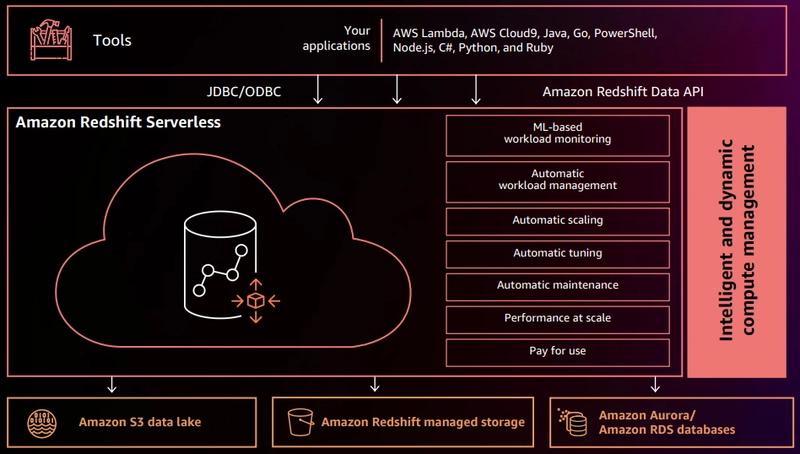
AWS organizes Redshift Serverless around namespaces and workgroups.
A namespace contains database objects and users.
A workgroup contains compute resources.
You do not select cluster node types and node counts in the same way as a provisioned cluster.
AWS automatically manages capacity and lets teams configure base capacity and cost controls.
Billing is based on Redshift Processing Unit usage while workloads run, subject to current AWS billing rules.
How Provisioned Redshift Works
Provisioned Redshift uses clusters.
You choose a supported node family, cluster size and related configuration.
Compute remains provisioned until the cluster is paused, resized or changed.
This provides explicit capacity ownership.
For steady workloads, that predictability can be useful.
It also means the team must pay more attention to:
- Sizing.
- Resizing.
- Concurrency.
- Utilization.
- Maintenance windows.
- Cost commitments.
Serverless Reduces Capacity Administration
With Serverless, teams do not need to choose a node count for normal operation.
This can reduce time spent on:
- Initial sizing.
- Resize planning.
- Capacity response to intermittent spikes.
- Pause/resume automation.
- Some concurrency management.
That is valuable for lean data teams.
But serverless does not remove performance engineering.
SQL, table design, workload patterns and cost controls still matter.
Provisioned Gives More Explicit Capacity Control
Some organizations prefer knowing exactly what cluster capacity exists.
Reasons can include:
- Stable 24/7 workloads.
- Predictable performance testing.
- Existing reserved-capacity economics.
- Mature workload-management practices.
- Strict change control.
- Large established Redshift estates.
The operating team may already know how to tune and govern the environment effectively.
In that situation, moving to Serverless purely to reduce infrastructure terminology may not create meaningful value.

Intermittent Workloads Favor Serverless
Consider an analytics environment that is heavily used:
- 8:00 AM to 11:00 AM.
- A little during the afternoon.
- Almost not at all overnight.
Serverless aligns compute billing more closely with actual activity.
AWS notes that there is no need to pause or resume Serverless because compute is billed when workloads run.
That can simplify environments with substantial idle time.
Steady Workloads Need an Economic Comparison
If a warehouse is busy continuously, Serverless will also be consuming capacity continuously.
At that point, compare:
- Actual RPU consumption.
- Provisioned cluster cost.
- Reserved pricing or commitments.
- Concurrency behavior.
- Operational effort.
- Performance.
Do not assume “serverless” means cheaper.
It means a different consumption and management model.
Base Capacity Matters
Redshift Serverless allows configuration of base capacity in RPUs.
This is part of the price/performance decision.
A workload with too little base capacity may not meet latency goals.
An unnecessarily high baseline may increase spend.
Benchmark representative queries and concurrency.
Capacity settings should be performance-tested, not selected from a generic sizing table.
Cost Controls Are Essential
Serverless can scale, which is useful operationally.
It also means teams should define spend guardrails.
AWS supports mechanisms such as maximum RPU-hour limits and usage controls.
Establish:
- Monthly budget.
- Daily monitoring.
- Alert thresholds.
- Maximum usage controls where appropriate.
- Owner.
- Escalation.
A system that scales automatically should also have automatic financial visibility.
Provisioned Cost Needs Utilization Monitoring
A provisioned cluster can look financially predictable while being poorly utilized.
Monitor:
- CPU.
- Query throughput.
- Queueing.
- Storage.
- Concurrency.
- Idle hours.
- Resize history.
- Workload distribution.
A fixed bill is not the same as an efficient bill.

Pause and Resume Can Help Provisioned Environments
Provisioned clusters can be paused and resumed in supported scenarios.
This can reduce cost for development or intermittent environments.
But it introduces scheduling and availability considerations.
If users expect the warehouse to be instantly available at unpredictable times, Serverless may offer a simpler experience.
Concurrency Behavior Differs
Redshift Serverless automatically manages resources and can scale for intermittent heavy load within configured controls.
Provisioned environments can use workload management and concurrency scaling.
For both architectures, test real concurrency.
A warehouse that performs well for one analyst may struggle when:
- Morning ETL runs.
- Executive dashboards refresh.
- Analysts issue ad hoc queries.
- Data science launches a large transformation.
Workload isolation matters regardless of operating model.
Workload Management Still Matters
Serverless reduces some infrastructure decisions, but query behavior remains important.
Classify workloads:
- ETL.
- Executive BI.
- Operational dashboards.
- Ad hoc analytics.
- Data science.
- Administration.
Set priorities and monitor contention.
The absence of node management does not eliminate the need for workload governance.
Storage and Compute Are Already Decoupled in Modern Redshift Architectures
Avoid making the decision based on an outdated idea that provisioned Redshift always couples storage rigidly to local node disks.
Modern Redshift architectures, particularly RA3 and newer offerings, provide managed storage behavior.
The comparison should focus on compute operating model, scaling and economics.
Data Lake Query Behavior Can Differ
AWS documents differences in how Serverless and provisioned configurations execute queries against external data.
If your architecture relies heavily on S3 data, Iceberg or Redshift Spectrum patterns, benchmark that workload specifically.
Do not extrapolate from native Redshift-table performance.
Feature Compatibility Should Be Checked
AWS continues to evolve both Redshift Serverless and provisioned Redshift.
Most core analytical capabilities overlap, but feature behavior and operational controls can differ.
Before migration, inventory:
- Security.
- Networking.
- Data sharing.
- Zero-ETL integrations.
- Materialized views.
- Stored procedures.
- UDFs.
- External schemas.
- Data lake access.
- Monitoring.
- Third-party tools.
Validate every production dependency.
Networking and Security Need Architecture
Serverless does not mean public.
Plan:
- VPC connectivity.
- Security groups.
- IAM.
- Database roles.
- Encryption.
- Private access.
- Secrets.
- Audit logging.
- BI-tool connectivity.
- Source-system access.
Security requirements remain essentially enterprise requirements.
Monitoring Is Different, Not Optional
Serverless changes what you monitor.
You may care less about individual nodes.
You still care about:
- Query duration.
- Queueing.
- RPU consumption.
- Cost.
- Failed queries.
- Concurrency.
- Data freshness.
- Workload spikes.
- Storage growth.
- User activity.
Provisioned environments add infrastructure utilization and cluster-specific metrics.
Create dashboards appropriate to the operating model.
Team Skills Matter
A mature Redshift platform team may be comfortable managing provisioned capacity.
A small analytics team may prefer to spend less time on infrastructure and more on models and dashboards.
Ask:
- Who owns capacity?
- Who responds to performance incidents?
- Who monitors cost?
- Who tunes SQL?
- Who handles scaling?
If the answers are unclear, operational simplicity has real value.
Development and Test May Use a Different Model
Production does not have to dictate every environment.
A company may use:
- Serverless for development and experimentation.
- Provisioned for a predictable production estate.
Or the reverse where production variability favors Serverless.
Evaluate each workload.
Consistency has benefits, but unnecessary infrastructure cost does not.
Migration Should Be Benchmarked
If moving from provisioned to Serverless, run representative workloads.
Test:
- ETL duration.
- Dashboard latency.
- Concurrency.
- Large joins.
- External queries.
- Peak periods.
- Monthly cost.
- Operational monitoring.
Do not migrate based only on a calculator.
Likewise, do not move from Serverless to provisioned based only on one expensive month without understanding the workload.
When Serverless Is Usually a Strong Candidate
Consider Redshift Serverless when:
- Usage is intermittent.
- Demand is unpredictable.
- The team wants less capacity administration.
- Development environments are frequently idle.
- New workloads are difficult to size.
- Fast setup matters.
- Cost controls can be configured responsibly.
When Provisioned Is Usually a Strong Candidate
Consider provisioned Redshift when:
- Workloads are consistently busy.
- Capacity is predictable.
- The organization has mature cluster operations.
- Reserved economics are attractive.
- Explicit capacity control is valuable.
- Existing architecture is stable and well optimized.
A Decision Framework
Compare five dimensions.
1. Workload shape
Steady or bursty?
2. Performance
What latency and concurrency must be guaranteed?
3. Economics
What is the measured cost at realistic utilization?
4. Operations
How much infrastructure management can the team support?
5. Governance
What cost controls, networking and security controls are required?
Score both models using real workload data.
Do not choose based on terminology.

Frequently Asked Questions
Is Redshift Serverless always cheaper than provisioned Redshift?
No. Cost depends on usage, capacity, workload shape, pricing and commitments. Serverless can be attractive for intermittent workloads, while continuously busy environments need a detailed comparison.
Does Redshift Serverless have clusters?
AWS uses namespaces and workgroups rather than the provisioned cluster model.
Can Redshift Serverless scale automatically?
Yes. AWS manages compute capacity and can scale around workload demand within the architecture and configured cost controls.
Can provisioned Redshift be paused?
Provisioned clusters support pause and resume in supported configurations, which can help reduce cost during idle periods.
Do I still need to tune SQL with Serverless?
Yes. Serverless automates infrastructure capacity management, not query correctness or efficient warehouse design.
Which is better for BI dashboards?
Either can support BI workloads. Choose based on concurrency, latency, workload shape, cost and operational ownership, then benchmark the actual dashboard queries.
Can we use both in one organization?
Yes. Different environments and workloads can use different Redshift operating models.
Conclusion
Redshift Serverless vs provisioned is an operating-model decision.
Serverless reduces capacity administration and aligns naturally with intermittent or uncertain demand.
Provisioned Redshift provides explicit capacity control and can be economically attractive for stable, well-understood workloads.
Neither removes the need for good SQL, governance, monitoring and cost accountability.
Profile the workload, define the performance SLA, model the economics and choose the architecture your team can operate reliably.
If you are evaluating Redshift Serverless, resizing a provisioned estate or troubleshooting warehouse cost and performance, Actiknow can help profile the workload and design the right data and BI architecture. Discuss your Redshift and analytics requirements with Actiknow.