

Most companies can identify dozens of workflows that feel inefficient.
People copy data between systems.
Approvals sit in inboxes.
Teams update spreadsheets manually.
Reports are assembled every week.
Customers wait for internal handoffs.
The mistake is trying to automate whichever complaint is loudest.
The first automation projects should be selected systematically.
Automation Is Not the Goal
The goal may be:
- Reduce cycle time.
- Reduce manual effort.
- Improve accuracy.
- Increase throughput.
- Improve customer response.
- Create auditability.
- Release staff capacity.
- Reduce operational risk.
Automation is one way to achieve those outcomes.
A bad process automated perfectly can become a faster bad process.
Actiknow’s custom solutions and automation work includes workflow applications, system integrations and rule-based process automation. The best opportunities are usually repetitive enough to matter and structured enough to control.
Start With Process Inventory
List recurring workflows across the organization.
Examples:
- Lead routing.
- Customer onboarding.
- Invoice approval.
- Employee onboarding.
- Purchase requests.
- Sales reporting.
- Contract generation.
- Support escalation.
- Inventory updates.
- Compliance checks.
- Data reconciliation.
Do not design solutions yet.
First identify the work.
Score Frequency
How often does the workflow occur?
Daily high-volume work usually creates more automation value than a quarterly process.
Score, for example:
- 1 = a few times per year.
- 2 = monthly.
- 3 = weekly.
- 4 = daily.
- 5 = many times per day.
Frequency alone is not enough, but it is a strong value multiplier.
Score Manual Effort
How much hands-on time does each case require?
Measure actual work, not elapsed waiting.
A process that takes three days may contain only 15 minutes of human effort.
Automation may reduce cycle time dramatically without saving many labor hours.
Track both.
Score Rule Clarity
Ask:
Can a trained employee explain the decision rules consistently?
Strong automation candidates have explicit rules.
Examples:
- If invoice amount < threshold and PO matches, route to standard approval.
- If customer country is X, require document Y.
- If support priority is critical, notify on-call team.
Weak candidates depend heavily on subjective judgment or undocumented context.
Score Exception Rate
What percentage of cases follow the normal path?
A process with 95% standard cases and 5% exceptions can be excellent for automation.
A process where every case is unique may not be.
Do not require 100% automation.
Automate the standard path and route exceptions to people.
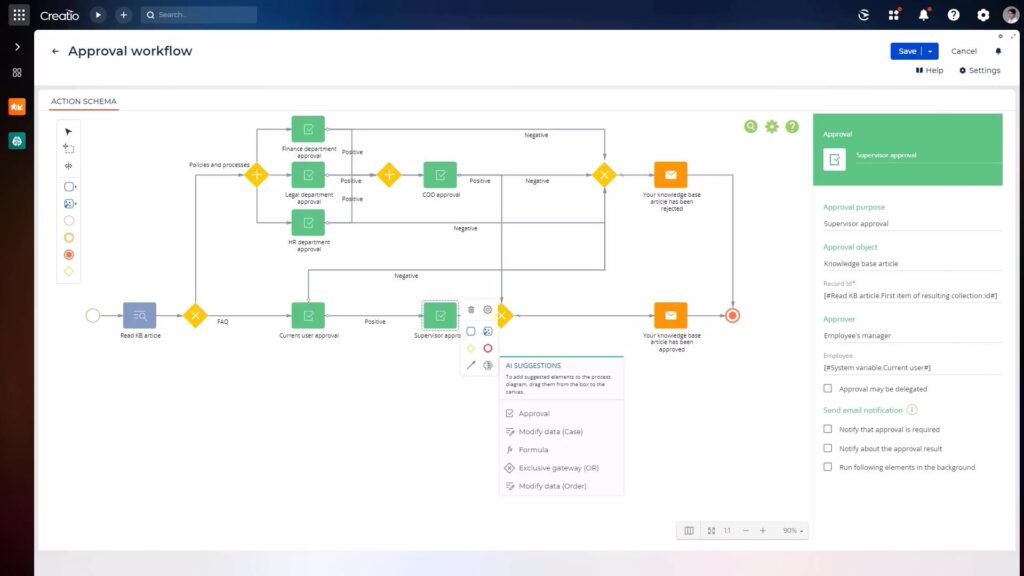
Score Number of Handoffs
Handoffs create delay.
Examples:
- Sales emails finance.
- Finance updates spreadsheet.
- Operations checks spreadsheet.
- Manager approves by email.
- Admin enters ERP.
Automation can create one controlled workflow with status and ownership.
High-handoff processes are often strong candidates.
Score Data Availability
Does the required data already exist in systems?
Automation is easier when inputs are structured and accessible.
Harder cases depend on:
- Free-form emails.
- Scanned documents.
- Phone conversations.
- Unstructured judgment.
- Missing master data.
Sometimes the first project should improve data capture rather than automate decisions.
Score Error Cost
What happens when a person makes a mistake?
Low impact:
Internal formatting issue.
Higher impact:
- Wrong invoice.
- Missed renewal.
- Incorrect customer access.
- Compliance failure.
- Duplicate payment.
Processes with high error cost can justify automation even if volume is moderate.
Score Delay Cost
What does waiting cost?
Examples:
- Slow lead response reduces conversion.
- Delayed invoice approval affects vendor relationships.
- Slow customer onboarding delays revenue.
- Late support escalation affects SLA.
Cycle-time value can exceed labor savings.
Score Audit Requirement
Some workflows need traceability.
Automation can record:
- Who submitted.
- Who approved.
- When.
- What changed.
- Why a rule fired.
- Which document version was used.
High audit requirements can make workflow systems valuable even without large time savings.
Score Integration Complexity
A workflow spanning two well-documented SaaS systems may be straightforward.
A workflow involving:
- Legacy desktop software.
- No API.
- Multiple external vendors.
- Complex authentication.
- Unreliable spreadsheets.
may require more engineering.
Higher complexity reduces early-project attractiveness.
Score Process Stability
Do rules change every week?
If the organization has not agreed how the process should work, automation will become a moving target.
Stabilize the process first.
Automate once the normal path and ownership are reasonably clear.
Use a Weighted Score
A simple model can score:
- Frequency.
- Manual effort.
- Rule clarity.
- Standard-case percentage.
- Handoffs.
- Delay cost.
- Error cost.
- Audit value.
- Data readiness.
- Implementation complexity.
Weight according to business priorities.
For example, a regulated company may weight auditability heavily.
A high-growth sales organization may weight response time.

Do Not Score Savings as Headcount Automatically
If automation saves 500 hours per month, that does not mean payroll drops by 500 hours.
Separate:
- Capacity released.
- Overtime reduced.
- Hiring avoided.
- Cash cost eliminated.
- Revenue accelerated.
- Error cost avoided.
Be precise.
This creates more credible automation ROI.
Look for Repetitive Copy-Paste Work
Common strong candidates include:
- Copying form submissions into CRM.
- Moving approved data into ERP.
- Synchronizing customer details.
- Generating standard documents.
- Updating status across systems.
- Creating recurring reports.
These are rules-based and measurable.
Look for Approval Bottlenecks
Approval workflows often suffer from:
- Email chains.
- Missing context.
- Unknown status.
- No reminders.
- No delegation.
- No audit history.
Automation can:
- Route by threshold.
- Escalate overdue items.
- Collect comments.
- Record decisions.
- Trigger downstream actions.
Keep humans where judgment is required.
Look for Scheduled Reporting Work
If a person spends every Monday:
- Exporting data.
- Copying it into Excel.
- Refreshing formulas.
- Creating a PDF.
- Emailing stakeholders.
the workflow may be highly automatable.
But first confirm whether the report itself is still useful.
Do not automate obsolete reporting.

Look for Data Reconciliation Work
Teams often manually compare:
- ERP vs payment system.
- CRM vs billing.
- Warehouse vs source.
- Inventory vs orders.
Automation can surface exceptions instead of requiring people to compare every row.
This changes the job from inspection to resolution.
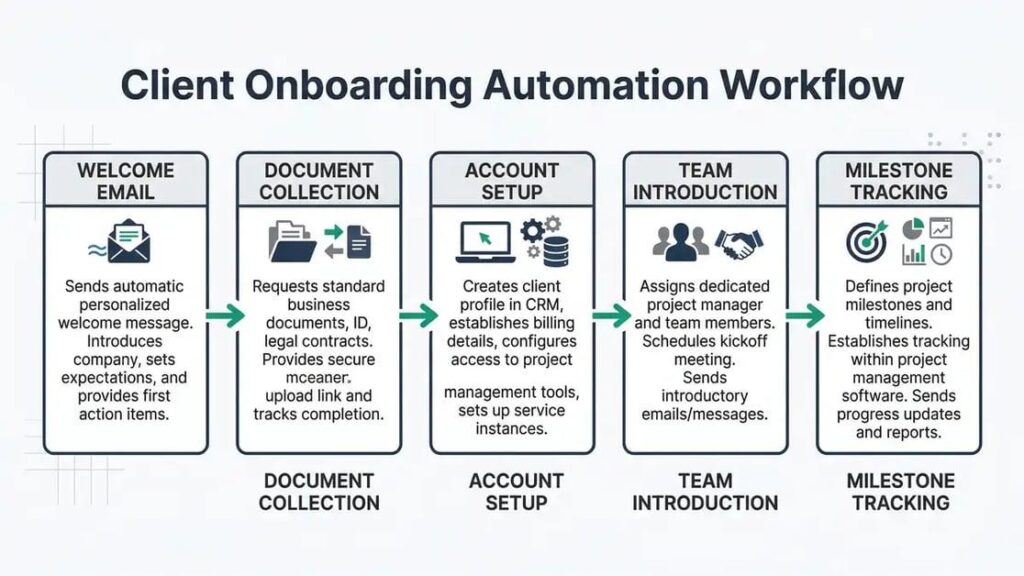
Look for Customer Onboarding
Onboarding often includes:
- Data collection.
- Validation.
- Account creation.
- Approvals.
- Document generation.
- Welcome communication.
- System provisioning.
Many steps can be automated while exceptions remain human.
This can improve both internal effort and customer cycle time.
Look for Employee Onboarding and Offboarding
Structured HR/IT workflows can coordinate:
- Accounts.
- Equipment.
- Permissions.
- Documents.
- Training.
- Manager tasks.
Offboarding is particularly important for security because access removal should not depend on memory.
Look for SLA-Driven Escalation
Automation is strong when time itself creates a rule.
Examples:
- If ticket unassigned for 15 minutes, escalate.
- If approval pending 48 hours, remind.
- If customer document expires in 30 days, notify.
These rules are explicit and easy to measure.
Do Not Automate Rare Chaos First
A workflow that occurs twice a year, changes every time and requires senior judgment is usually a poor first candidate.
Even if people dislike it.
The build and maintenance cost may exceed the benefit.
Do Not Automate Broken Master Data
If customer IDs are inconsistent across systems, automating synchronization can spread the inconsistency faster.
Fix identity and data rules first.
Automation amplifies the quality of its inputs.
Do Not Remove Necessary Human Judgment
Some decisions should remain human because they involve:
- Material financial approval.
- Customer relationship judgment.
- Legal interpretation.
- Safety.
- Compliance exceptions.
- Strategic prioritization.
Automation can prepare evidence and route the decision.
It does not need to execute it.
Choose a Narrow First Release
Do not automate an entire department in version one.
Select:
- One workflow.
- One normal path.
- Known exceptions.
- Measurable baseline.
- Clear owner.
Then prove value.
Expand after the operating model works.
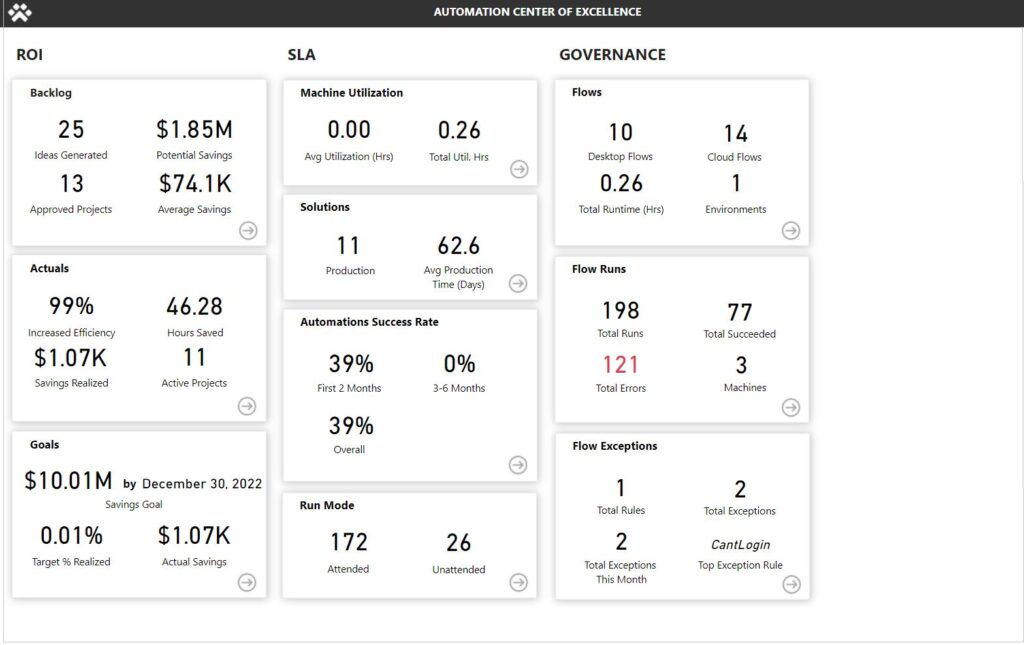
Measure the Baseline
Before automation, record:
- Cases per month.
- Hands-on minutes per case.
- End-to-end cycle time.
- Error rate.
- Rework rate.
- Exception rate.
- SLA misses.
- Customer wait time.
Without baseline data, ROI becomes opinion.
Define Success Metrics
Examples:
- Reduce average onboarding from 3 days to 1 day.
- Reduce manual processing from 20 minutes to 5 minutes.
- Reduce duplicate entry errors by 80%.
- Reduce overdue approvals from 25% to 5%.
- Automatically process 85% of standard cases.
Metrics should reflect business outcomes.
Design Exception Handling First
Ask:
What will automation not handle?
Create:
- Exception queue.
- Reason.
- Owner.
- SLA.
- Manual override.
- Retry.
- Resolution tracking.
A process with excellent exception handling is often more successful than one chasing 100% straight-through automation.
Choose the Right Automation Layer
Possible solutions include:
- Built-in SaaS automation.
- Zapier/Make/iPaaS.
- RPA.
- Custom web application.
- API integration.
- Workflow engine.
- Scheduled scripts.
Choose based on:
- Complexity.
- Volume.
- Security.
- Audit.
- Reliability.
- User interface needs.
- Integration depth.
- Lifecycle.
No-code is excellent for some workflows.
Custom software is justified when the process becomes a core operational system.
Create Ownership
Every automated workflow needs:
- Business owner.
- Technical owner.
- Exception owner.
- Change process.
- Monitoring.
Automation without ownership becomes invisible technical debt.
Review After 30 to 90 Days
Compare actual results with baseline.
Measure:
- Volume automated.
- Exceptions.
- Cycle time.
- Manual effort.
- Errors.
- Support effort.
- Maintenance.
- Unexpected behavior.
Then decide:
- Expand.
- Adjust.
- Leave as is.
- Retire.
A Workflow Prioritization Checklist
A strong early automation candidate usually has:
- High enough frequency.
- Meaningful manual effort or delay.
- Clear normal rules.
- Manageable exception rate.
- Structured input data.
- Multiple handoffs.
- Measurable error or delay cost.
- Stable process ownership.
- Feasible integrations.
- Clear success metrics.
Frequently Asked Questions
What business processes should be automated first?
Start with frequent, rules-based workflows that have measurable manual effort, delay, handoffs or error cost and a manageable exception rate.
What are common business process automation examples?
Lead routing, approvals, onboarding, document generation, scheduled reporting, data synchronization, reconciliation and SLA escalation are common candidates.
Should a process be standardized before automation?
Usually yes. The normal path, rules and ownership should be reasonably clear before engineering the workflow.
Does automation need to remove humans completely?
No. Many successful workflows automate preparation, routing and standard cases while people handle approvals and exceptions.
How do you measure automation ROI?
Measure baseline effort, cycle time, errors and volume, then separate released capacity from actual cash savings, avoided cost and revenue impact.
Should we use no-code tools or custom software?
Use the simplest tool that can meet reliability, security, auditability, scale and lifecycle requirements. Core complex workflows may justify custom software.
What is a good first automation project?
One with a narrow scope, clear owner, high standard-case percentage, visible pain and measurable before/after metrics.
Conclusion
The best first automation project is not the flashiest workflow.
It is the process where repetitive work, clear rules and measurable business friction intersect.
Inventory workflows.
Score frequency, effort, handoffs, exceptions, risk and data readiness.
Start narrow.
Design exceptions.
Measure the baseline.
Then expand based on proven results.
If you want to identify and prioritize automation opportunities across your operations, Actiknow can help map workflows, quantify the business case and implement the right mix of integrations, automation and custom software. Discuss your automation requirements with Actiknow.