

Search intent: Commercial investigation and implementation guidance
Audience: CIOs, CISOs, data platform leaders, analytics engineering managers and enterprise architects
An AI agent that answers questions about revenue, customers or contracts is not merely a chat interface. It is an application with identities, privileges, data dependencies, tools and configuration that may itself reveal sensitive business logic. The relevant executive question is not “Can employees open the agent?” It is “What can each employee make the agent access, what configuration can they inspect, and how will we detect a change?”
Snowflake’s September 16, 2026 general-availability update introduced secure Cortex Agent objects, temporary agents, COPY GRANTS support and agents in personal databases. These features improve the options available to enterprise teams, but none replaces deliberate role design, testing and monitoring. Snowflake’s official Cortex Agents release notes explain the scope of the update.
The most important distinction: securing an agent’s YAML specification is different from securing the data that its tools can reach. A well-governed deployment needs both.
The five decisions executives should settle before production
First, define who is permitted to invoke the agent. Second, decide who owns and can modify its specification. Third, map every data and tool privilege required by the intended audience. Fourth, establish how changes are tested and promoted without unintentionally expanding access. Fifth, assign someone to review usage, failures, spending and permission drift.
These decisions are operational, not just technical. A sales assistant that should expose regional revenue totals is a different security product from an internal finance assistant that can query transaction-level data. Sharing a conversational interface does not mean those users should share an identical privilege footprint.
For teams still formalizing metrics and access boundaries, the underlying data model matters as much as the interface. Actiknow’s business intelligence consulting and integration services describe the architecture and modeling work that should precede reliable analytical access.
1. Separate the four layers of Cortex Agent access
A practical security review separates four questions that are often conflated.
Platform entitlement: may this role use Cortex Agents at all?
Snowflake documents database roles such as SNOWFLAKE.CORTEX_AGENT_USER and SNOWFLAKE.CORTEX_USER. The former is scoped to Cortex Agents; the latter provides broader access to covered AI features. Snowflake notes that CORTEX_USER may be granted to PUBLIC by default, so administrators should inspect the actual role graph rather than assuming AI access is restricted.
Removing broad grants can have consequences outside a single agent. In particular, Snowflake warns that revoking imported privileges on the SNOWFLAKE database from PUBLIC affects other shared database objects. Treat changes to account-wide defaults as reviewed security changes with a rollback plan.
Object access: may this role invoke this particular agent?
A caller needs USAGE on the agent and its containing database and schema. A role with no path to the agent should not be given an application-level shortcut that bypasses role assignment. Document which human and service roles receive USAGE and why.
Tool access: what may the agent actually do?
An agent can be configured to use Cortex Analyst, Cortex Search, procedures, functions and other tools. Invocation privileges do not automatically supply the caller with all tool permissions. Snowflake evaluates permissions using the caller’s active session roles, including applicable secondary roles. Tool-specific grants and warehouse USAGE matter.
Configuration access: may this role read or change the specification?
The agent specification can describe semantic-view references, search services, tool definitions, orchestration instructions and external bindings. Reading it may disclose valuable architecture or business-sensitive context even when the reader cannot access every underlying dataset. This is the layer addressed by secure agents.
A security matrix should therefore distinguish invoke, read specification, modify, own, monitor and use tools. A single “agent access: yes/no” column hides too much.

2. Use secure agents to protect configuration, not to claim perfect secrecy
A secure Cortex Agent hides its complete YAML specification from roles that lack the activated owner role, including roles with USAGE or MODIFY alone. Snowflake describes redaction in DESCRIBE AGENT, GET_DDL and relevant version metadata, and restricts direct reads of the versioned specification stage.
For example, an owner can create an agent using CREATE OR REPLACE SECURE AGENT … FROM SPECIFICATION, or mark an existing agent secure using ALTER AGENT <name> SET SECURE = TRUE. SHOW AGENTS exposes an is_secure field that can be checked during an audit.
This is valuable when an organization wants analysts to ask questions without exposing internal tool routing, semantic model paths or orchestration instructions. It also helps protect proprietary configuration in sharing scenarios.
But “secure” does not mean “impossible to infer.” Snowflake explicitly cautions that specification redaction does not guarantee that conversational prompts or prompt injection cannot elicit information about instructions, tools or resources. A user may also infer sensitive facts from legitimate answers if data privileges are too broad.
The control objective is narrower and measurable: prevent direct retrieval of the agent specification by non-owner roles through supported metadata and stage surfaces. Keep secrets out of prompts and specifications where possible, and continue to test response-level leakage separately.
3. Treat OWNERSHIP, MODIFY, USAGE and MONITOR as different jobs
OWNERSHIP is the highest-trust agent role. With the owner role activated, a user can read the full secure specification and manage the object. Reserve ownership for a controlled deployment or platform-administration role, not a general analyst group.
MODIFY permits alteration of agent properties without necessarily granting invocation or specification visibility on a secure agent. It is not a substitute for ownership when replacing an agent definition. Grant it to a narrow maintenance function only when that separation is intentional.
USAGE is the right starting point for a business user who needs to invoke the agent. It should be paired with the necessary database, schema, warehouse and tool privileges, and nothing more.
MONITOR is a separate operational permission for threads, logs and traces. Logs may contain prompts, generated outputs, identifiers or sensitive context. Monitoring access should therefore be assigned to designated support and security personnel under an appropriate retention policy.
A useful role model has an agent owner, a deployment role, a limited consumer role and a separate operations role. In smaller organizations, one person may hold more than one role, but the privileges should still be distinguishable and reviewable.
4. Inventory every downstream tool and data path
Start with the agent specification and build a dependency register. For each tool, record its object name, owner, warehouse, data classification, authorized audience, failure behavior and the role used to execute it. Include semantic views, Cortex Search services, procedures, functions and external integrations where configured.
Do not stop at the agent object. A semantic view can depend on several tables; a search service can index documents with different confidentiality levels; a stored procedure may execute with owner’s rights rather than caller’s rights. Each mechanism deserves a separate authorization review.
Snowflake’s access-control documentation states that the caller needs privileges on tools it uses. It also documents a subtle operational behavior: when a configured tool is inaccessible, the default handling can allow the run to continue with accessible tools and report a warning. For workflows where a missing control would produce an incomplete or misleading answer, consider a fail-closed inaccessible-tool policy and test the selected mode.
Illustrative scenario: a regional sales agent has two tools, one for revenue metrics and one for contract search. A regional manager can query the revenue semantic view but has no permission to the contract search service. A correct test verifies not only that contract content is inaccessible, but also whether the agent clearly reports that limitation instead of silently producing an apparently complete answer.
This is also why semantic-model governance belongs in the security conversation. Actiknow’s guide to governing Snowflake semantic views explores verified queries, testing and controlled changes that can improve the reliability of AI-facing metrics.
5. Design a role matrix before granting access
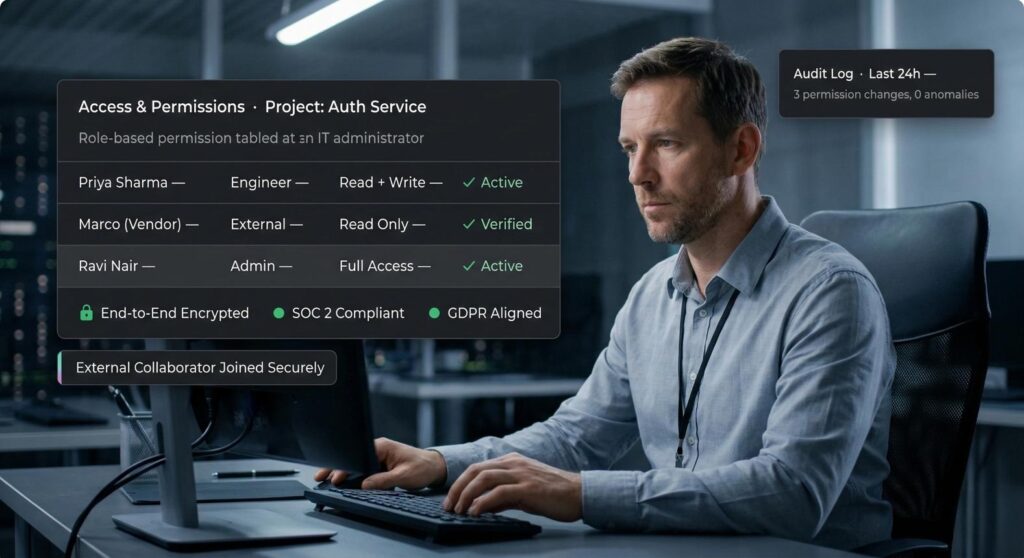
For every production agent, maintain a simple matrix with the following columns: role or service identity; permitted business purpose; agent USAGE; specification visibility; MODIFY or OWNERSHIP; tool grants; warehouse USAGE; MONITOR; approved data sensitivity; and approval owner.
A finance controller might be allowed to invoke a finance agent against curated financial metrics, while a customer-support role can invoke a different agent against masked customer-service records. The roles should not inherit one another’s data grants merely because both use the same chat application.
Review secondary roles explicitly. The active role set can change which objects are reachable, and a successful test under an administrator’s session is not evidence that a restricted end user is safe. Test with actual representative consumer roles, not only with ACCOUNTADMIN.
Also examine service identities. An application using a programmatic access token, OAuth or key-pair authentication still needs a clearly chosen Snowflake role. Avoid relying on an unexpectedly powerful default role when the X-Snowflake-Role header is omitted.
6. Keep development experiments separate from durable production objects
Temporary agents, now generally available, are useful for isolated tests and one-off workflows. CREATE TEMPORARY AGENT creates a session-scoped object bound to the creating user, role and session; it disappears when the session ends. Snowflake notes that temporary agents do not require CREATE AGENT on the schema and do not support permanent-agent versioning operations.
That makes them convenient for testing model settings and tool configurations without leaving a permanent object behind. It does not make them a substitute for production change control. The session’s permissions still matter, and a temporary agent can still access whatever its caller and configured tools are authorized to use.
Use distinct names for temporary and permanent agents. Snowflake warns that a temporary agent with the same name can shadow a permanent agent within the session, creating confusing test results.
For promotion, keep production agents permanent, versioned and deployed through an approved pipeline. Test the specification with restricted roles, check expected tool behavior, and record which version was approved.

7. Use COPY GRANTS carefully during replacement
CREATE OR REPLACE AGENT … COPY GRANTS can preserve explicit grants other than OWNERSHIP when an agent is replaced. This is operationally useful because a deployment should not unexpectedly revoke access for legitimate consumers.
It is not a permission review. COPY GRANTS can also preserve a grant that should have been removed. Before replacement, compare the existing privilege list with the intended role matrix; after replacement, verify the grants and ownership state again.
When replacing a secure agent, explicitly preserve its secure designation. Snowflake documents additional constraints for agents shared through shares or Native Apps where secure status is required. Treat shared-agent deployments as a separate change category because configuration visibility and downstream access have a wider audience.
A sound release checklist includes: approved specification, expected owner role, secure flag, consumer grants, tool privileges, warehouse grants, version identifier, rollback approach and a restricted-user smoke test.
8. Do not confuse agent security with answer correctness
An agent may be perfectly authorized and still answer incorrectly. It can misunderstand a metric, choose the wrong grain, omit a filter or misinterpret a time period. Security and quality assurance are adjacent controls, not interchangeable ones.
Build a small evaluation set of questions with known answers and expected access behavior. Include ordinary queries, ambiguous business language, out-of-scope requests, prompt-injection attempts and questions that cross a role boundary.
Test the following outcomes separately: the agent refuses or cannot access unauthorized data; the agent explains missing tool access appropriately; authorized answers match trusted SQL or curated reports; and outputs disclose their scope and limitations.
For high-stakes uses, keep a human approval step for consequential actions. A conversational result should not independently trigger a financial adjustment, customer communication or production data change without an explicit authorized workflow.
9. Monitor what changes after launch
A one-time permission review is insufficient because agents, roles, tool resources and data classifications change. Establish an operating cadence and named owners.
Security teams should watch for new or widened grants, unexpected owner changes, secure flags being disabled, newly added tools, service identities using broad roles and abnormal access patterns. Platform teams should track failed runs, inaccessible-tool warnings, latency, token or compute spend, version changes and rollback incidents.
Review monitoring access itself. A trace that is useful for troubleshooting may also expose a customer name or confidential prompt. Limit log access, document retention and ensure that audit evidence can be retrieved without exposing it to every agent consumer.
An executive dashboard does not need every trace. It needs a short control summary: number of production agents, percentage with approved owners, percentage with reviewed tool dependencies, unresolved access exceptions, failed security tests, and material changes since the last review.

A practical 30-day rollout plan
Days 1–7: discover and classify
Inventory all production and pilot agents. Record owners, users, tool dependencies, underlying data classes and service identities. Inspect account-level Cortex entitlements, especially inherited grants. Identify where specifications contain proprietary information or sensitive references.
Deliverable: a dependency register and draft role matrix, with a risk owner for each exception.
Days 8–14: harden and separate duties
Mark appropriate production agents secure. Reduce unnecessary USAGE, MODIFY and ownership grants. Validate database, schema, warehouse and tool privileges for representative roles. Review monitoring access and the handling of inaccessible tools.
Deliverable: approved privileges and a list of changes that require business sign-off.
Days 15–21: test realistic access boundaries
Use temporary agents or a separate development environment for experiments. Run restricted-role tests against known queries, confidential records and tool failures. Include prompt-injection probes, while acknowledging that no single test proves immunity. Compare expected answers with trusted metrics.
Deliverable: a repeatable test suite and documented failures with owners.
Days 22–30: operationalize releases and monitoring
Put agent definitions under change control. Verify secure status and grants after replacements, including COPY GRANTS behavior. Define who can approve a new tool, who reviews incidents, and how to roll back. Set a recurring quarterly access review, with immediate review for high-risk changes.
Deliverable: production runbook, approval matrix, monitoring plan and first access-review record.
Common implementation mistakes
- The first mistake is granting broad Cortex access and assuming individual agent USAGE will cover every risk. Platform entitlement, agent privileges and tool privileges are separate.
- The second is treating SECURE = TRUE as a data-loss-prevention control. It primarily redacts the specification from non-owner metadata access. It does not replace masking, row-level policies, tool grants or adversarial testing.
- The third is testing only as an administrator. That misses the exact behavior business users experience, including secondary roles and inaccessible tools.
- The fourth is treating temporary agents as inherently harmless. They are short-lived, but their session privileges can still expose data.
- The fifth is automating replacement without inspecting grants. COPY GRANTS improves continuity but can carry forward outdated access.
- The sixth is granting MONITOR broadly without considering what traces contain. Operational observability requires its own access and retention decisions.
Questions the CIO and CISO should ask before sign-off
- Can we name the owner of every production agent?
- Can we show its complete tool and data dependency map?
- Which roles can invoke it, modify it, read its specification and inspect its traces?
- Have we tested those roles independently?
- Are specifications secure where needed?
- What happens when one tool is inaccessible?
- What is the release and rollback procedure?
- Who reviews privilege drift and incidents?
If these questions cannot be answered from a short runbook and current role matrix, the deployment is not yet operationally mature, regardless of how convincing its demonstration looks.

FAQs
Does a secure Snowflake Cortex Agent prevent users from seeing all its configuration?
It restricts direct access to the complete specification through supported metadata and stage surfaces for roles without the activated owner role. It does not guarantee that information cannot be inferred through conversational interaction or prompt injection.
Is USAGE on an agent enough to query its data?
No. Callers also need relevant platform, database, schema, warehouse and tool privileges under their active Snowflake roles. The exact requirements depend on the tools configured.
Should every agent be marked secure?
Consider secure status when specifications include proprietary instructions, tool bindings or business-sensitive configuration, particularly for widely used or shared agents. It should be part of a broader data and tool access design rather than a blanket substitute for least privilege.
What is the difference between MODIFY and OWNERSHIP?
MODIFY allows certain agent changes but does not by itself reveal the specification of a secure agent or grant invocation. OWNERSHIP is the stronger control needed for owner-level specification access and replacement operations.
Can temporary agents be used in production?
They are best suited to session-scoped tests, scripts and ephemeral workflows. They are automatically dropped at session end and do not support permanent-agent versioning. Durable, governed business assistants generally benefit from permanent objects and formal release controls.
What does COPY GRANTS preserve?
When replacing an agent, COPY GRANTS preserves explicit privileges except OWNERSHIP. Teams should still compare grants with the approved role matrix because preserving access is not the same as validating it.
What happens when a user cannot access one of an agent’s tools?
Snowflake documents modes that determine whether the run continues with accessible tools and warnings or rejects the request. Choose behavior based on business risk, then test it under the actual user role.
Can we rely on an agent to enforce all customer-level permissions?
No. Enforce the intended boundaries in Snowflake object permissions and relevant data-protection policies, validate the behavior of each tool and test with representative users. The interface should not be the only access-control layer.
How often should we review Cortex Agent access?
Review before initial deployment, after material changes to roles or tools, and on a recurring schedule proportionate to data sensitivity. A quarterly review is a practical starting point for many teams, with faster escalation for incidents and high-risk changes.
The executive takeaway
The right security architecture is not a locked-down agent that nobody can use. It is an agent whose capabilities are understandable, intentionally limited and verifiable. Secure specifications, narrow role grants, caller-aware tool permissions, temporary testing and controlled deployment each solve different problems. Treat them as a coordinated operating model.
If your team is building analytics assistants on Snowflake and needs to align semantic models, access design and production governance, Actiknow can discuss the data engineering and BI architecture behind the deployment. Start with a focused conversation through the Actiknow contact page rather than committing to a broad platform overhaul.
Source note: Feature availability and privilege details were checked against Snowflake’s September 16, 2026 release notes and current official documentation for secure agents, access control and temporary agents. Validate syntax and account settings in your own Snowflake environment before implementation.