

For mobile applications used in warehouses, retail stores, hospitals, construction sites, or anywhere connectivity is unreliable, offline capability is not simply a feature that lets users keep typing. It is a commitment that work captured on a device will survive interruptions and eventually reach the right system without silently overwriting someone else’s changes.
That commitment is harder than it sounds. Two users can edit the same record before either device reconnects. An upload may succeed on the server while the phone never receives the acknowledgment. A user can sign out with a queue of unsent changes. A deleted record can reappear after a stale device syncs. Reliable offline synchronization requires explicit answers to each of these problems, not a generic “retry when online” routine.
The executive question is therefore not “Can the app work offline?” It is “Which actions can users safely complete offline, how do we reconcile competing changes, and what happens when synchronization cannot finish?”
What offline-first actually means
An offline-first application uses locally stored information to support essential user journeys without waiting for a network response. It may support reading cached records, creating drafts, capturing forms, scanning items, or completing certain transactions while disconnected. Some operations, such as taking payment or confirming scarce inventory, may still require an online server decision.
The design begins with a deliberate boundary: which operations are safe to accept provisionally, and which require authoritative confirmation? A user may save an inspection locally, but the business should not claim that a regulatory submission has been accepted until the server acknowledges it. Likewise, a field worker can record a proposed stock adjustment offline, but the warehouse’s official quantity should not change without reconciliation.

Google’s Android architecture guidance describes a local data source as the app’s source of truth for its user interface, while the network source represents shared application state. That distinction helps prevent screens from switching unpredictably between cached and remote versions. See the Android Developers guide to building an offline-first app for the underlying repository and synchronization patterns.
Offline-first is not synonymous with eventually accepting every edit. Some edits must be rejected, merged, escalated, or reversed to preserve business rules.

A concrete example: two people edit one delivery record
Consider a hypothetical delivery application. At 10:00, a driver downloads delivery record D-104 with version 12 and a status of “scheduled.” At 10:10, while offline, the driver marks it “delivered” and records a photo. At 10:12, a dispatcher working online changes the delivery to “cancelled,” producing version 13. The driver’s device reconnects at 10:20.
A naive sync routine uploads the driver’s complete record and overwrites the cancellation. Another naive routine discards the driver’s changes because the server is newer. Both can lose important evidence. A safer design detects that the driver’s edit was based on version 12, compares it with version 13, and applies a policy suited to delivery status: perhaps the status needs supervisor review while the photo and timestamp are preserved as an immutable event.
This is why conflict resolution must be designed around business meaning. A shared note, an inventory balance, and a legally significant approval should not all follow the same merge rule.

The six components of a dependable sync architecture
1. A durable local store
Keep the records needed for offline journeys in a persistent on-device database, not only in memory. Each locally edited entity should carry its stable identifier, last known server version, local edit state, and any metadata required for reconciliation. Local reads should continue to work during network outages and after the app process restarts.
Use platform-appropriate storage, such as Room on Android or Core Data/SwiftData patterns on Apple platforms, with explicit migrations as the schema evolves. Encrypt sensitive data at rest where required, minimize the offline data footprint, and define retention and device-wipe behavior.
2. A persistent operation outbox
When a user saves an offline change, write both the updated local state and a corresponding pending operation in one atomic local transaction. The outbox survives app termination and device restarts. Each operation needs a unique operation ID, entity ID, operation type, payload or patch, base server version, creation time, retry count, and status.

The outbox is preferable to treating “dirty” records as an unordered batch when order matters. For example, “create inspection” must precede “attach inspection photo,” and “submit inspection” must not overtake its required answers. Use dependency information or per-entity ordering, while allowing unrelated records to sync independently.
3. A sync coordinator
A coordinator decides when to push local operations, pull remote changes, and retry failures. Useful triggers include app launch, returning to foreground, restored connectivity, and a user-initiated refresh. On Android, WorkManager can schedule persistent work subject to network constraints and retry policies. On iOS, background execution is subject to system scheduling and cannot be treated as an always-on service.
The coordinator should prevent overlapping runs from sending the same queue twice, use bounded batches, pause when authentication is invalid, and distinguish temporary failures from permanent business rejections. A “network available” signal is a hint to attempt sync, not proof that the API is reachable.
4. Version-aware server APIs
A robust API accepts the operation ID and the version on which the client based its edit. For a REST resource, an ETag with If-Match or an explicit expectedVersion field can support optimistic concurrency. If the current server version differs, return a structured conflict rather than silently overwriting the resource.
The server must enforce permissions and invariants even if the client has already validated them. It should also retain enough context to explain a rejection: current version, changed fields, allowed next actions, and whether the original operation was already applied.
5. A change feed or incremental pull mechanism
After pushing local operations, the client needs a way to fetch authoritative changes made elsewhere. A server-issued cursor or monotonic sequence is generally safer than asking for everything modified since a device-clock timestamp. Include deletions as tombstones or deletion events; otherwise an offline device may resurrect records that no longer exist.
The server must define cursor expiry and recovery. If a device has been offline longer than the retained change history, require a controlled resnapshot that preserves and reconciles unsent local work before replacing its cache.
6. User-visible status and recovery
The interface should distinguish “Saved on this device,” “Waiting to sync,” “Syncing,” “Synced,” “Needs review,” and “Failed.” Users need to know whether work is merely stored locally or acknowledged by the business system. A clear conflict screen should show what changed, what was preserved, and which action is required.
These six components are part of the broader application and integration design described in Actiknow’s custom solutions and integrations services. The critical engineering choice is to make synchronization a first-class workflow rather than a hidden network utility.
Design the data contract before choosing a sync library
For each editable entity, define a server-generated or globally unique identifier, an integer or opaque server version, field ownership, validation rules, allowed state transitions, and deletion semantics. For each client operation, define operation_id, entity_id, base_version, action, payload, and a stable actor/device context. Keep client timestamps for display and troubleshooting, but do not use device clock time as the sole authority for deciding which edit wins.
Prefer patch-like operations for independent fields rather than replacing an entire record when only one value changed. A user editing a delivery note should not accidentally overwrite a dispatcher’s changed address because the client sent a stale full object.
Also separate business events from mutable snapshots. An “item scanned” event, for example, may be append-only and uniquely identified, while a current quantity is derived or recalculated on the server. That often reduces destructive conflicts and improves auditability.
Choose conflict resolution per field and business risk
Last-write-wins: simple, but easy to misuse
Last-write-wins selects a newer edit based on an agreed ordering rule. It can work for low-stakes preferences where losing an earlier value is acceptable. It is a poor default for stock counts, clinical records, approvals, financial transactions, or concurrent free-text edits. Client clocks can drift, and a timestamp cannot tell which business decision is correct.
Server-wins or client-wins: only with explicit trade-offs
Server-wins is defensible for authoritative prices, access rights, or inventory availability, provided the app retains rejected local input and explains what happened. Client-wins can be appropriate for a user’s private draft, but it must not bypass server-side business validation. Neither policy should silently discard the losing version when the data is important.
Field-level merge: useful when changes do not overlap
If device A changes a customer’s phone number while device B changes an independent delivery instruction, a field-level merge may safely preserve both. The server needs a shared base version or field-level change history to determine that the edits truly do not overlap. It must still validate cross-field rules after merging.
Append-only events and domain operations: often safer than row replacement
Instead of uploading “quantity = 18,” send “counted 3 units in bin X” or “moved 2 units from location A to B,” with unique event IDs and appropriate business validation. This does not eliminate all conflicts, but it retains the actions that produced the result and makes duplicates detectable. Domain commands such as “approve,” “cancel,” and “complete” can be validated against an authoritative state machine.
Manual resolution: necessary for high-impact ambiguity
When two edits are genuinely incompatible, preserve both and ask an authorized person to choose or reconcile. The conflict screen should show the local change, the current server value, the relevant history, and consequences of each option. Avoid presenting raw JSON or forcing users to remember which device was offline.
A practical policy matrix might be: display preferences → last-write-wins; independent profile fields → field merge; immutable scan events → deduplicated append; inventory allocations → server validation; safety approvals → authorized review. This is a design illustration, not a universal rule.
Make retries safe with idempotency and explicit acknowledgment
Mobile networks fail at inconvenient moments. Suppose an operation reaches the server and commits, but the acknowledgment is lost. The client retries. Without idempotency, a purchase, attendance check-in, or inventory movement could be applied twice.
The server should store or otherwise recognize each unique operation ID within a documented retention window. A retry of an already committed operation returns the original result instead of repeating its side effect. The client removes an operation from the pending queue only after receiving a durable acknowledgment or verifying the committed result.
Do not promise “exactly once delivery” from an unreliable network. Aim for at-least-once transmission with idempotent processing and clear reconciliation. Backoff with jitter for transient failures, honor rate limits, and send permanently invalid operations to a review state rather than retrying indefinitely.
Handle deletion, authentication, and device changes deliberately
Deletion needs special treatment. If the server removes a record while an offline device retains an older copy, a later upload can recreate it unless the sync protocol understands tombstones and version conflicts. Keep deletion markers for a retention period aligned with realistic offline durations, and define a full-resync path for older devices.
When credentials expire, keep pending work encrypted and pause network submission until the user reauthenticates. When a user signs out, switches organizations, or loses device access, decide whether pending data can be transferred, exported, retained, or must be securely removed. Do not sync a previous user’s queue under a new user’s credentials.
Large attachments should have their own upload lifecycle, including local file persistence, checksum verification, resumable or staged upload where supported, and cleanup only after server confirmation. A form should not be shown as fully submitted if its required photograph is still pending.
Platform capabilities matter here. Apple’s Core Data persistent history can help track local store changes, but it is not by itself a complete server conflict-resolution protocol. Similarly, cross-platform frameworks still rely on platform-specific background execution rules. Actiknow’s cross-platform mobile app development page describes the supported development context, not a guarantee that background sync runs continuously.
Build a synchronization experience users can trust
A successful offline UI does not simply hide the absence of internet. It makes provisional states understandable. Show a persistent but unobtrusive pending count, last successful sync time, and a per-record status for consequential actions. Use plain language such as “Saved on this phone; not yet submitted” instead of a green checkmark that implies remote acceptance.
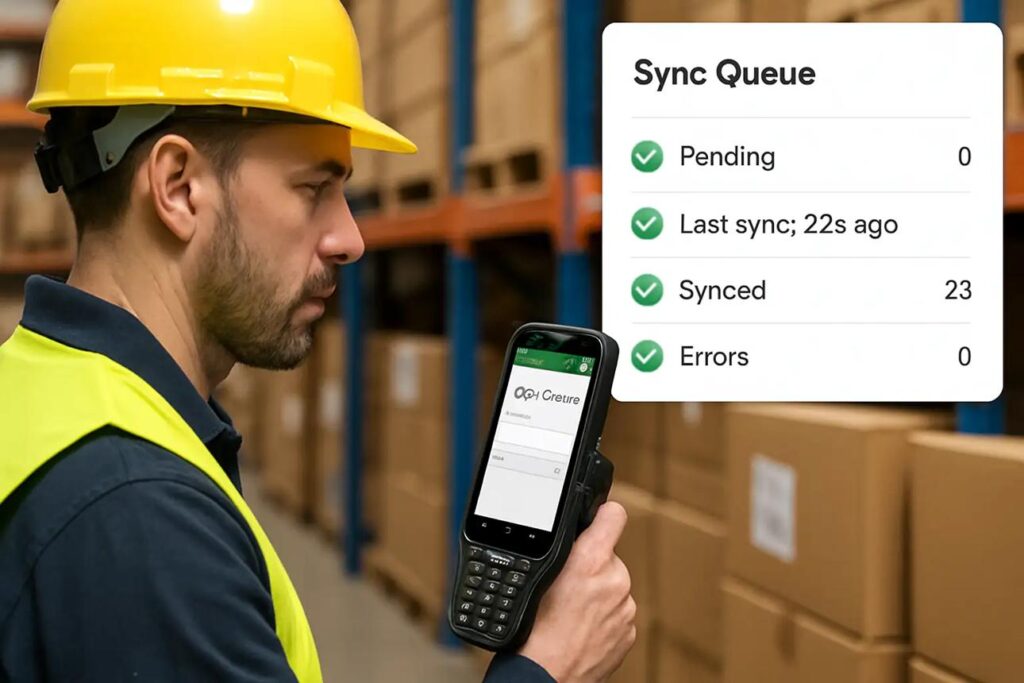
Provide a manual retry control for failed items, but do not make users repeatedly press it to recover from normal connectivity changes. For conflicts, offer a side-by-side comparison and preserve a copy of rejected input. For long offline periods, communicate when cached reference data may be stale, especially prices, permissions, assignments, or schedules.
Support teams need a diagnostic view of operation IDs, device/app version, retry history, server response categories, and the last acknowledged cursor. This can resolve disputes without exposing sensitive payloads in logs.
What to measure after launch
Track the percentage of operations acknowledged within a defined service-level window, median and tail sync latency after connectivity returns, age and size of pending queues, retry counts by error category, conflict rate by entity type, manual-resolution backlog, and duplicate-operation rejection counts. Segment by app version, device OS, region, and network conditions without collecting unnecessary personal data.
Set alerts for queues that stop draining, sudden spikes in 409-style version conflicts, expired cursors, authentication failures, and unusually old unsynced records. A low crash rate is not proof of sync correctness; a user can have a perfectly stable app that quietly loses work.
Test the failure cases, not just the happy path
A credible test plan should include the following scenarios, each with an expected outcome and evidence of preserved data:
- Create and edit records while offline, then restart the app before reconnecting. Pending operations must survive.
- Send an operation, let the server commit it, then drop the response. A retry must not duplicate the side effect.
- Edit the same field on two devices from the same base version. The documented conflict policy must be applied and visible.
- Edit different fields on two devices. A safe merge must preserve both edits or produce an explicit conflict.
- Delete a record online while another device remains offline. The stale device must not resurrect it.
- Reconnect after a long outage or expired change cursor. Resnapshot must not erase unsent work.
- Expire authentication mid-batch, switch accounts, and restore access. Work must not cross tenant or user boundaries.
- Interrupt attachment upload, change networks, exhaust storage, and upgrade the app database schema. Recovery must be deterministic.
- Submit operations out of order and from older app versions. Dependencies and compatibility rules must prevent invalid state transitions.
- Disable background execution or battery-intensive activity. Foreground recovery must still work and the UI must disclose pending work.

Treat these as acceptance tests, not optional resilience exercises. The system should have an audit trail that proves what happened to each operation.
A practical four-week implementation plan
Week 1: classify workflows and define correctness
Inventory offline user journeys, data sensitivity, permissible provisional actions, server-authoritative decisions, and conflict ownership. Write an entity-by-entity policy matrix. Agree on maximum supported offline duration, attachment limits, and recovery obligations. Deliverable: signed-off synchronization contract and failure-state UX.
Week 2: implement local persistence and server contracts
Build the local store, atomic outbox, operation IDs, version checks, idempotency handling, and incremental change feed. Define structured errors and tombstones. Demonstrate a full create-edit-delete cycle with airplane mode and forced app restarts.
Week 3: implement reconciliation and visibility
Add conflict policies, manual review screens, background/foreground scheduling, attachment handling, queue diagnostics, and secure sign-out behavior. Test concurrent edits across two devices and verify that every rejected change remains recoverable.
Week 4: harden and pilot
Run the failure matrix, load-test batch behavior, monitor queue age and conflict rates, rehearse rollback and schema migration, and pilot with users in realistically poor connectivity. Launch only when the team can explain how to trace and recover a missing operation.
Four weeks is an illustrative planning sequence for a focused synchronization slice, not a guaranteed delivery estimate. Existing backend design, regulated workflows, data migration, and multi-tenant permissions can materially change the scope.
The decision checklist for product and technology leaders
Before approving an offline-sync implementation, ask: Which actions are provisional? Who owns the authoritative state? Can every user action be traced by operation ID? What happens when the server commits but the response is lost? Can the app detect concurrent edits? Are deletion and account-switch scenarios covered? Can a user recover a rejected change? How long can a device remain offline? What metrics prove that queues are draining? Who resolves conflicts that cannot be automated?
If those questions do not have clear answers, the team is probably building offline storage rather than a dependable offline business process.
Frequently asked questions
1. What is mobile app offline synchronization?
It is the process of reconciling locally stored records and queued actions with shared server data after a device has worked without reliable connectivity. A dependable design also handles duplicates, concurrent edits, deletions, permissions, and recovery.
2. Is caching the same as offline-first?
No. A cache may allow users to view old information. Offline-first design deliberately supports defined business operations without a network and specifies how their results are later reconciled.
3. How do you prevent offline data loss?
Persist local changes and their outbox operations atomically, use stable IDs and idempotent server processing, retain rejected edits for review, and test process termination, response loss, and long outages.
4. What causes a sync conflict?
A conflict occurs when an offline edit was based on a version that has since changed, or when two operations violate a shared business rule. Not every concurrent edit is irreconcilable; independent fields can sometimes merge.
5. Is last-write-wins a good default?
Usually not for high-value business data. It is simple but may discard meaningful work. Use it selectively for low-risk fields and prefer domain validation or review where decisions have operational consequences.
6. Should the server or the device be the source of truth?
The local store should consistently drive the app’s displayed state, while the server remains authoritative for shared business rules and accepted transactions. The sync protocol reconciles the two without pretending that a provisional local save is final.
7. How should an app sync after several weeks offline?
Use a retained change feed when available. If the cursor has expired, take a fresh server snapshot while preserving the local outbox, then replay or reconcile pending work under current permissions and versions.
8. Can Flutter or React Native support reliable offline sync?
Yes, with suitable persistent storage, API contracts, queue processing, and platform-aware scheduling. A shared codebase does not remove iOS and Android background execution constraints.
9. What if a user signs out before syncing?
The app needs an explicit policy for unsent work, including warnings, secure retention or export, and account isolation. Never upload the old user’s pending operations under a different identity.
10. How do we know offline sync is working in production?
Measure acknowledgment latency, queue age, conflict and retry rates, unreconciled operations, and successful recovery after failures. Investigate missing acknowledgments even when the app itself appears stable.
Build offline reliability into the product, not around it
For organizations designing or modernizing mobile workflows, the most valuable early investment is often a short architecture exercise: define authoritative state, map offline-safe actions, agree on conflict policies, and test the failure paths before scaling development. Actiknow’s custom app development services cover tailored mobile applications and API integration; a discussion about these requirements can help scope the right implementation and validation approach without assuming every workflow needs a complex sync engine.
Technical references
Android Developers: Build an offline-first app. Covers local and network repositories, synchronization, conflict handling, and WorkManager patterns.
Apple Developer Documentation: Persistent history. Describes tracking changes in an on-device Core Data store; application-level server reconciliation remains a separate responsibility.
Apple Developer Documentation: Downloading files in the background. Describes background transfer capabilities and limitations relevant to large offline attachments.