

A mobile release is not a website deployment
A web team can often reverse a deployment and have most users see the previous version immediately. A mobile team cannot assume that. App-store review, device update settings, offline use and fragmented installed versions mean old and new clients coexist. A server rollback may also be insufficient if the new app has already changed local data or invoked a new API contract.
That changes the central release question. It is not simply “Can we ship this build?” It is “Can the business safely operate several client versions, enable or disable risky functionality, detect customer harm and recover without making users reinstall?” A good mobile app release strategy separates code distribution, feature exposure and backend compatibility. It gives product, engineering and support teams explicit decision rights before the first incident.
The four controls that must work together
- App-store distribution controls who receives a binary. Apple phased releases and Google Play staged rollouts can gradually expose a new production version, subject to each platform’s current rules and eligibility. They are distribution mechanisms, not universal rollback buttons.
- Feature flags determine whether eligible clients can use particular capabilities. Remote configuration can gate a feature without waiting for a new binary, provided the code was designed for that control and the device can retrieve updated configuration.
- API compatibility allows old and new app versions to communicate with the backend during a transition. The server must not assume that every device upgrades when the latest release is approved.
- Minimum-supported-version policies define when continued use is genuinely unsafe or impossible. A forced-update screen is a last-resort operational measure, not a substitute for compatibility engineering.
These controls solve different problems. A rollout percentage cannot immediately disable a defective feature on devices that already installed it. A feature flag cannot repair a crash that occurs before remote configuration loads. A forced update cannot guarantee immediate adoption by offline devices.
Start with a release risk classification
Classify each change by business impact and reversibility. A copy change or a noncritical screen adjustment may be low risk. A new payment flow, identity-provider change, offline sync redesign, database migration or permission model change deserves a more deliberate plan.
For each release, record: affected user journeys; supported operating systems; required backend changes; whether old clients remain functional; whether the feature can be disabled remotely; what telemetry proves success; and who has authority to halt the rollout. Identify changes that cannot be reversed after users create new data.
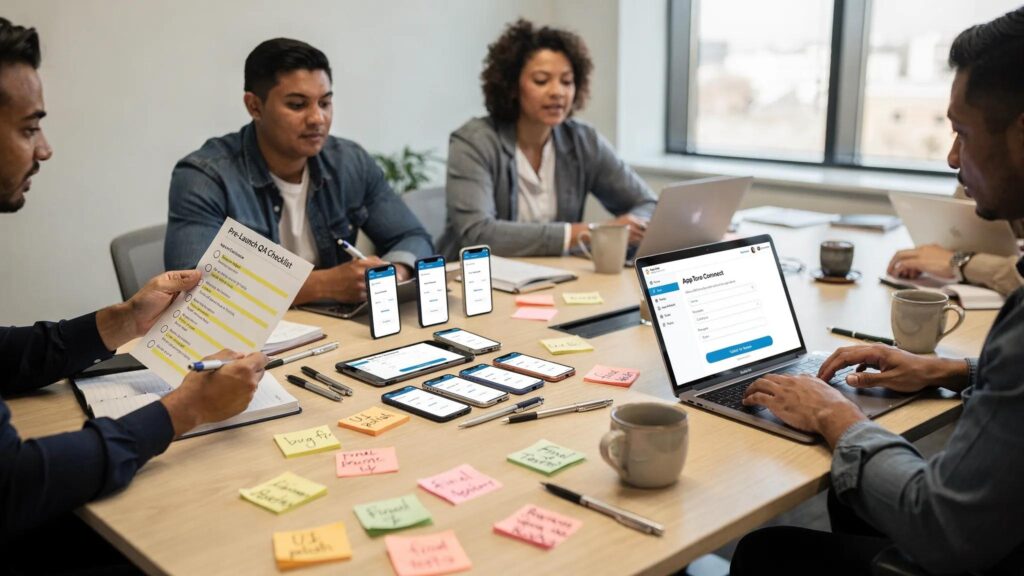
A practical release readiness meeting should produce a short decision record, not an elaborate approval ritual. For example, a field-service app adding offline work-order attachments may need tests for interrupted uploads, duplicate retries, low storage, background execution and synchronization after the user reconnects. A screen that merely reorders menu items needs less ceremony.
Feature flags: design the off switch before the on switch
A feature flag is useful only when both states are tested. Define the default when the configuration service is unavailable; for a risky new capability, that is usually the existing safe experience. Keep security enforcement on the server: a client-side flag is not an authorization boundary.
Target flags by stable cohorts such as internal staff, beta users, organization, platform, app version or a deterministic user bucket. Avoid random reassignment on each app launch, which can make debugging impossible. Document flag owner, purpose, activation date, expected removal date and dependencies.
Distinguish release flags from permanent operational configuration. Temporary flags accumulate technical debt if nobody removes them. Track stale flags and test both branches while they coexist. Where a flag controls an irreversible operation, disabling the UI may not stop work already queued on the server; cancellation and compensation rules must be designed separately.

For a mobile product with multiple customer organizations, enable a new workflow first for an internal test organization, then a willing pilot tenant, and only then wider cohorts. This supports meaningful feedback without assuming that a percentage of downloads maps neatly to a percentage of business risk.
Staged rollouts: percentages are a control, not a safety guarantee
Begin with a small eligible audience, observe predefined health measures, and expand only after a suitable monitoring window. The exact stages should reflect daily active users, geographic distribution, critical workflow frequency and incident-response coverage. A low-volume enterprise app may need days to observe enough completed transactions; a high-volume consumer app may generate meaningful evidence sooner.
Do not use crash-free sessions alone as the launch gate. Monitor login completion, successful payments or bookings, background sync success, API error rates, app-start latency, support contacts and version-specific retention. Segment by platform, operating system, device class, network quality and app version. A release can appear healthy overall while failing on a specific older device.

Before expansion, require explicit answers:
- Is the change causing measurable degradation?
- Is the sample representative of the users who will receive it next?
- Are errors concentrated in a particular cohort?
- Can support explain and mitigate known failures?
If evidence is inconclusive, hold the stage rather than treating a calendar date as proof of safety.
Platform-specific distribution behavior changes over time. Confirm the latest Apple App Store Connect and Google Play Console capabilities when implementing the rollout; do not assume identical pause, resume or downgrade behavior.
Backward-compatible APIs are the real foundation
Mobile clients remain in the wild after backend deployments. Treat the backend as a service that must support a defined range of client versions. Prefer additive response fields, tolerant readers and versioned behavior where semantics genuinely change. Avoid removing a field or changing its meaning merely because the latest app no longer uses it.
For a breaking workflow change, use an expand-and-contract sequence: introduce compatible backend capabilities; deploy and observe them; release clients that can use the new behavior; measure adoption; and retire the old contract only after the support window and risk review. Schema migrations should likewise preserve old reads and writes during coexistence when feasible.
Make API error responses actionable. A client that receives a generic 500 cannot distinguish an expired session, unsupported feature, transient outage or minimum-version requirement. Define stable machine-readable error codes, correlation IDs and safe retry rules.

Offline data complicates migrations. Consider a user who updates after several weeks without connectivity: their local records may predate multiple schema changes. Test migration paths from the oldest supported client and database state, not only from yesterday’s build. Maintain backups or recoverable sync checkpoints for high-value records.
Kill switches and incident response
A kill switch should disable a specific hazardous capability without taking down the entire application. Examples include pausing a third-party integration, suppressing a defective checkout option, stopping new attachment uploads or switching to a read-only mode. Prefer narrow controls so unaffected workflows remain usable.
Write an incident runbook for each high-risk feature: symptom, telemetry query, owner, flag name, expected effect, propagation delay, fallback behavior and recovery procedure. Verify that operators can activate the control with appropriate authorization and audit logging. Test the switch in a staging environment and, where safe, in a controlled production cohort.
Recognize limits. Remote flags may not reach offline devices immediately. A crash during startup may prevent configuration refresh. Background tasks already executing may require a server-side circuit breaker. For these cases, backend controls and safe defaults are more reliable than a UI toggle alone.
Forced updates: use them sparingly and transparently
A forced update can be justified when an unsupported client presents a material security risk, relies on a retired API or cannot perform a mandatory workflow correctly. It can also strand users who have limited connectivity, insufficient storage, older operating systems or urgent tasks to complete.
Define a minimum-supported version independently of the latest available version. Where possible, warn users in advance, allow a grace period and provide a clear explanation of what will stop working. Preserve access to essential data or safe read-only functions when appropriate. Do not force an update during an irreversible transaction.
Design the update screen for failure: the store may be unavailable, the device may not support the new OS requirement, and the user may return without installing. A minimum-version policy must have an escalation route for customers whose devices cannot upgrade. For regulated or business-critical workflows, document the exception process and communicate planned deprecations to administrators.
Avoid relying on version-number string comparisons. Parse platform-specific build and semantic version values consistently, and ensure the server returns a policy that is scoped to platform and supported OS. A remote policy should be authenticated and protected against accidental global activation.
A practical release decision matrix
- Low-risk visual change: normal quality assurance, standard store release and basic monitoring; a flag may be unnecessary.
- New optional workflow: remote feature flag, internal cohort, limited rollout, journey-specific metrics and a tested off switch.
- Payments, authentication or sensitive-data handling: independent security review, compatible backend rollout, strict acceptance criteria, narrow cohort and on-call ownership.
- Data model or offline synchronization change: migration rehearsal from older versions, conflict-resolution tests, recoverability checks and a prolonged compatibility window.
- Critical vulnerability: accelerated remediation, carefully scoped minimum-version enforcement when necessary, explicit user communication and fallback support for incompatible devices.
The matrix is a starting point. Adjust the controls to actual impact, not the team’s preference for faster or slower releases.
What to measure after each release
Maintain a release scorecard with build version, exposure cohort, deployment timestamp, crash-free users or sessions, app-not-responding rate where relevant, successful critical journeys, API errors, sync backlog, app-start performance, support ticket rate and adoption by version.
Include guardrail thresholds and an action owner. “Crash rate looks fine” is not a decision criterion. “If successful job submissions fall below the agreed baseline for a meaningful sample, stop expansion and disable the new submission path” is actionable. Use baselines and statistical caution; do not invent universal percentages.
Track operational metrics too: time to detect a regression, time to disable an affected feature, proportion of active users on supported versions, number of stale flags and incidents attributable to API incompatibility. A release process improves when these measures inform the next release, rather than merely filling a dashboard.
A four-week implementation pilot
Week 1
Inventory supported versions and critical journeys. Map the app-store process, backend contracts, local-data migrations and incident history. Choose one upcoming feature with meaningful but manageable risk. Establish a release owner and acceptance criteria.
Week 2
Add a remote flag with a safe default, server-side enforcement where needed, deterministic cohort assignment and auditability. Instrument the critical journey end to end. Test the disabled state and loss of configuration connectivity.
Week 3
Rehearse deployment with old and new clients against the same backend. Test offline updates, expired sessions, failed synchronization, partial backend rollout and emergency feature disablement. Write a one-page operational runbook.
Week 4
Release to internal users and a limited production cohort. Review guardrails, expand deliberately and conduct a post-release review. Remove obsolete temporary flags after the rollout is stable.
Deliverables should include a version-support policy, rollout checklist, monitoring dashboard, flag register, compatibility test suite and incident decision tree. A pilot is successful when the team can demonstrate safe containment and recovery, not merely when the feature launches.

Common mistakes executives should challenge
Shipping backend breaking changes before older app versions are retired; treating app-store rollout controls as instant rollback; using flags for security authorization; failing to test offline and upgrade-from-old-version paths; setting forced-update thresholds without a support plan; measuring crashes but not failed business transactions; and leaving dozens of undocumented flags permanently enabled.
Another common mistake is confusing deployment with adoption. A release marked complete in the store may still be absent from a large share of active devices. Plan product, customer-support and backend retirement decisions using observed installed-version distribution, not the release date alone.
Frequently asked questions
1. What is the difference between a staged rollout and a feature flag?
A staged rollout controls distribution of a new app build. A feature flag controls whether code already installed can expose a capability, subject to configuration availability and design.
2. Can we roll back an iOS or Android app instantly?
Do not assume so. Store controls differ, and installed builds remain on devices. Server-side flags and compatible APIs are often the faster mitigation for a feature regression.
3. Should every feature have a flag?
No. Flags add complexity. Use them when controlled exposure or emergency disablement offers meaningful value.
4. How long should old app versions be supported?
Choose a documented window based on adoption patterns, contractual obligations, security needs and backend maintenance costs. Measure actual use before retiring a contract.
5. When is a forced update appropriate?
When continued operation on an old version creates an unacceptable risk or cannot be supported safely, after assessing device compatibility and user disruption.
6. Can feature flags replace QA?
No. Both enabled and disabled behavior, cohort targeting and fallback behavior require testing.
7. What should be monitored during rollout?
Crashes and performance, but also completion of core journeys, integration failures, synchronization, support contacts and version-specific anomalies.
8. How do we handle offline users?
Test local schema upgrades, queued operations, conflict resolution and delayed policy retrieval. Design safe behavior while configuration and APIs are unreachable.
9. Who should approve rollout expansion?
A named release owner should use agreed evidence from engineering, product, support and security when applicable, with clear authority to pause.
10. What is the first improvement for a team releasing manually?
Document supported versions and critical business journeys, then add one measurable rollout gate and a rehearsed recovery path before investing in more tooling.
Build a release process that protects customers
The strongest mobile release strategy treats distribution, feature exposure, compatibility and recovery as one operational system. Product leaders should ask for evidence that a change can be observed and contained, not just assurances that it passed testing.
Actiknow develops custom mobile and web applications and provides post-launch support. Teams planning a new app or improving an existing release process can review Actiknow’s mobile application development services and discuss compatibility, rollout controls and maintenance needs with the team through its contact page. The goal is a practical release plan suited to the product’s users and business risk, not more process for its own sake.