

APIs are often treated as the modern answer and files as the legacy answer.
That is too simplistic.
A well-designed daily file feed can be more reliable and auditable than a fragile API integration.
A well-designed API can deliver data in seconds while a nightly file leaves the business operating on yesterday’s information.
The correct choice depends on the business process.
Start With the Required Freshness
Ask how quickly the destination actually needs the data.
Seconds or minutes may favor:
- API requests.
- Webhooks.
- Streaming.
- Near-real-time replication.
Daily or weekly needs may be perfectly served by:
- CSV.
- JSON files.
- SFTP.
- Object storage drops.
- Batch exports.
Do not build real-time architecture for a report reviewed once every morning.
Actiknow’s custom solutions and data engineering work includes API integrations, scheduled data exchange, warehouse pipelines and business automation. Integration design should optimize reliability and operating cost for the actual business requirement.
What API Integration Provides
An API exposes defined operations over a network.
It can support:
- Real-time reads.
- Record creation.
- Updates.
- Commands.
- Validation.
- Fine-grained requests.
- Application workflows.
- Authentication and authorization.
APIs are natural for interactive system-to-system behavior.

What File-Based Integration Provides
File integration exchanges datasets as files.
Common patterns include:
- CSV over SFTP.
- JSON to object storage.
- Excel uploads.
- XML feeds.
- Compressed archives.
- Scheduled exports.
Files are naturally batch-oriented.
They are often easy to archive and replay.
That can be an advantage for business-critical transfers.

Timeliness
API integration can provide low latency.
A CRM update can be sent immediately to another application.
A file feed usually waits for a batch window.
But APIs are not automatically real time.
If your application polls an API once every night, it is still a batch integration.
Architecture determines freshness.
Reliability
APIs introduce network and service dependencies.
Possible failures:
- Timeout.
- Rate limit.
- Authentication failure.
- Vendor outage.
- Partial response.
- Pagination bug.
- API version change.
Files have different failures:
- File not delivered.
- Partial upload.
- Wrong format.
- Duplicate file.
- Incorrect naming.
- Corrupt archive.
- Late delivery.
Neither approach is inherently reliable.
Reliability comes from controls.
Auditability
Files can be excellent audit artifacts.
You can retain:
- Exact file received.
- Checksum.
- Delivery time.
- Record count.
- Processing result.
This makes replay straightforward.
API integrations need to create equivalent evidence through:
- Request logs.
- Response logs.
- Event IDs.
- Checkpoints.
- Raw payload retention.
- Processing ledgers.
For regulated or finance-heavy workflows, this difference matters.
Recovery
Ask:
How do we replay yesterday’s data?
With files, the answer may be:
Reprocess file 2026-09-30.csv.
With APIs, replay may require:
- Re-querying a date range.
- Resetting a cursor.
- Replaying stored events.
- Using historical endpoints.
- Handling changed source records.
An API architecture should define replay before production.
Data Volume
Large bulk datasets may be more efficient as files.
Exporting 50 million historical records through a paginated API can be slow and rate-limit intensive.
A compressed bulk file may be simpler.
APIs are often better for:
- Incremental changes.
- Individual entities.
- Interactive requests.
Files are often better for:
- Bulk history.
- Large snapshots.
- Scheduled extracts.
- Initial migrations.
Many mature integrations use both.
Rate Limits
SaaS APIs commonly limit request volume.
Design around:
- Requests per second.
- Daily quotas.
- Concurrent requests.
- Burst limits.
- Pagination.
- Retry-after guidance.
If the required volume cannot fit within the vendor limits, a bulk export may be better.
Do not discover this after development.
Pagination Is a Reliability Concern
An API may return 100 records per page.
The integration must correctly handle:
- Next-page tokens.
- Offsets.
- Changing source data during pagination.
- Duplicate pages.
- Missing pages.
- Retries.
Pagination defects can silently lose data.
Use vendor-supported stable cursors where available.
Webhooks Can Reduce Polling
If the source supports webhooks, an API integration can become event-driven.
The source notifies you when something changes.
This reduces polling and latency.
But webhooks need:
- Authentication.
- Duplicate handling.
- Replay.
- Missed-event recovery.
- Ordering logic.
- Monitoring.
A webhook is a delivery signal, not a complete reliability strategy.

Files Can Provide Natural Completeness Signals
A file can represent a complete batch.
For example:
All transactions for September 30.
This makes reconciliation easier.
You can compare:
- Expected file.
- Record count.
- Control total.
- Checksum.
API incremental feeds often require more sophisticated completeness logic.
The source may not tell you whether you missed an event.
Transactional Workflows Favor APIs
If system A needs to:
- Create a customer in system B.
- Receive the new ID.
- Validate the response.
- Then create an order.
An API is the natural pattern.
Waiting for a nightly file would make the workflow awkward.
APIs support interaction.
Files support exchange.
Bulk Analytics Feeds Often Favor Files
Suppose a vendor sends 10 GB of event history every night.
A file in cloud storage may be more practical than millions of API calls.
The warehouse can load it in bulk.
The file can be retained for audit and replay.
Do not reject file delivery simply because it sounds less modern.
Security Differs by Pattern
API security may involve:
- OAuth.
- API keys.
- JWT.
- mTLS.
- IP controls.
- Scopes.
Files may involve:
- SFTP credentials.
- SSH keys.
- Bucket IAM.
- Encryption.
- PGP.
- Network controls.
Both require:
- Secret rotation.
- Least privilege.
- Audit.
- Offboarding.
- Encryption.
Choose the security model your organization can operate correctly.
Vendor Capability Can Decide the Architecture
Sometimes there is no choice.
A vendor may offer:
- API only.
- SFTP only.
- Daily export only.
- Webhook plus API.
- Bulk export plus incremental API.
Design around the best supported mechanism.
Do not build unsupported scraping or brittle workarounds because the preferred architecture is unavailable.
Use Hybrid Patterns
A strong pattern for SaaS data is:
- Bulk file for initial history.
- API for incremental changes.
- Webhook for low-latency notification.
- Periodic file or API reconciliation.
Each mechanism solves a different problem.
Hybrid does not mean overengineering if each path has a clear role.

Data Transformation Should Be Separate
Do not embed all business logic into the transport layer.
Whether data arrives through API or file:
- Land raw input.
- Validate.
- Standardize.
- Transform.
- Publish.
This makes it easier to change transport later.
The warehouse should not care whether yesterday’s orders arrived by SFTP or REST once they enter a stable staging contract.
Schema Changes Affect Both
API fields change.
File columns change.
Monitor:
- Added fields.
- Removed fields.
- Type changes.
- Enum values.
- Required fields.
- File headers.
- Version.
Both patterns need schema governance.
Idempotency Matters for Both
An API page may replay.
A webhook may duplicate.
A file may be delivered twice.
The integration should recognize repeated logical input.
Use:
- Stable record IDs.
- Event IDs.
- File hashes.
- Batch IDs.
- Merge keys.
Safe retries are a universal integration requirement.
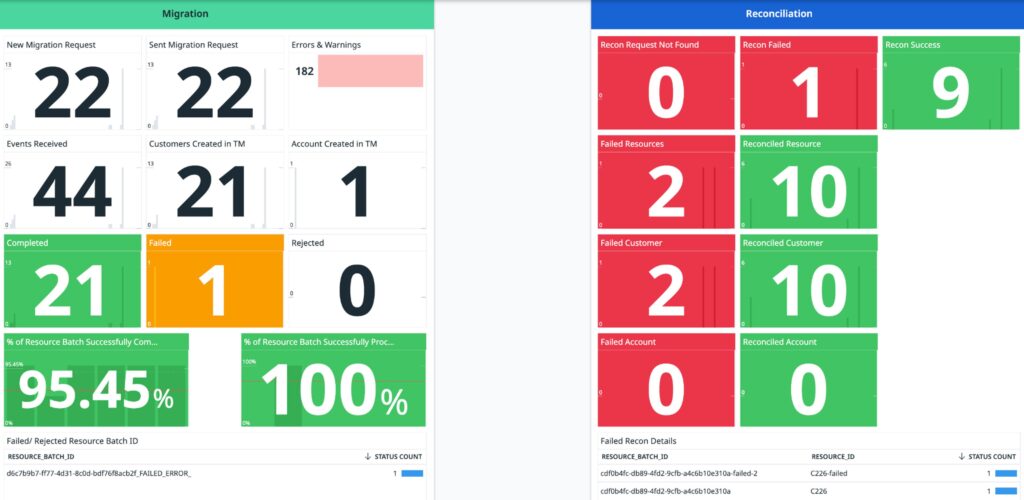
Reconciliation Matters for Both
For critical data, compare source and destination.
Use:
- Row counts.
- Distinct keys.
- Financial totals.
- Date ranges.
- Delete counts
- Late records.
No transport protocol guarantees business completeness.
Operational Ownership
Ask who will support the integration.
API support may require:
- Developer debugging.
- Token management.
- Vendor documentation.
- Rate-limit analysis.
File support may require:
- Delivery monitoring.
- SFTP/bucket administration.
- File-format troubleshooting.
- Batch reruns.
The cheaper build is not always the cheaper operating model.
Change Frequency Matters
If the business process evolves frequently, APIs may provide finer-grained flexibility.
But vendor API version changes can also create maintenance.
A stable contractual file format can run unchanged for years.
Evaluate the specific provider’s change history.
Cost
Compare total cost:
- Development.
- Vendor API fees.
- Connector fees.
- Infrastructure.
- Transfer.
- Storage.
- Monitoring.
- Support.
- Incident recovery.
- Manual reconciliation.
- Latency impact.
Do not compare only initial development hours.
When API Integration Is Usually Better
Choose API integration when:
- Low latency matters.
- Applications need interactive requests.
- Records must be created or updated.
- Responses affect immediate workflow.
- Incremental volume is manageable.
- Vendor API is mature.
- Authentication and replay can be operated reliably.
When File Integration Is Usually Better
Choose file integration when:
- Data is naturally batch-oriented.
- Large bulk volumes are exchanged.
- Audit/replay artifacts are valuable.
- The vendor supports stable exports.
- Daily or periodic freshness is sufficient.
- Initial historical loads are large.
- The process requires a complete batch.
A Decision Matrix
Evaluate:
- Freshness requirement.
- Data volume.
- Interaction vs batch.
- Audit needs.
- Replay.
- Rate limits.
- Source capability.
- Security.
- Change frequency.
- Support skills.
- Cost.
Do not let “API sounds modern” become a technical requirement.
Production Checklist for APIs
- Authentication lifecycle documented.
- Rate limits tested.
- Pagination tested.
- Retries are idempotent.
- Webhook duplicates handled.
- Replay path exists.
- Raw responses retained where appropriate.
- Schema changes monitored.
- Source-to-target reconciliation exists.
- Vendor outage procedure exists.
Production Checklist for Files
- Delivery location secured.
- File naming/version rules documented.
- Checksums or integrity checks used.
- Duplicate files detected.
- Partial uploads prevented/detected.
- Schema/header validated.
- Control totals checked.
- Files retained for replay.
- Late/missing delivery alerts exist.
- Reprocessing is idempotent.
Frequently Asked Questions
Are APIs better than file integrations?
Not universally. APIs are strong for interactive and low-latency workflows. Files can be excellent for bulk, batch, audit and replay requirements.
Are file integrations outdated?
No. SFTP and object-storage file exchange remain practical for many enterprise and analytical workloads.
Which is more reliable?
Either can be highly reliable when designed with retries, idempotency, monitoring and reconciliation. Their failure modes differ.
Which is better for large data volumes?
Bulk files are often simpler for very large historical or scheduled datasets. APIs can be efficient for incremental changes.
Can an integration use both APIs and files?
Yes. A common design uses files for bulk history and APIs or webhooks for ongoing incremental updates.
Which is easier to audit?
Files naturally provide immutable delivery artifacts. APIs can be equally auditable if requests, responses, events and checkpoints are retained appropriately.
What should determine the choice?
Business freshness, volume, interaction requirements, vendor capability, recovery, security and total operating cost.
Conclusion
API integration and file integration are tools, not generations of technology.
Use APIs when the business process is interactive, incremental or latency-sensitive.
Use files when data is bulk-oriented, scheduled, replay-heavy or naturally batch-based.
Use both when the source and business requirement justify a hybrid.
Then apply the same production disciplines to either: security, idempotency, schema controls, monitoring, reconciliation and recovery.
If you are deciding how business-critical systems should exchange data, Actiknow can help evaluate the source constraints, operational requirements and long-term maintenance cost before choosing the integration pattern. Discuss your integration requirements with Actiknow.