

An analyst can legitimately query a restricted dataset, inspect a few rows and then download the results to a laptop. From the warehouse’s perspective, the query succeeded. From a governance perspective, a new question begins: did sensitive data leave the managed environment, who initiated the action, and what evidence would an investigator have?
BigQuery’s console download audit signal makes that question easier to investigate. It does not, however, turn BigQuery into a complete data-loss prevention system. Leaders should distinguish visibility into a particular user-interface action from proof of what happened to the data afterward.
What changed in BigQuery download auditing?
Google Cloud introduced a uiDownloadRequest indicator in Data Access audit logs associated with the tabledata.list method, with general availability announced on July 30, 2026. The field indicates whether the request was triggered by downloading query results through the BigQuery console interface. This is more specific than simply knowing that a query ran or that rows were read.
The distinction matters. A completed query is not evidence that a CSV was saved locally. Conversely, a download event should not automatically be classified as a breach: analysts often need approved extracts for reconciliation, finance reporting, regulated submissions or offline work. The signal is useful because it supports a more precise investigation and a proportionate response.
For the exact documented audit method coverage and evolving schema, consult Google’s BigQuery audit logs overview. Treat the uiDownloadRequest flag as an event-level indicator, not a universal record of every possible export path.
What the event can tell you, and what it cannot
A well-configured investigation may be able to establish the event timestamp, authenticated principal, relevant project and resource context, method name and the console-download indicator. The surrounding query job and data-access records can provide additional context, subject to log availability and field coverage.
It does not necessarily prove that the user opened the file, forwarded it to an external recipient, retained a copy, or copied all of a sensitive table. It also does not guarantee coverage of exports via custom scripts, third-party BI tools, copy-and-paste, screenshots, scheduled extracts, application APIs, or other transfer paths. Those require their own telemetry and controls.
There is another subtlety: a user may download a query result derived from several source tables. The download event and the source-table read events are not always a one-to-one relationship. Correlation should rely on available identifiers and timestamps, not assume that one log line reconstructs the complete lineage of a downloaded file.
Start with a test, not a dashboard
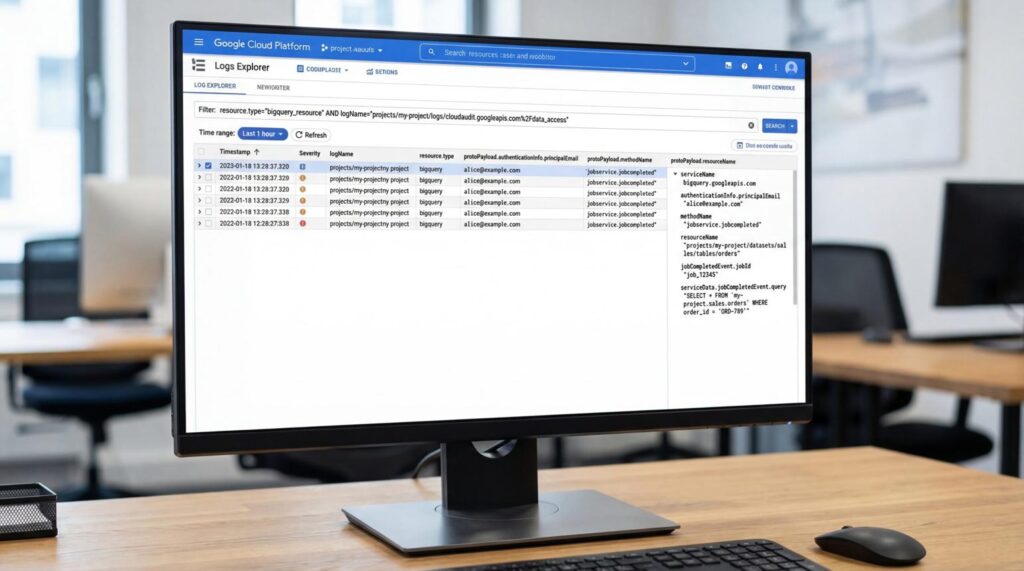
Before deploying organization-wide alerts, create a controlled test in a non-sensitive project. Have an authorized analyst run a query, download a small result using the console and capture the approximate time. Then inspect Cloud Logging for the BigQuery Data Access event.
A starting Logs Explorer filter is:
protoPayload.serviceName=”bigquery.googleapis.com”
logName:”cloudaudit.googleapis.com%2Fdata_access”
protoPayload.methodName:”tabledata.list”
The exact method-name spelling and metadata path can vary across audit-log formats and API representations. Inspect a real emitted entry before adding a nested uiDownloadRequest filter. Do not assume that a field visible in documentation will appear at a particular JSON path in every project. Confirm whether the flag is present and whether its value changes between a normal read and a console download.
Repeat the test with an API client and a BI tool. Record which events are present, which are absent and which identifiers can be used to join them. This coverage matrix is the foundation for credible controls.

Build an evidence trail that investigators can trust
For a meaningful review, capture six categories of information: identity, timestamp, operation, resource, data sensitivity and business context. Identity should distinguish human users from service accounts. Resource context should include the project, datasets or tables when available. Sensitivity should come from a maintained classification scheme, not guesses based on table names.
Where the available logs permit it, connect the download event to query job metadata and the tables accessed. BigQuery INFORMATION_SCHEMA job views can help analysts understand query execution, while Cloud Audit Logs remain the primary source for audited access actions. Google’s introduction to BigQuery audit logs explains why these sources are complementary rather than interchangeable.
Avoid storing the entire query text in a broadly accessible alert. SQL and log metadata can themselves reveal sensitive identifiers, filters or business logic. Limit access to detailed evidence, retain only necessary fields in monitoring tables, and define a retention period appropriate to investigation and legal requirements.
A practical risk-based alert model
Not every download warrants a security ticket. Start with three tiers.
Low risk: a known analyst exports a small, approved result from a non-sensitive dataset during ordinary working hours. Record it for trend analysis, but do not interrupt the user.
Review: a new user exports from a confidential dataset, or the volume and frequency differ substantially from their normal activity. Route this to the data owner or security analyst with enough context to distinguish legitimate work from unusual behavior.
High priority: an unusual export involves highly restricted data, a recently changed privilege, an account under investigation or other independent risk signals. Escalate quickly and preserve the supporting evidence. Do not rely on the download flag alone to establish malicious intent.
Thresholds should be tuned using observed activity. A fixed row-count cutoff across all departments is rarely useful: a thousand payroll rows and a thousand public reference rows carry very different risk. Some audit events may not expose exact exported row counts, so avoid implying precision where telemetry is incomplete.

Controls that matter more than alert volume
Monitoring is detective. Prevention starts with least-privilege access, row-level access policies, column-level security and policy tags where appropriate, authorized views, approved extract workflows, and carefully governed service accounts. Limit sensitive datasets to the people and workloads that need them.
For teams designing governed analytics environments, Actiknow’s business intelligence consulting and data integration services describe the practical implementation work around source integration, modeling and reporting. A governance program should integrate those engineering decisions with security policy rather than bolt on an alert after deployment.
Consider a sanctioned export route for recurring business needs. An approved workflow can require a business purpose, apply masking, log the requester and recipient, use an expiring delivery location and enforce retention. That is usually more sustainable than prohibiting every download while leaving users to invent workarounds.
Monitoring architecture: from logs to decisions
A pragmatic architecture has five stages. First, collect relevant Data Access audit logs across in-scope projects and ensure that routing, exclusions and retention are explicitly documented. Second, route required events to a controlled destination, such as a logging analytics environment or BigQuery dataset. Third, normalize identities, methods, resource references and download indicators while preserving raw evidence. Fourth, enrich events with classification, owner and approved-use information. Fifth, trigger risk-based alerts and provide an investigation workflow.
The pipeline itself needs monitoring. Alert when log delivery stops unexpectedly, when a schema change breaks extraction, or when the classifier fails to map sensitive datasets. A dashboard showing zero downloads during a logging outage is not a success metric.
Measure alert precision, investigation time, the percentage of sensitive assets with reliable coverage, missing-log incidents and repeat policy exceptions. Count downloads as an operational signal, not as an executive security outcome.
An illustrative investigation
Suppose a finance analyst downloads a query result shortly after a reporting deadline. The event is associated with a restricted finance dataset. An automated rule flags it because the user has not downloaded from that dataset previously.
An investigator should check whether the user was authorized, whether the query served a documented reconciliation request, what data classification applies, whether other unusual access occurred and whether the file was delivered through an approved channel. The investigator may close the alert as legitimate, require a safer export workflow, or escalate based on corroborating evidence.
This is a hypothetical scenario, not an Actiknow customer case study. Its purpose is to show why contextual review is better than treating every flagged download as exfiltration.
A four-week implementation plan
Week 1
inventory sensitive datasets, review IAM and classification, select pilot projects, and test the console download event. Document the precise fields actually emitted.
Week 2
configure appropriate log collection, validate completeness, establish restricted evidence storage, and correlate sample events with job metadata where feasible.
Week 3
implement three or four initial alert rules with named owners, severity criteria and response playbooks. Run tabletop exercises for legitimate and suspicious exports.
Week 4
review false positives, validate alternate export paths, measure monitoring gaps, and agree on an expansion plan. Do not declare complete coverage until each relevant client and transfer mechanism has been tested.

Questions executives should ask before approving rollout
- Can we distinguish an approved download from a suspicious one?
- Which sensitive datasets are covered?
- What happens when logging is interrupted?
- Who receives an alert, and how quickly?
- Can the team explain exactly what evidence the event does and does not establish?
- Which export routes remain outside this signal?
A useful governance dashboard answers these questions without exposing raw sensitive query details to every executive viewer. Actiknow’s business intelligence dashboard services are relevant to designing reporting interfaces that make operational measures accessible to decision-makers, while security policy and incident ownership remain with the organization.
Frequently asked questions
1. Does BigQuery record every download of query results?
No. The console-download indicator addresses a documented interface pathway. Other tools and transfer methods require separate coverage assessment.
2. Is uiDownloadRequest a data-loss prevention control?
No. It is an audit signal. Preventive controls require permissions, data protection policies and approved delivery mechanisms.
3. Can I identify the user who downloaded a result?
Audit entries commonly contain authentication context, subject to the identity type, logging configuration and available metadata. Verify this in your own environment.
4. Does a download log show the exact file contents?
Do not assume so. Audit metadata describes operations; it is not a guaranteed archive of exported files.
5. Are Data Access logs always available?
Coverage depends on the service, method and logging configuration. Validate actual events and any exclusions or retention settings before relying on them.
6. Can I connect a download to its SQL query?
Sometimes, by correlating available identifiers and timestamps with job metadata. The relationship should be validated, not assumed.
7. Does the signal cover Power BI, Tableau or Python exports?
Not comprehensively. Each application and API path needs separate tests and, where appropriate, application-level logging.
8. Should every export generate an alert?
No. Use classification, authorization, user behavior and business context to prioritize review.
9. How long should download logs be retained?
Choose retention based on investigation needs, regulatory obligations, cost and privacy requirements. There is no universal period appropriate for every organization.
10. What is the first step for a small data team?
Run a controlled console download, inspect the actual audit event, and document what it proves before building automation around it.
The executive takeaway
BigQuery query download auditing improves accountability because it can identify a specific console-driven export action that ordinary query monitoring may not distinguish. But effective governance depends on accurate coverage claims, appropriate access controls, tested evidence collection and human review of meaningful exceptions.
If your organization is building a more trustworthy analytics operating model, contact Actiknow to discuss data integration, governed reporting and practical BI implementation. A sensible first engagement is a scoped assessment of data access, reporting workflows and monitoring gaps rather than a promise that one new log field will eliminate export risk.
Reference notes
Google Cloud: BigQuery audit logs overview (https://docs.cloud.google.com/bigquery/docs/reference/auditlogs)
Google Cloud: Introduction to audit logs in BigQuery (https://docs.cloud.google.com/bigquery/docs/introduction-audit-workloads)