
When Power BI reports depend on on-premises databases, file shares or other private-network sources, the gateway becomes production infrastructure.
If it fails, scheduled refreshes can fail.
If DirectQuery uses it, interactive reports can slow down or become unavailable.
If credentials are poorly managed, a routine employee departure can interrupt executive reporting.
That is why a Power BI gateway should not be installed casually on somebody’s workstation and forgotten.
It needs architecture, ownership, monitoring and recovery.
What the On-Premises Data Gateway Does
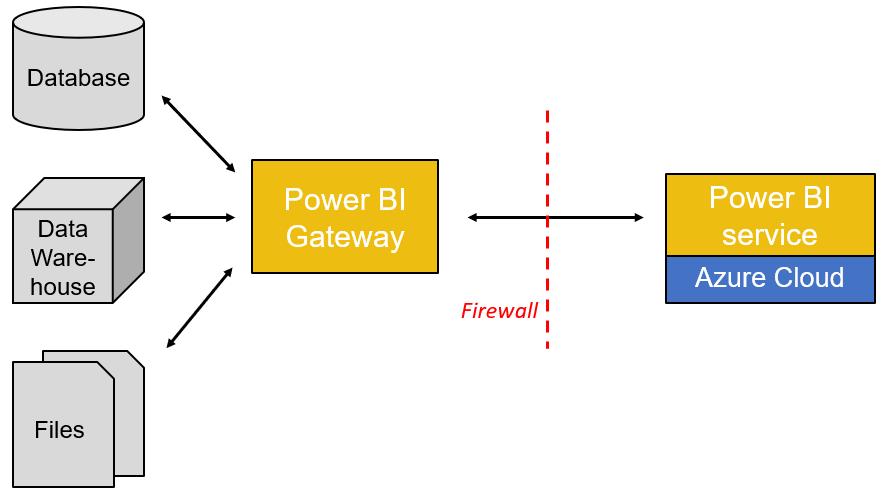
Microsoft’s on-premises data gateway provides a bridge between on-premises data and Microsoft cloud services.
The gateway establishes outbound connections to the cloud rather than requiring inbound connections from the public internet to the private data source.
Power BI can use the gateway for scenarios such as scheduled refresh and DirectQuery against supported private-network sources.
The gateway does not eliminate the need for source security.
It is a connectivity layer between Power BI and the data source.
Actiknow’s business intelligence services include Power BI implementation, data integration and automated reporting. Gateway design should therefore be treated as part of the end-to-end BI architecture, not as a desktop installation step.

Microsoft offers different gateway modes, including the standard on-premises data gateway and personal mode.
For shared organizational workloads, standard mode is the appropriate architecture to evaluate.
Personal mode is tied more closely to an individual user scenario and does not provide the same centralized gateway management capabilities.
Critical enterprise reporting should not depend on one employee’s personal gateway installation.
Install the Gateway on a Dedicated, Always-On Machine
The gateway host should be available whenever Power BI needs it.
Avoid installing critical gateways on:
- Employee laptops.
- Machines that routinely sleep.
- Servers scheduled for frequent reboot without coordination.
- Systems already under unpredictable heavy workload.
- Temporary virtual machines.
Use a stable Windows host that meets Microsoft requirements and has reliable network connectivity to both the source systems and required Microsoft services.
Separate the Gateway From the Database When Practical
Microsoft advises against installing the gateway on a domain controller and generally recommends considering separation from data sources for performance and resilience.
The gateway consumes CPU, memory and network resources.
If it shares a server with a busy database, the two workloads can compete.
A separate host also makes gateway maintenance easier to manage independently.
Size for the Workload
Gateway sizing depends on what passes through it.
Consider:
- Number of semantic models.
- Refresh frequency.
- Data volume.
- Concurrent refreshes.
- DirectQuery traffic.
- Number of users.
- Query complexity.
- Network throughput.
- Other services using the gateway.
Do not size only for average daily use.
Consider the peak window when several morning refreshes overlap.
Monitor CPU, memory and network utilization after deployment and adjust based on evidence.
Use a Gateway Cluster for High Availability
A single gateway machine is a single point of failure.
Microsoft supports gateway clusters, allowing multiple gateway installations to work together for high availability and load balancing.
For important reporting, use at least two appropriate gateway members where the business continuity requirement justifies it.
A cluster can help during:
- Server failure.
- Maintenance.
- Patching.
- Unexpected gateway-service issues.
- Capacity spikes.
High availability does not remove every failure mode.
If all gateway members share the same network path, service account or upstream database, those dependencies can still fail.
Design the entire path.

Place Cluster Members Deliberately
Do not create redundancy that fails together.
Consider whether cluster members share:
- Physical host.
- Hypervisor.
- Availability zone.
- Network switch.
- Firewall path.
- Power supply.
- Domain dependency.
- Service account.
- Database route.
The level of separation should reflect the importance of the reporting workload.
For many organizations, two VMs on resilient infrastructure are sufficient.
For highly critical environments, infrastructure teams may require stronger separation.
Keep Gateway Members Consistent
Cluster members should have consistent configuration and appropriate gateway versions.
Plan upgrades rather than updating one production server casually.
Microsoft updates the gateway regularly and supports only a defined set of recent releases.
Maintain a patching process that keeps the cluster supported while preserving availability.
Understand Gateway Recovery Keys
When configuring a gateway, Microsoft requires a recovery key.
The recovery key is important for recovery, migration and cluster operations.
Treat it as a privileged secret.
Store it in an approved password or secrets-management system.
Do not leave it in:
- Personal notes.
- Email.
- A shared spreadsheet.
- A ticket visible to broad groups.
- Documentation without access controls.
Also ensure that more than one authorized administrator can retrieve it during an incident.
Use Organizational Ownership
Do not build the gateway around one employee.
Define:
- Gateway administrators.
- Infrastructure owner.
- Power BI owner.
- Data-source owner.
- Credential owner.
- Support escalation.
- Recovery-key custody.
- Change approver.
At least two appropriate people should be able to administer critical infrastructure.
This reduces key-person risk.
Plan Service Accounts Carefully
The gateway Windows service runs under an account.
Data-source credentials used by Power BI connections are a separate concern.
Understand both.
Do not casually replace service identities or source credentials without knowing the impact.
For database access, use controlled organizational accounts appropriate to the authentication method rather than personal employee credentials where possible.
Apply Least Privilege
The account used to query a source should have only the access Power BI needs.
For a reporting database, that may be read-only access to specific schemas or views.
Avoid using:
- Database administrator credentials.
- Broad domain administrator accounts.
- Personal credentials with unrelated access.
- Shared superuser accounts.
Actiknow’s security practices emphasize least-privilege access, MFA where supported and controlled credential handling. Those principles apply directly to gateway-connected BI environments.
Separate Development and Production Where Risk Requires It
Development activity can create unstable queries and experimental data-source connections.
For larger environments, consider separate gateway clusters or controlled data sources for development, test and production.
This can prevent experimental workloads from affecting production refreshes.
The exact separation depends on scale.
A small organization may use one managed cluster with strong governance.
A large enterprise may require separate infrastructure.
Map Every Semantic Model to an Owner
A gateway can become crowded with connections nobody understands.
Maintain an inventory containing:
- Power BI workspace.
- Semantic model.
- Business owner.
- Technical owner.
- Gateway cluster.
- Data source.
- Authentication method.
- Refresh schedule.
- Criticality.
- Expected duration.
- SLA.
This makes incident response far faster.
When a database password changes, the team should know exactly which semantic models are affected.
Avoid Refresh Collisions
Ten models scheduled at 8:00 AM can overload the gateway and source.
Stagger refresh schedules based on:
- Business need.
- Source capacity.
- Gateway capacity.
- Model duration.
- Dependencies.
- Executive-report deadlines.
Use monitoring data to identify contention.
A report needed at 9:00 AM does not necessarily need to begin refreshing at the same time as every other report.
DirectQuery Requires Stronger Availability
For Import models, the gateway is needed during refresh.
If a refresh fails, users may still see the previously loaded data while the issue is resolved.
DirectQuery is different.
Interactive report queries may depend on the gateway at viewing time.
Gateway availability and latency therefore become part of the user experience.
For DirectQuery workloads, pay particular attention to:
- Cluster resilience.
- Network latency.
- Source performance.
- Concurrent queries.
- Monitoring.
- Capacity.
- Maintenance windows.
Test the entire path under realistic user load.
Network Latency Matters
The gateway sits between cloud services and private data sources.
Place it close to the data sources it queries.
Avoid unnecessary network hops.
If the gateway is in one data center and the database is across a slow WAN link, the architecture may add avoidable latency.
For DirectQuery, small delays can multiply because a report page may issue several queries.
Firewall Rules Should Be Deliberate
The gateway uses outbound connectivity to Microsoft services.
Work with network and security teams to configure the required endpoints and ports according to current Microsoft documentation.
Avoid overly broad firewall exceptions merely to make the gateway work.
Document:
- Required destinations.
- Proxy behavior.
- TLS inspection implications.
- DNS dependencies.
- Change ownership.
- Testing procedure.
Network policy changes should be part of gateway change management.

Understand Private Networking Options
Organizations with strict network requirements may use architectures involving virtual networks or other Microsoft-supported private connectivity patterns depending on the data source and Power BI/Fabric setup.
Do not assume the on-premises gateway is the only connectivity pattern.
Evaluate:
- Source location.
- Cloud platform.
- Private endpoints.
- Fabric or Power BI capacity.
- Security policy.
- Latency.
- Operational ownership.
Choose the connectivity architecture that matches the environment.
Manage Data-Source Credentials Centrally
A gateway can remain healthy while refreshes fail because a data-source credential expired.
Track credential ownership.
For each source, know:
- Authentication method.
- Account owner.
- Password or secret rotation policy.
- Expiry.
- Required permissions.
- Who updates Power BI.
- How the change is tested.
Avoid credentials that depend on an individual’s employment status.
Plan Credential Rotation
Security policies often require password or secret rotation.
Test rotation as an operating procedure.
A safe process may include:
- Create or rotate the source credential.
- Validate source access.
- Update the gateway data-source configuration.
- Test a representative query.
- Trigger a controlled refresh.
- Confirm dependent semantic models.
- Record the change.
Do not discover the process during an expired-password outage.
Monitor Gateway Health
Microsoft provides gateway monitoring and logs that can help diagnose performance and reliability.
Monitor at least:
- Gateway online status.
- CPU.
- Memory.
- Network.
- Refresh failures.
- Refresh duration.
- Query latency.
- Concurrent workloads.
- Service restarts.
- Repeated credential errors.
Create alerts appropriate to the environment.
Monitoring that nobody owns is not monitoring.

Monitor Refresh Outcomes Separately
A healthy gateway does not mean every refresh succeeded.
Power BI refresh monitoring should identify:
- Failed models.
- Repeated failures.
- Long-running refreshes.
- Stale models.
- Credential failures.
- Source timeouts.
- Capacity issues.
- Gateway errors.
Track data freshness as a business metric.
The business cares that the dashboard is current, not merely that the gateway service is running.
Define a Freshness SLA
For important reporting, define how current the data must be.
Example:
Executive sales dashboard should reflect source data through 6:00 AM by 7:00 AM each business day.
Then define:
- Refresh start.
- Expected completion.
- Failure alert.
- Retry.
- Escalation.
- Maximum acceptable staleness.
- Recovery owner.
This converts “the dashboard should be updated every morning” into an operable commitment.
Build a Failure Runbook
Document common incidents.
- Gateway offline.
- Source unavailable.
- Credential expired.
- Firewall change.
- Refresh timeout.
- Cluster member unavailable.
- Gateway update failure.
- Database query slowdown.
- Capacity issue.
For each incident, document:
- How it is detected.
- Initial checks.
- Owner.
- Recovery steps.
- Escalation.
- Communication.
- Validation after recovery.
A runbook reduces dependence on the engineer who originally installed the gateway.
Test Gateway Failover
A cluster is useful only if failover works.
Schedule controlled testing.
For example:
- Take one member offline.
- Run representative refreshes.
- Test DirectQuery if used.
- Confirm monitoring.
- Restore the member.
- Review logs.
Do this before a real server failure.
Test Disaster Recovery
High availability and disaster recovery are different.
A cluster can protect against one server failing.
It may not protect against loss of the site, network, domain or shared infrastructure.
For critical environments, define how the gateway would be restored elsewhere.
Document:
- Installer.
- Configuration.
- Recovery key.
- Service identity.
- Firewall requirements.
- Data-source mappings.
- Administrators.
- Validation steps.
- Recovery time objective.

Back Up What You Actually Need
The gateway does not require traditional backup in the same way as a database, but the ability to recover its configuration is essential.
Protect:
- Recovery key.
- Configuration knowledge.
- Service-account information.
- Network configuration.
- Data-source inventory.
- Administrator list.
- Installation and recovery procedure.
Do not rely on a VM snapshot as the only recovery strategy.
Control Administrative Access
Limit gateway administration to appropriate staff.
Review administrators periodically.
Remove access when roles change.
Separate routine Power BI development from infrastructure administration where appropriate.
Administrative convenience should not create unnecessary access to production connectivity.
Keep an Audit Trail of Changes
Record material changes such as:
- Gateway installation.
- Cluster changes.
- Version upgrades.
- Administrator changes.
- Credential changes.
- New data sources.
- Firewall changes.
- Service-account changes.
- Recovery operations.
This helps incident investigation and compliance review.
A Production Gateway Checklist
1. Architecture:
- Use standard mode for shared enterprise workloads.
- Host the gateway on stable, always-on infrastructure.
- Separate it from heavily loaded data sources where practical.
- Use a cluster when availability requirements justify it.
- Place cluster members to avoid obvious common failure points.
- Size for peak refresh and DirectQuery workload.
2. Security:
- Apply least privilege to source accounts.
- Protect the recovery key.
- Restrict gateway administrators.
- Avoid personal source credentials for critical reporting.
- Document firewall and network rules.
- Manage credential rotation.
3. Operations:
- Inventory semantic models and owners.
- Stagger refresh schedules.
- Monitor gateway infrastructure.
- Monitor Power BI refresh outcomes.
- Define data freshness SLAs.
- Maintain a failure runbook.
- Test cluster failover.
- Plan disaster recovery.
- Keep gateway versions supported.
Frequently Asked Questions
Does Power BI need a gateway for on-premises data?
For many Power BI service scenarios involving on-premises or private-network data sources, an on-premises data gateway provides the required connectivity. The exact requirement depends on the source and architecture.
Should the Power BI gateway be installed on the database server?
It can technically be possible in some environments, but a separate host is often preferable for resource isolation, maintenance and resilience. Evaluate workload and Microsoft guidance for your environment.
Do I need more than one Power BI gateway?
For critical workloads, a gateway cluster with multiple members can provide high availability and load balancing. A single gateway is a single infrastructure dependency.
Does DirectQuery use the gateway continuously?
If DirectQuery accesses an on-premises source through the gateway, interactive report queries can depend on it while users view reports. Availability and latency therefore matter more than for scheduled Import refresh alone.
What happens if the gateway is offline during scheduled refresh?
The refresh can fail because Power BI cannot reach the source through the gateway. Users may continue seeing the previously imported data, but the model becomes stale until a successful refresh occurs.
Who should own the gateway?
Ownership should be organizational, with clear BI, infrastructure and data-source responsibilities. Avoid dependence on one employee.
How should gateway credentials be managed?
Use controlled organizational credentials, least privilege, documented ownership and a tested rotation process. Protect the recovery key and other privileged secrets.
How often should the gateway be updated?
Microsoft releases gateway updates regularly and supports recent versions. Establish a planned update process rather than allowing production gateways to become significantly outdated.
Conclusion
A Power BI gateway is production data infrastructure.
Reliable architecture requires more than installing the software and entering database credentials.
Use stable hosts. Add clustering when the reporting SLA requires high availability. Protect the recovery key. Use organizational credentials. Apply least privilege. Stagger refreshes. Monitor both the gateway and the actual freshness of semantic models.
Most importantly, document how the environment recovers when something fails.
If you are designing or troubleshooting a Power BI gateway architecture, Actiknow can help assess gateway sizing, refresh workloads, data-source connectivity, semantic-model design and operational monitoring. Discuss your Power BI requirements with Actiknow.