
A Salesforce-to-Snowflake pipeline is not trustworthy just because the data arrives
Moving Salesforce data into Snowflake is technically straightforward compared with making the resulting numbers dependable enough for finance, revenue operations, and executive reporting. A pipeline can run every hour, show a successful status, and still produce a different opportunity count, pipeline value, customer total, or revenue number from the Salesforce report the business treats as authoritative.
The reason is simple: data movement and business reconciliation are different problems. A connector is responsible for extracting and loading records. A finance-grade data product must also preserve record state, reproduce business definitions, handle deletions and late changes, account for calculated fields, respect source permissions, and explain every material difference between the warehouse and the source system.
That distinction should shape the architecture from day one. Actiknow’s Salesforce services include Salesforce integration with other systems, while its broader business intelligence work covers the reporting and analytics layer downstream. For a Salesforce-to-Snowflake project, those concerns should be designed together rather than treated as separate handoffs.
1. Define what “matches Salesforce” actually means
Before selecting a connector or writing a transformation, identify the Salesforce reports or business processes that the warehouse must reconcile against. “All Opportunities” is not a sufficient definition. Finance may use a report with filters for record type, stage, close date, business unit, test accounts, currency, owner, or a custom status field. Another team may use a dashboard component with additional filters.
For each critical metric, document the source object, relevant joins, filters, date logic, currency treatment, exclusions, and expected grain. If a Salesforce formula or report-level calculation contributes to the number, document that too.
This creates a reconciliation contract. The goal is not merely to reproduce Salesforce tables in Snowflake. The goal is to reproduce agreed business outputs from governed warehouse data.
2. Separate raw replication from business logic
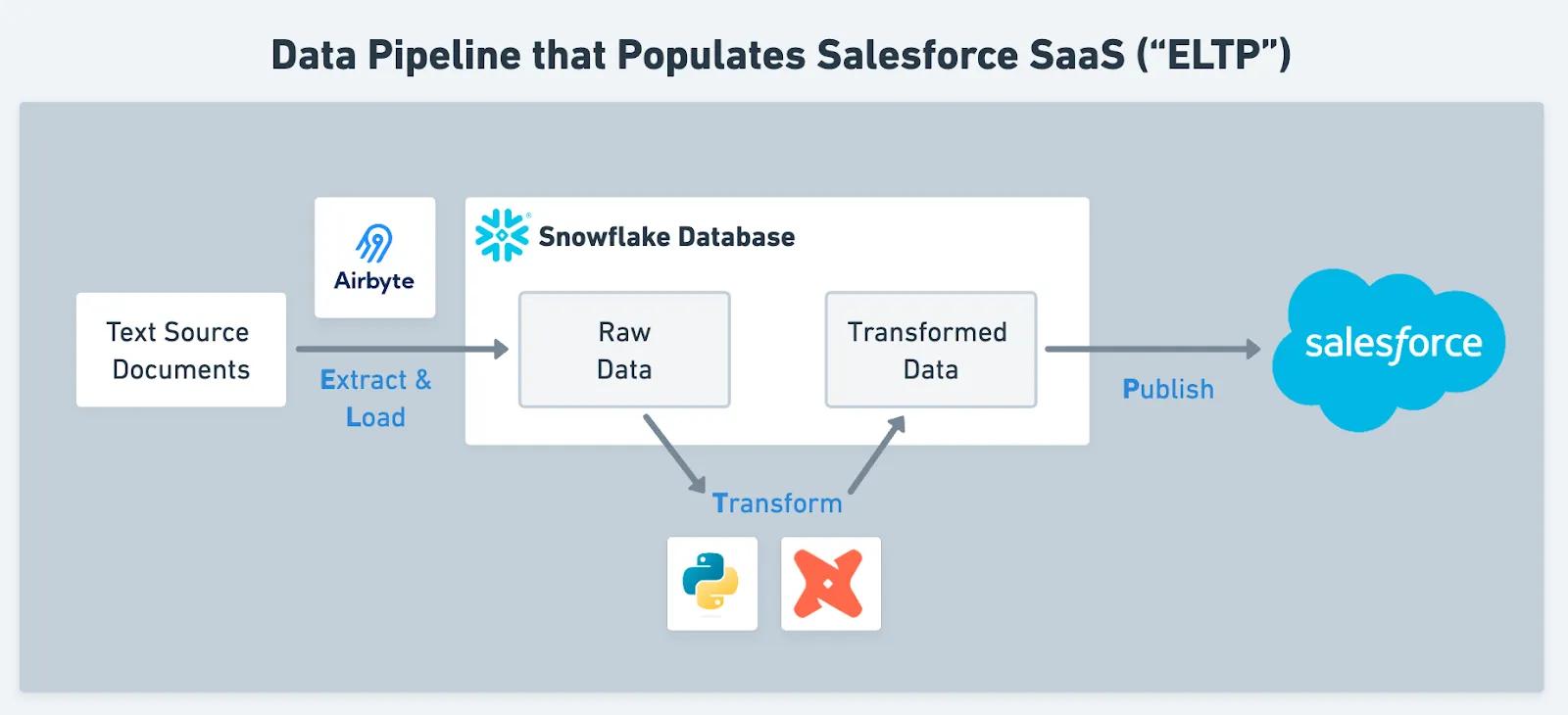
A reliable architecture normally keeps the first Snowflake layer close to the source. Raw Salesforce objects should land with minimal interpretation so the team can distinguish extraction problems from transformation problems.
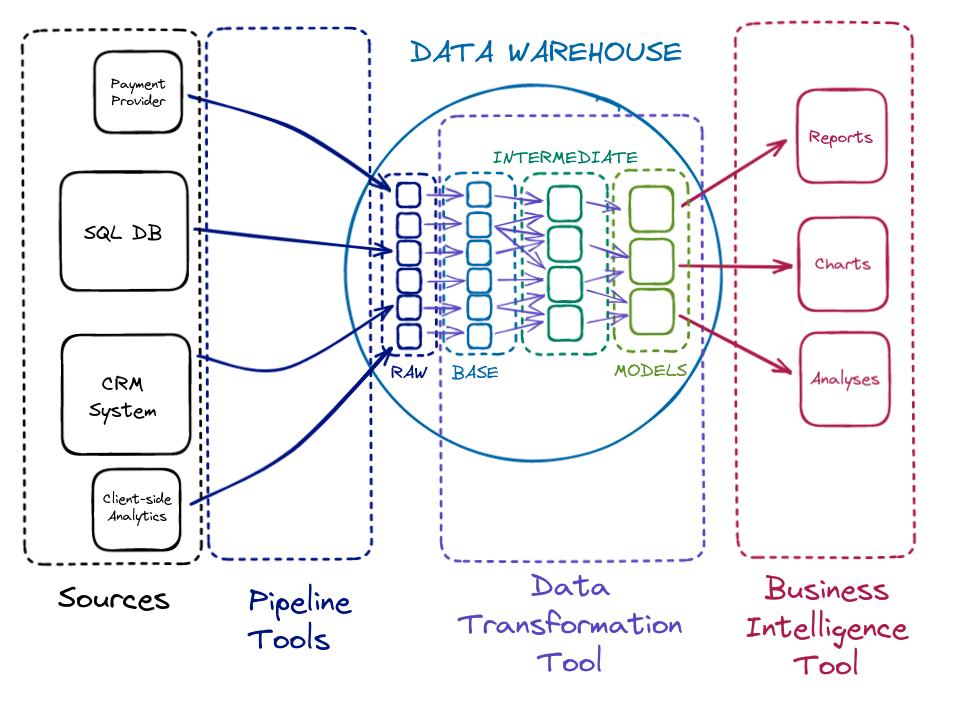
A practical structure is:
- Raw layer: replicated Salesforce objects and connector metadata.
- Staging layer: standardized names, data types, deletion handling, deduplication, and reusable relationship logic.
- Business or mart layer: finance-approved definitions for pipeline, bookings, customers, renewals, or other reporting concepts.
- BI or semantic layer: governed measures and dimensions exposed to Power BI, Tableau, or another reporting tool.
Keeping these responsibilities separate makes discrepancies diagnosable. If a record is missing in raw data, investigate extraction or permissions. If it exists in raw but disappears in staging, investigate transformation logic. If the row is present but a dashboard total differs, investigate the business definition or semantic model.
This is also why the broader ETL vs ELT decision matters. In a cloud warehouse architecture, loading source data first and applying transparent, tested transformations in Snowflake can make reconciliation and reprocessing easier, provided governance is strong.
3. Design incremental sync around change semantics, not only timestamps
Full reloads are simple conceptually but become inefficient as Salesforce volumes grow. Incremental extraction is usually preferable, but the design must answer a more important question: what constitutes a change?
The pipeline should retain enough source and connector metadata to answer when a row was observed, when Salesforce last changed it, and whether the row is currently active or deleted.
Do not assume every business-relevant change behaves like an ordinary field update. Formula fields are an important exception. A formula value can change because its definition changed or because a referenced record changed. Material calculated fields therefore need explicit validation rather than blind reliance on an incremental timestamp.
4. Treat deletes and merges as first-class data events
Finance reconciliation fails quickly when a warehouse only inserts and updates records.
Salesforce supports deleted records and record merges, so the warehouse model needs an explicit policy for them. For current-state reporting, a deleted source record may need to disappear from an active population. For historical reporting, simply removing it may destroy the ability to reproduce an earlier period. A merged Account or Contact may also require relationship repair so downstream facts point to the surviving business entity.
The right answer depends on the reporting requirement, but the behavior must be intentional. “The connector handles deletes” is not a complete finance control.

5. Rebuild formula logic deliberately
Salesforce formula fields are convenient because users see a calculated value directly on a record. They are dangerous to treat as ordinary replicated columns.
If the warehouse relies on a formula field for a material metric, choose an explicit strategy: recreate the formula in the transformation layer from its underlying fields; use a connector-supported formula mechanism where appropriate; materialize the business logic independently in the warehouse; or use a controlled refresh strategy for exceptional fields.
Whichever option you choose, test formula dependencies. A calculated value based on Account data may change when the Account changes even if the related Opportunity does not. That is exactly the type of discrepancy that can survive unnoticed until a finance user compares totals.
6. Use a dedicated integration identity with deliberate permissions
A pipeline can only extract what its Salesforce identity is allowed to see. Missing objects or fields can therefore be a permissions problem rather than a pipeline defect.
Use a dedicated integration identity where your Salesforce licensing and security model permit it. Document the objects and fields the pipeline is expected to access, keep privileges aligned with the reporting requirement, and include permission checks in change management. If a new custom field is added to an executive report but not exposed to the integration identity, the warehouse can become incomplete without an obvious pipeline failure.
For sensitive fields, do not replicate data simply because it is technically available. Decide whether the analytical use case requires it, and apply warehouse access controls independently of Salesforce permissions.
7. Reconcile in layers, not with one grand total
A finance-grade validation process should make it easy to locate the point at which numbers diverge. Start with simple controls and progressively add business logic.
At the extraction level, compare record counts for key objects and confirm expected high-water marks. At the transformation level, compare counts before and after filters, joins, deduplication, and delete handling. At the business level, reconcile measures such as opportunity amount, bookings, active customers, or application counts against named Salesforce reports.
The strongest reconciliations are segmented. Instead of checking only that total pipeline equals a single number, compare by stage, month, region, business unit, currency, or another dimension that helps isolate discrepancies. A total can accidentally match while underlying populations are wrong.

8. Build an exception report instead of hiding differences
A mature reconciliation process does not merely display “matched” or “failed.” It produces the records responsible for the variance.
Useful exception outputs include Salesforce IDs present in the source but missing in Snowflake; records present in Snowflake but no longer active in Salesforce; amount or status mismatches for the same Salesforce ID; records excluded by a warehouse filter; formula-dependent records requiring recalculation; join failures; and records arriving after the reporting cutoff.
An exception table turns reconciliation from a recurring argument into an operational workflow. Owners can classify each difference as expected, a source-data issue, a pipeline issue, or a definition issue.
9. Preserve enough history to answer “why did last month change?”
Finance teams often care about both the current truth and the truth that was reported previously. Salesforce is an operational system, so records continue to change after a month closes. If Snowflake stores only the latest version of every record, a historical dashboard can silently restate prior periods.
Decide which entities require history. Opportunity stage, forecast category, ownership, membership status, pricing attributes, and other mutable fields may need snapshots or history tables depending on the business question.
Do not snapshot everything by default. History has storage, transformation, and interpretation costs. Preserve it where the organization needs point-in-time analysis, auditability, or repeatable period reporting.
10. Monitor data quality separately from pipeline uptime
A successful sync only proves that a technical process completed. It does not prove that the data is usable.
Monitor at least four classes of controls: freshness, volume, schema, and business reconciliation. Freshness asks whether expected Salesforce data arrived on time. Volume detects unexpected row-count changes. Schema monitoring identifies objects or fields that appear, disappear, or change. Business reconciliation tests whether agreed warehouse metrics still reconcile to Salesforce within defined tolerances.
Alert ownership matters as much as alert creation. A data engineer can own failed loads, but a sudden change in the definition of “active customer” may require a CRM administrator or finance owner.
A practical go-live checklist
Before finance relies on a Salesforce-to-Snowflake pipeline, confirm that:
- Critical Salesforce reports and their filters are documented.
- The integration identity can access every required object and field.
- Incremental sync behavior has been tested with inserts, updates, deletes, merges, and late changes.
- Formula fields have an explicit handling strategy.
- Raw, staging, and business layers have clear responsibilities.
- Current-state and historical reporting requirements are separated.
- Reconciliation tests run by object and by material business metric.
- Exceptions identify individual records rather than only aggregate variances.
- Currency and date/time rules are documented where relevant.
- Data-quality monitoring covers freshness, volume, schema, and business reconciliation.
- Owners and escalation paths exist for technical and business-definition failures.
- Finance or the relevant business owner has signed off on the agreed reconciliation outputs.
The architecture finance can trust
The most important design principle is that trust is engineered, not assumed. Salesforce and Snowflake serve different purposes. Salesforce manages operational CRM workflows; Snowflake can provide a governed analytical foundation across CRM and other business systems. A reliable integration must preserve enough source behavior to explain the data while creating explicit warehouse logic that can be tested, versioned, and reconciled.

That means the project should not end when Salesforce records begin appearing in Snowflake. It ends when stakeholders can trace a reported number back through the business definition, transformation, replicated records, and source-system behavior, and when exceptions are visible rather than buried. This is consistent with a broader single-source-of-truth approach: authoritative operational facts and governed analytical definitions can coexist without pretending that one physical database is the master of everything.
Frequently asked questions
Should Snowflake match every Salesforce dashboard exactly?
It should match the Salesforce reports or dashboard components designated as reconciliation targets, after accounting for deliberately different definitions. Two Salesforce reports can themselves differ because of filters, report types, formulas, or date logic. The first step is agreeing which source output is authoritative for each metric.
Should we replicate Salesforce formula fields directly?
Not automatically. Formula fields require special attention because their dependencies may not behave like normal record updates for incremental synchronization. For material metrics, transformation-based recreation or another controlled strategy is easier to test and reconcile.
How should deleted Salesforce records be handled in Snowflake?
Keep deletion state available in the raw or staging layer, then apply the appropriate rule in downstream models. Current-state reporting may exclude deleted records, while historical or audit reporting may need to retain their prior state.
Do we need Salesforce history in Snowflake?
Only where the business needs point-in-time analysis or repeatable historical reporting. Snapshotting every object can create unnecessary complexity. Identify the fields and entities whose historical state changes the decisions or reports you need to reproduce.
How often should Salesforce data sync to Snowflake?
Set frequency from the business decision, not from a desire for the smallest possible latency. Executive reporting may tolerate hourly or daily refreshes, while operational workflows may require shorter intervals. Define a freshness service level for each use case.
What is the best way to prove the pipeline is correct?
Use layered reconciliation with named source reports, object-level counts, segmented business totals, and record-level exception outputs. Repeat those tests automatically after go-live instead of treating reconciliation as a one-time migration exercise.
Need help designing the integration?
If your team is planning a Salesforce-to-Snowflake reporting architecture, Actiknow can help assess the source model, integration approach, warehouse transformations, and BI reconciliation requirements. Contact Actiknow to discuss the data flow and controls your reporting process needs.